- 17 -
Digital Video Security Systems
HD-SDI DNR DAY & NIGHT COLOR CAMERA
White Balance
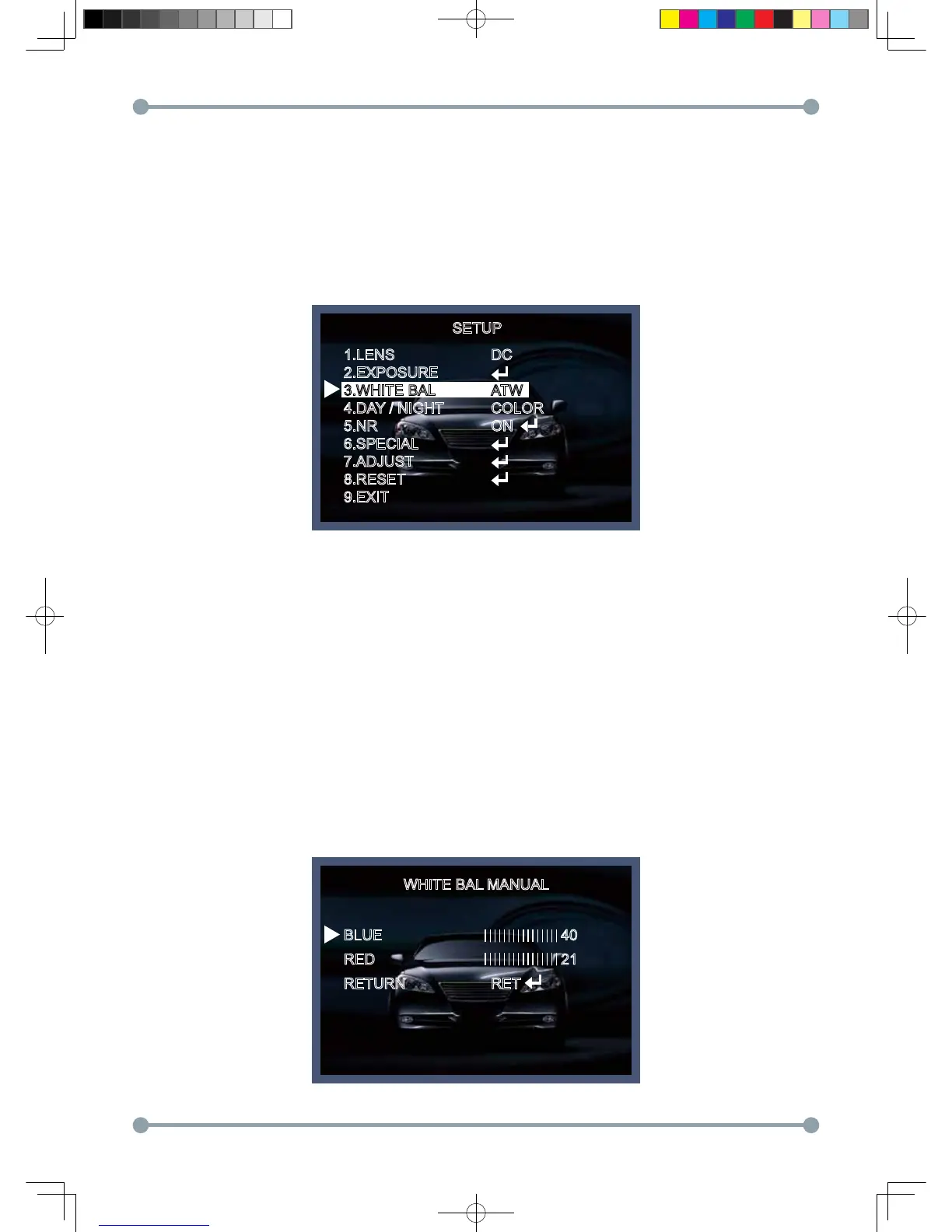
The White Balance function is used to control the “on-screen” colors.
1. Move the arrow indicator to WHITE BAL on the SETUP menu screen using the Up and Down button.
2. Select the desired mode by using the Left or Right button.
* There are three user selectable White Balance settings available.
* ATW : (Auto Tracking White Balance)
Normal setting; when the color temperature range is from 1,800˚K to 10,500˚K. (Ex: a fluorescent lamp or outdoors)
* AWC → SET : To obtain the best results press the SET button while the camera is focused onto white
paper. If the environment, and/or light source changes, the White Balance will require re-adjustment.
* MANUAL : Used for fine adjustment of White Balance. Set White Balance first using ATW or AWC then
change to MANUAL and press SETUP button. Increase or decrease the value of R-Gain(Red) and
B-Gain(Blue) while monitoring the color of the image.
WHITE BAL MANUAL
BLUE
RED
RETURN
40
21
RET
SETUP
1.LENS
2.EXPOSURE
3.WHITE BAL
4.DAY / NIGHT
5.NR
6.SPECIAL
7.ADJUST
8.RESET
9.EXIT
DC
ATW
COLOR
ON
HD-SDI 공용 Manual.indd 17 2011-09-28 오후 4:34:05



 To Next Page