- 29 -
Digital Video Security Systems
HD-SDI DNR DAY & NIGHT COLOR CAMERA
Adjust
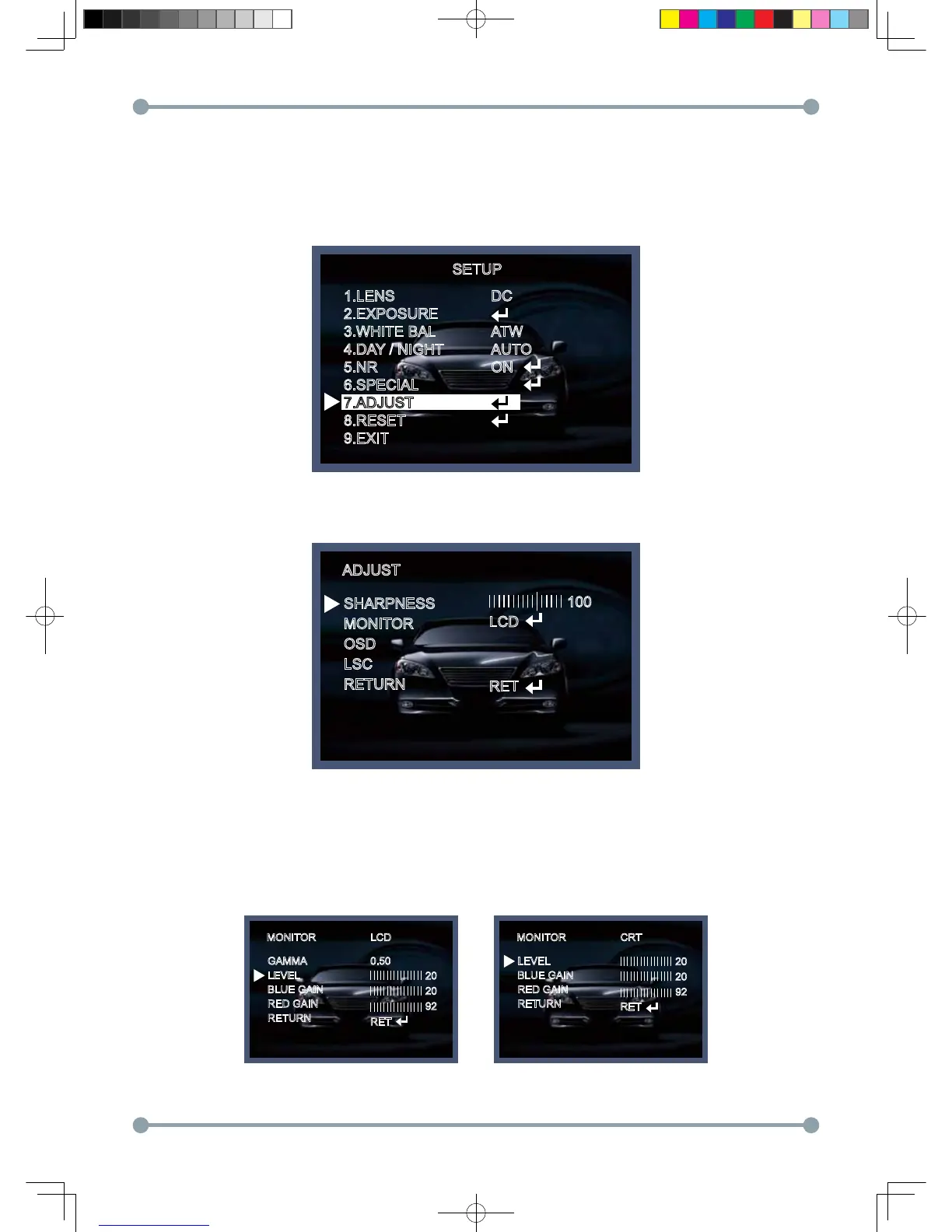
1. When the SETUP menu screen is displayed, select ADJUST using the Up and Down buttons.
SETUP
1.LENS
2.EXPOSURE
3.WHITE BAL
4.DAY / NIGHT
5.NR
6.SPECIAL
7.ADJUST
8.RESET
9.EXIT
DC
ATW
AUTO
ON
2. Select the desired mode by using Up or Down button..
SHARPNESS : Improving image clarity. The level can be adjusted to obtain an improved image.
However, when the level is set too high it can distort the image or cause noise.
You can adjust from level 1 to 100, and can set to monitor function as LCD, and CRT.
ADJUST
SHARPNESS
MONITOR
OSD
LSC
RETURN
LCD
RET
100
MONITOR MONITORLCD CRT
GAMMA
LEVEL
BLUE GAIN
RED GAIN
RETURN
LEVEL
BLUE GAIN
RED GAIN
RETURN
0.50
RET
RET
20
20
92
20
20
92
HD-SDI 공용 Manual.indd 29 2011-09-28 오후 4:34:12



 To Next Page