16.3.5 Connect to Power Supply
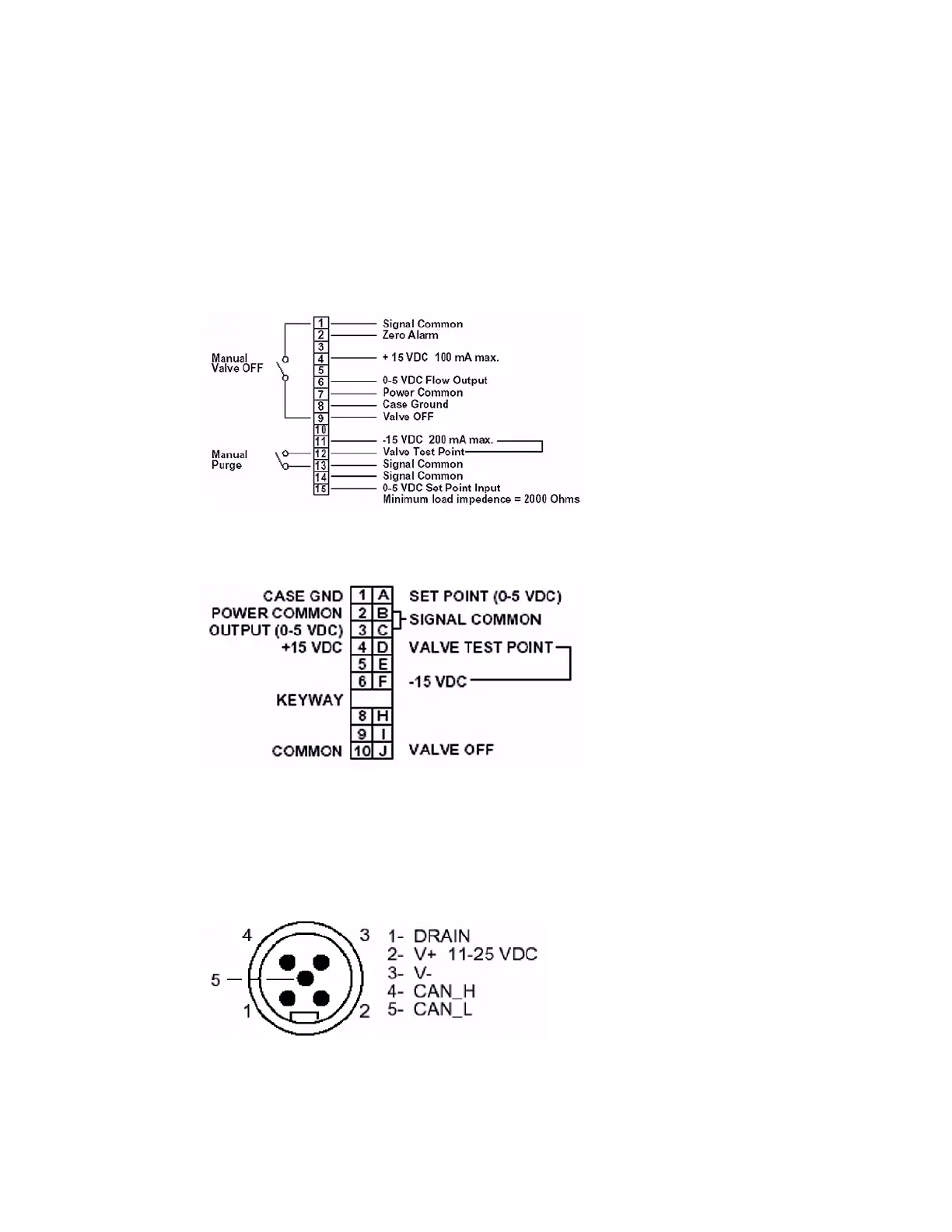
- The 9000 Series uses a Cardedge plus either 15 pin or 9 pin “D” connector for power,
flow, and control signal lines, unless it is a DeviceNet model.
- If you ar
e using a power supply other than one from Unit Instruments, check the pin
assignments, making sure they match those in Figure 1.
- Once the power supply is securely plugged in, the flow controller should be warmed up
for 60 minutes before any other operation.
Figure 1. 9000 Series 15 pin D Connector Pinout
Figure 2. 9000 Series Cardedge Connector Pinout
NOTE: The Model 9865 DeviceNet versions use a mini 5 pin connector that is compliant
with DeviceNet specifications (see Pinouts below).
Figure 3. 9000 Series DeviceNet Connector Pinout (Male)
21
©2005 Celerity
, Inc.
#199-001-0006 REV
.F 4/05
Artisan Technology Group - Quality Instrumentation ... Guaranteed | (888) 88-SOURCE | www.artisantg.com



 To Next Page