Ultima 9
1
/
4
and Ultima 11 Manual 39
THE HAND CONTROLLER BUTTONS
The buttons on the hand controller are intentionally labeled in a rather vague manner. This is due to the fact that
these buttons are user definable. With the hand controller cord facing down, the default
settings are as follows:
• ‘Up’ button moves the telescope north
• ‘Down’ button moves the telescope south
• ‘Right’ button moves the telescope west
• ‘Left’ button moves the telescope east
The buttons that control these settings are found on the upper left hand corner of the cover
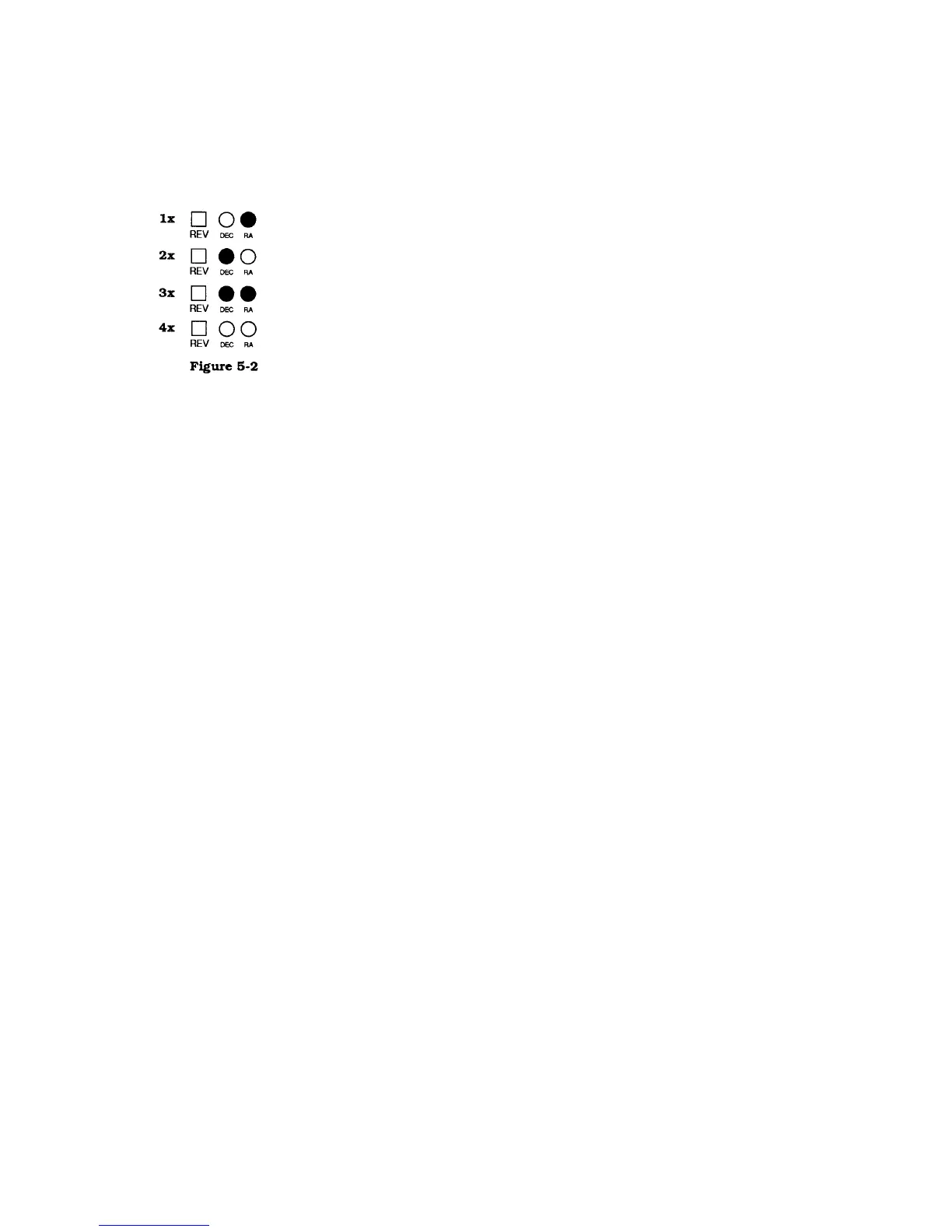
of the drive base. The button is labeled ‘REV’ and is next to two LEDs, one labeled ‘RA’
the other ‘DEC.’ To change the settings, press the ‘REV’ button. As the button is pressed,
the LED will display which axis has been reversed.
• Pressing the button once reverses the RA setting
• Pressing the button twice reverses the DEC setting while returning RA to the default setting
• Pressing the button three times reverses both the RA and DEC settings
• Pressing the button four times returns both RA and DEC to their default settings
If you are NOT using the optional DEC motor then the DEC buttons are inoperable. As a result, all corrections to
the declination axis must be made manually (i.e., by turning the DEC slow motion knob).












 To Next Page