24
Do not look directly at UV light and do not expose your skin to UV light. UV light can
cause serious personal injury.
Aenon! The UV sterilizaon procedure will kill or damage any living organisms inside the print
chamber. Remove any of your cells or ssues from the print chamber before inializing the UV
sterilizaon procedure.
BIO has a UV sterilizaon system to ensure a sterile environment. The system sterilizes the print
chamber, and Clean Chamber technology maintains the system’s sterility. Run the UV sterilizaon
procedure before each bioprinng.
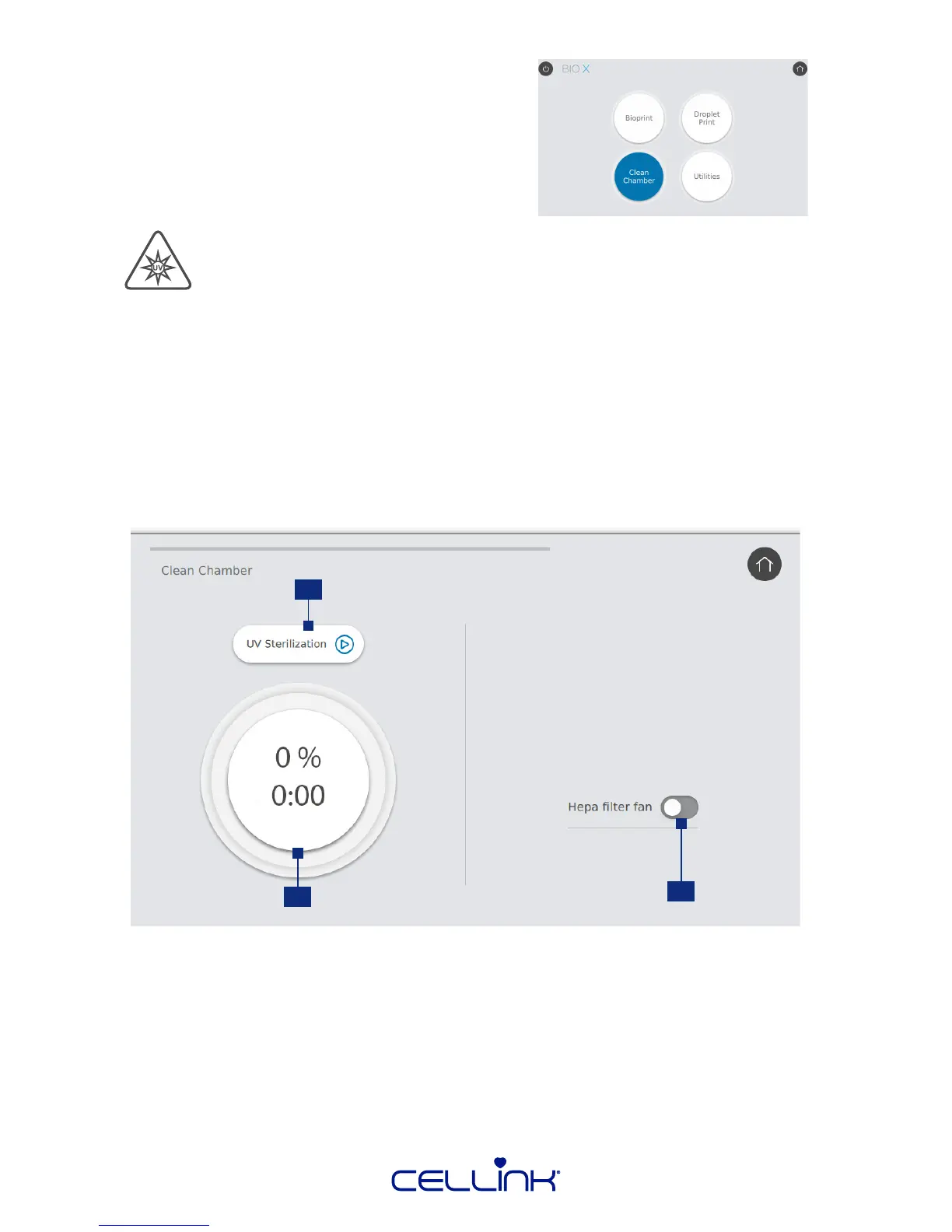
To begin the UV sterilizaon procedure, select “Clean Chamber” from the home screen and conrm.
4.1 Clean Chamber
3
2
1
1. UV Sterilizaon - Tap to start or abort the UV sterilizaon procedure.
2. Progress indicator.
3. HEPA lter fan - Tap to turn the HEPA lter fan on or o. You can turn the HEPA lter fan on
or o during UV sterilizaon and during bioprinng.
Sterilizing with UV light



 To Next Page