25
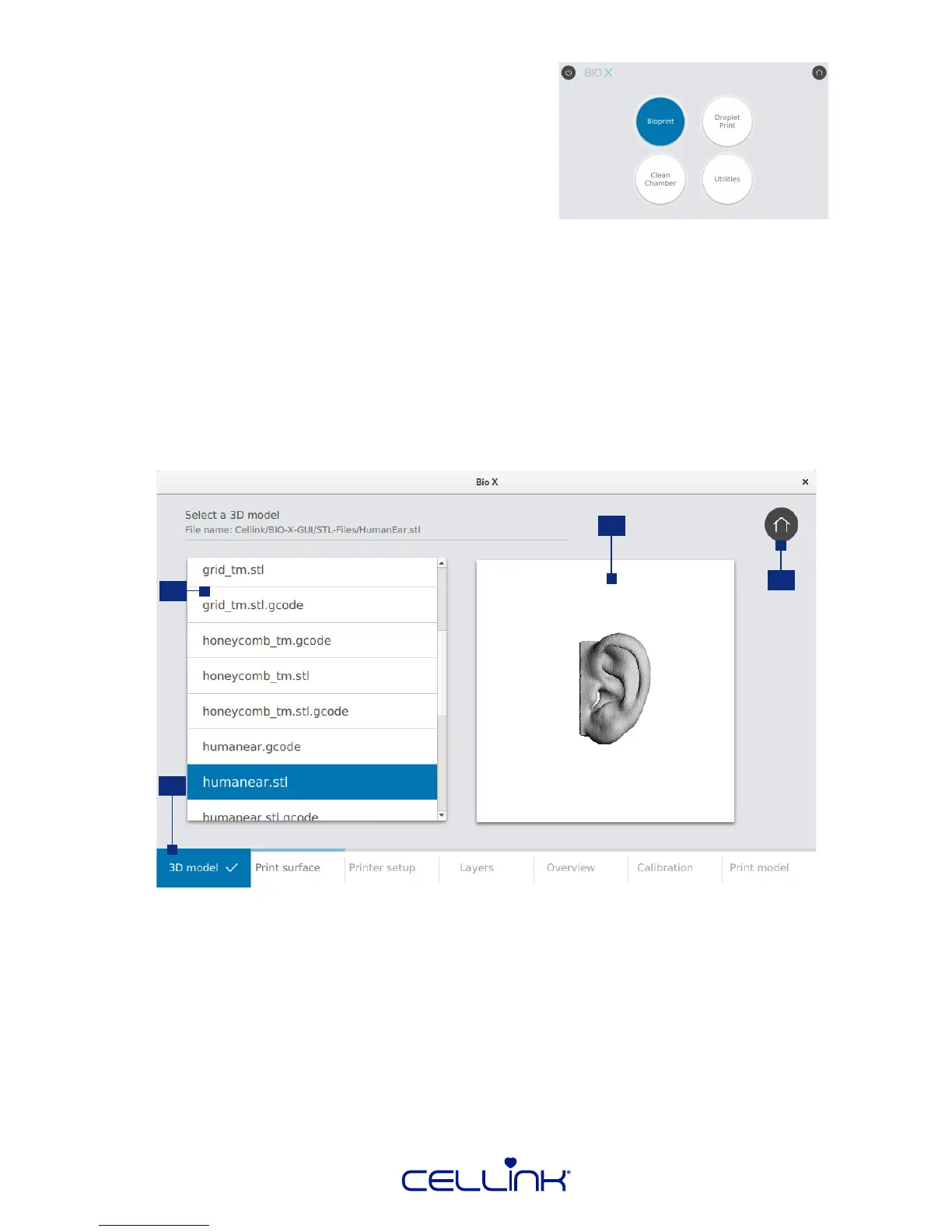
4.2 Bioprinng from a 3D model
Choose this opon to start a new bioprinng process
using a 3D model. BIO X will guide you through the
process of seng up your bioprint.
4.2.1 Open le
Insert a USB drive containing your 3D model and any custom proles you would like to use into the
USB port on the front of BIO X. Keep the USB drive connected unl the bioprinng process starts.
Note: The USB drive needs to be readable and writeable.
Next, choose the model you wish to bioprint. BIO X accepts the le formats .stl, .obj, .amf, and .BIOX.
3
1
2
4
1. File list - Tap to select the model you wish to bioprint.
2. Preview - The model currently selected will appear in this window.
3. Home - Use this buon to abort the setup process and return to the home screen.
4. Navigaon bar - Use this bar to navigate to the next and previous step. A check mark will
appear once a step is completed.



 To Next Page