36
7
1
2
3
4
5
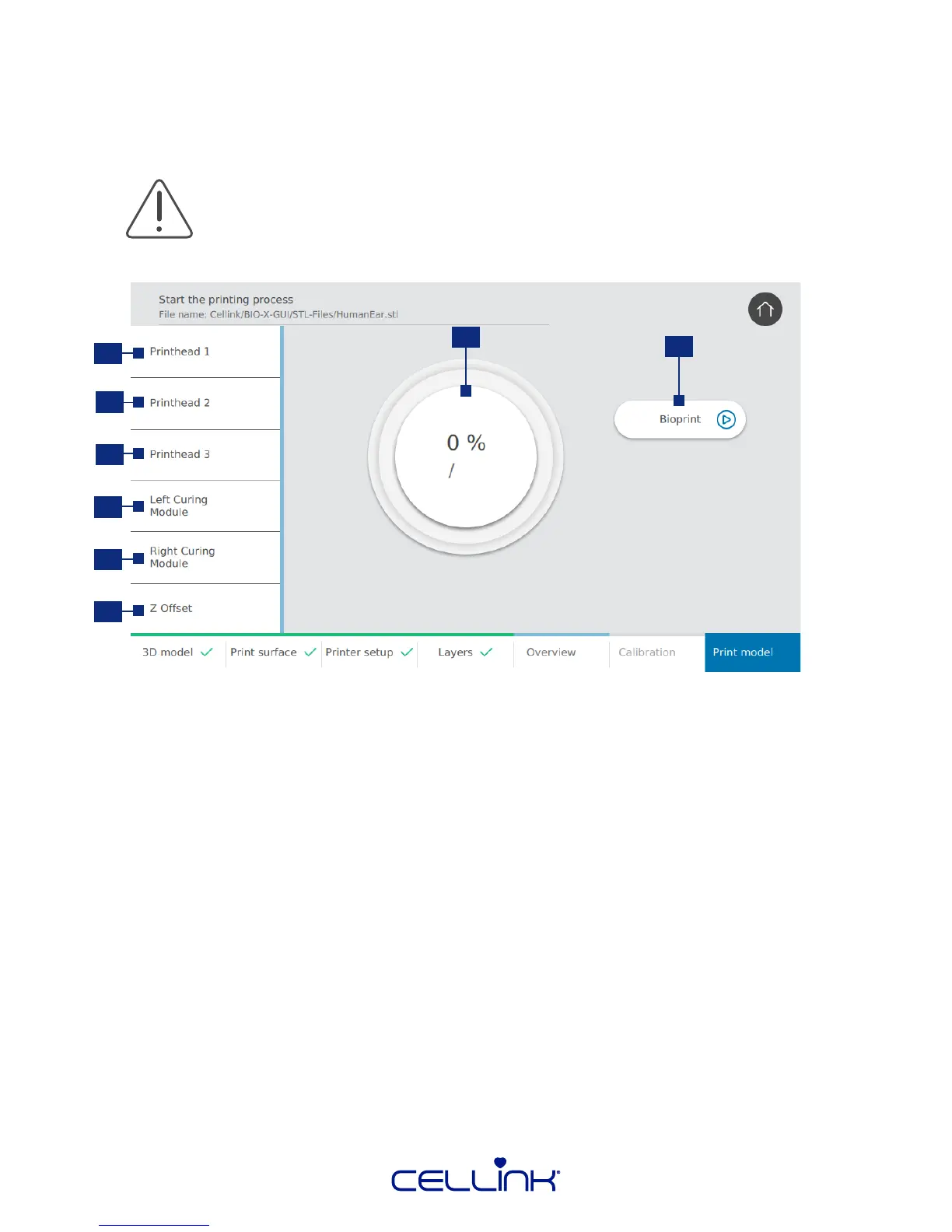
4.2.11 Print model
This screen summarizes the bioprinng process. You can monitor the acvity of each printhead and
curing module while prinng.
1. Printhead 1 – Allows you to monitor the specic properes of printhead 1.
2. Printhead 2 - Allows you to monitor the specic properes of printhead 2.
3. Printhead 3 - Allows you to monitor the specic properes of printhead 3.
4. Le photo-curing module – Allows you to monitor the specic properes of the le photo-
curing module.
5. Right photo-curing module – Allows you to monitor the specic properes of the right
photo-curing module.
6. Z Oset - Adjust printbed posion during prinng.
7. Progress indicator – Displays progress and me le to compleon.
8. Bioprint - Tap to start the bioprinng process.
Always pause bioprinng before opening the door. Do not remove printheads before
bioprinng has stopped. Doing so risks aborng the process and compromising your
cells.
6
8



 To Next Page