9
Network
LAN Setting
WiFi Settings
Hostname
WiFi......
ACCESS POINTSTATIC iP
DHCP
IP:
SUBNET
MASK:
GATEWAY:
MENU
Network information
Network
LAN Setting
WiFi Settings
Hostname
MENU
Network information
Access Point
SSID:
Password:
IP:
MG4-20AA001
00000000
ACCESS POINTSTATIC iP
DHCP
2.2.5 Connection via Ethernet network
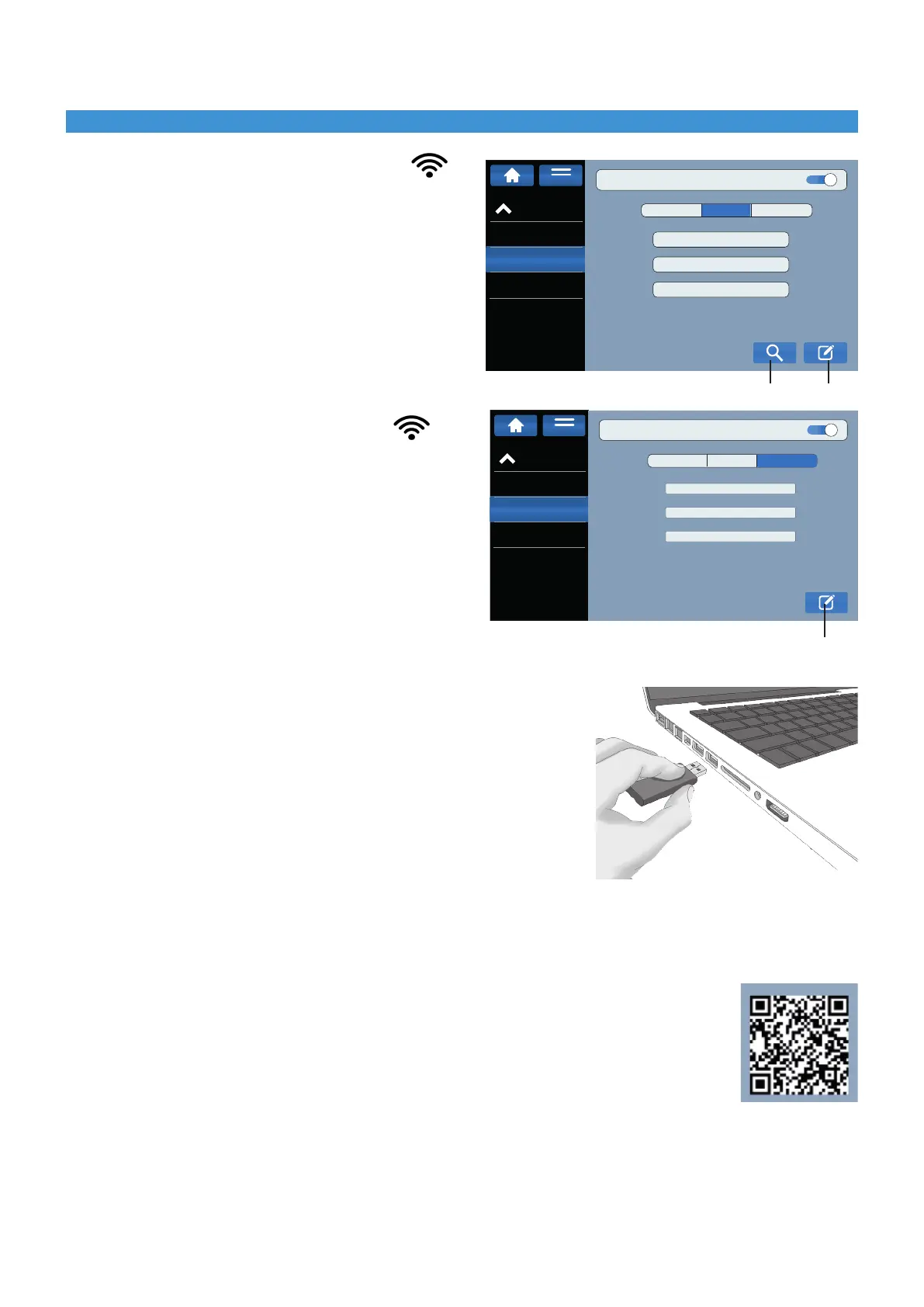
► From the MG4 display, select: Settings Network
WiFi settings.
► ClickontheeditbuttonandselectDHCP.
► SearchforaselectthedesiredWi-Finetworkand
enter its password.
► Proceedasdescribedin§2.2.4.1.
2.2.6 Connection via an Access Point AP
► From the MG4 display, select: Network Settings
WiFi settings
► Activatethebuttoninthetopright-handcorner
► ClickontheeditbuttonandselectACCESSDHCP.
► SelecttheSSIDnetworkgeneratedbytheMG4,
enter the password, or, in "Network Information”,
scan the QR code.
► Proceedasdescribedin§2.2.4.1.
2.2.7 Installing the "GENIUSPRO" operating software
► The USBashdrive(FD-GENIUSPRO)containsthe“GENIUSPRO”
operating software and the drivers necessary for the printer to function.
Any updates to the "GENIUSPRO" software can be downloaded from
the website www.cembre.com.
► Insert the USB drive into the computer’s USB port and proceed with
the installationof“GENIUSPRO”throughtheSETUPle.
2.2.8 Connection to the "Geniuspro Mobile" app
► Installthe "Geniuspro Mobile" app on your Android or iOS mobile device (refer to § 1.1).
► PairtheMG4totheappviaanaccesspoint(proceedasdescribedinsection2.2.6)orviaaWiFinetwork.
(proceed as described in § 2.2.5 verifying that the device is also connected to the WiFi
network already connected to the MG4).
► Openthe"GeniusproMobile"app,clickon ADD PRINTERS.
► Enterinthe"NetworkInformation"menuoftheMG4andescantheQRcodeonthedisplay
via the mobile device, pairing the MG4.
Installation2
EDIT
EDIT
SEARCH


 To Next Page