ADJUSTMENT
Handle Removal and Adjustment
The HANDLE (#18) may be adjusted or moved by removing one of the handle knobs and loos-
ening the wing nut that holds the handle in place. It may then be slid out of the handle socket,
moved to the opposite side of the tool, and tightened in the most convenient position.
Bending Die Adjustment and Removal
The UPPER BRAKING DIE (#12) is segmented and can be used for varying sizes of box and
pan forming. When forming a smaller box or pan, choose the desired size UPPER DIE finger,
center it and remove the others. See below for adjustment instructions.
The SHEAR BRAKE ROLL can be used to bend sheet metal up to 20 gauge. The space
between the UPPER DIE and the MOVING CUTTER PLATE (#11) is adjustable. To adjust the
spacing, perform the following steps:
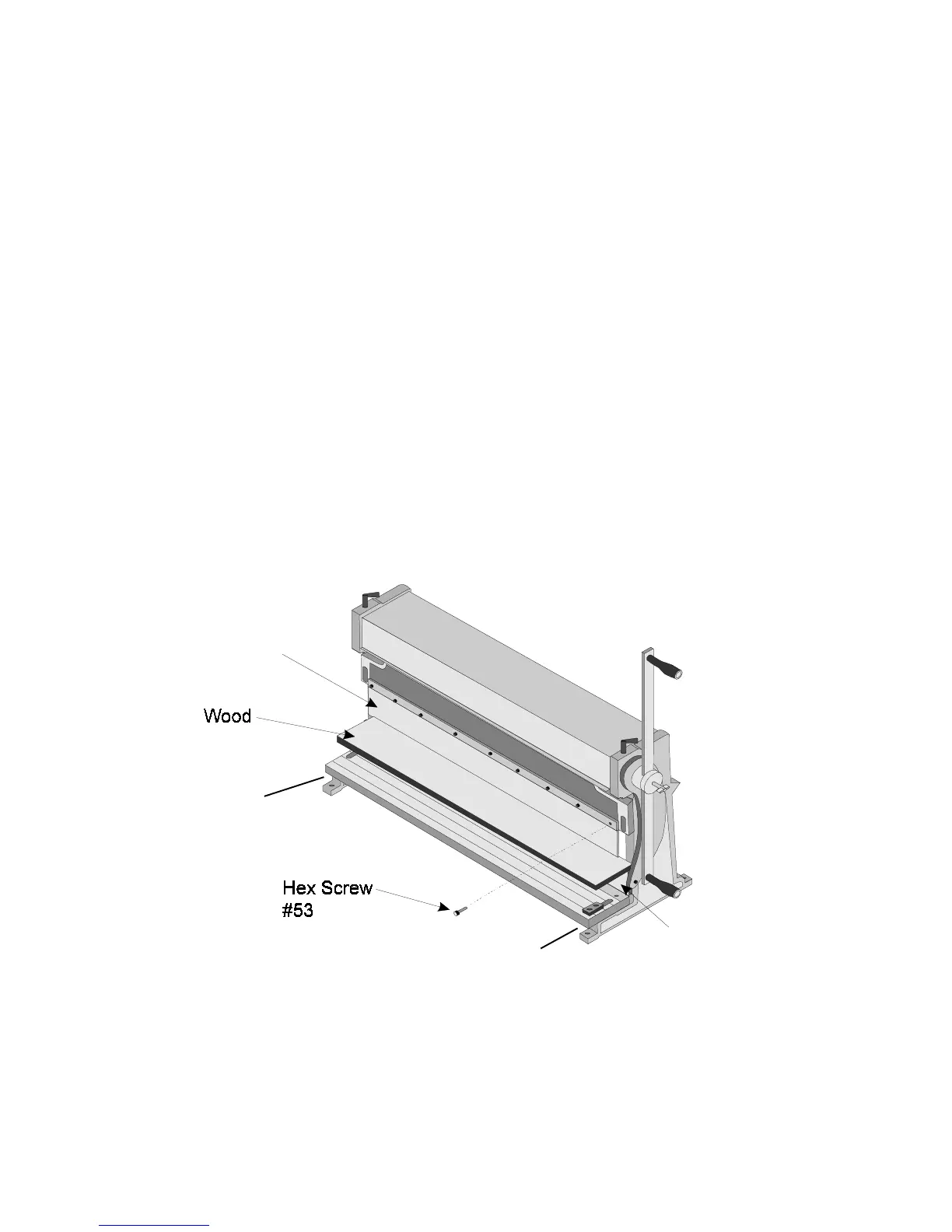
Step 1. Place a flat straight piece of wood between the UPPER BRAKING DIE and MOVING
CUTTER PLATE and raise the MOVING CUTTER PLATE so that the material just
touches the UPPER DIE as shown in Figure 1.
Figure 1 — Adjusting the Dies
Step 2. Loosen the HEX SCREWS (#53) holding the UPPER DIE fingers in place. It is not
necessary to remove them.
Adjusting Screw #61
Adjusting Screw #61
Upper Braking
Die #12
Moving Cutter Plate #11
Page 3 -- SKU: 05907 REV 11/02



 To Next Page