page 43 www.centsys.com
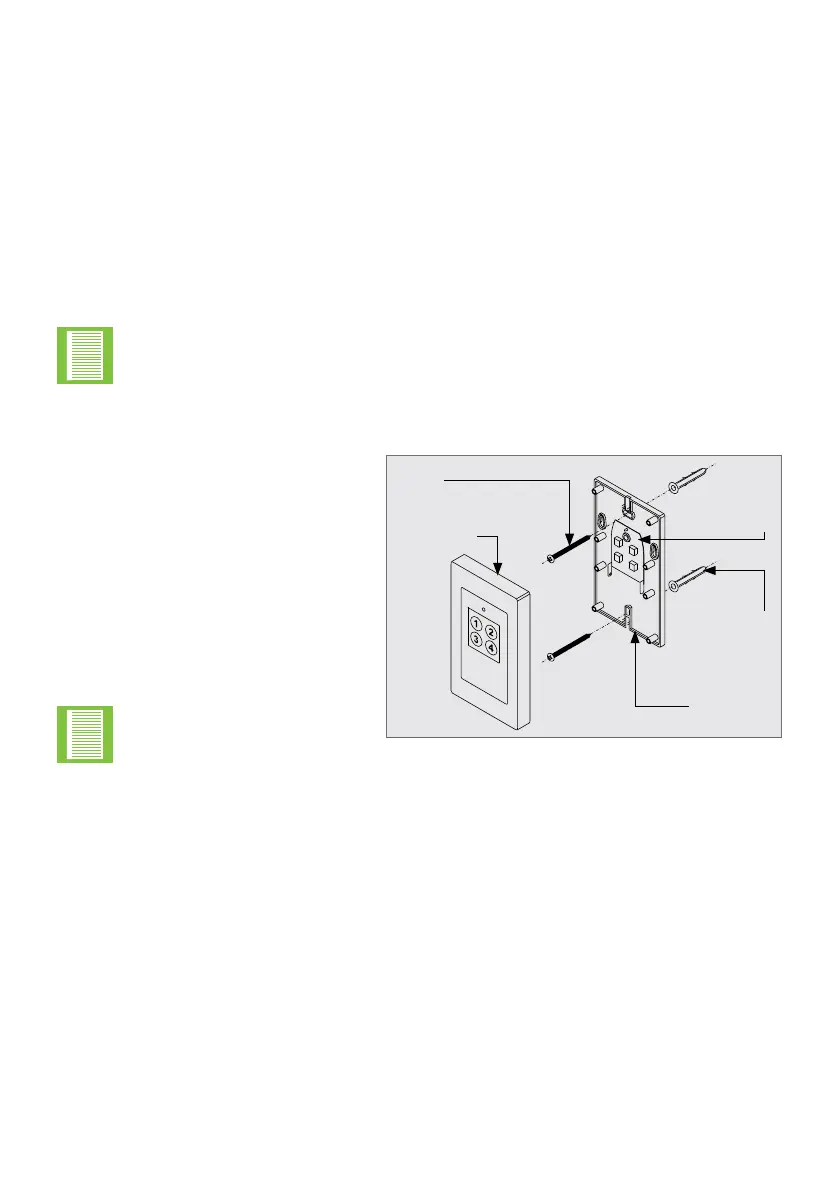
FIGURE 78
Mounting
• The switch can be permanently
screwed to the wall through the
mounting holes provided or,
alternatively, ‘hooked’ on the wall,
providing the convenience of easy
demount ability, through the ‘hook’
holes provided on the base cover
• To permanently mount the unit,
open it, and place the back panel
of the unit in the desired position
on the wall
Take care not to damage
the electronics when
opening and handling the
unit.
Fischer
plug
PC
Board
Wall switch
back cover
Wall switch
front cover
Screw
• Place a small spirit level on the top of the back panel to ensure that the unit will be
level once mounted. Using a marking pen, mark the drill holes on the wall
• Drill two 6mm holes
• Locate two scher plugs into the holes
• Align the back panel holes with the holes in the wall, and secure it into position using
two screws
• Insert the battery, and replace the front cover
• The wireless wall switch may be learned into the SDO4 SMART’s memory via the
MyCentsys Pro mobile application under “Remotes” at the bottom of the screen.
6.6. The Wireless Wall Switch
The wireless wall switch provided with the SDO4 SMART kit (T12 Model only) provides
ease of installation, obviating the need for running hard wires to the switch. It can be
mounted in a convenient location such as adjacent to a side entry door into the garage.
The four buttons provided on the wall switch are for independently operating from one
wall switch, the two openers of a double garage door installation. The buttons can be
used for activating the various functions provided by the system.
Each individual button of the wall switch has been marked with a number, from one to
four, to help the user identify which function each button operates. The buttons can be
learned in any conguration.
The wireless wall switch must be mounted within sight of the garage door and
a reasonable distance away from moving parts. It should be mounted at least
1500mm above the ground and the entrapment warning label provided, must be
attached adjacent to the switch.
OPERATOR INSTALLATIONSECTION 6



 To Next Page