16-14
RESTORE FUNCTION
The RESTORE function allows you to load on the truck the files for saving the operator profile
parameters present on the SD card, created with the SAVE function
Note:
Before proceeding with the RESTORE function, it is necessary to ensure that the truck that is to
receive the update has the same software versions as the truck from which the file was created.
If the receiving truck has different software versions from the original truck, the update might not
display all the parameters, indicating this with the message "FAILED".
Procedure
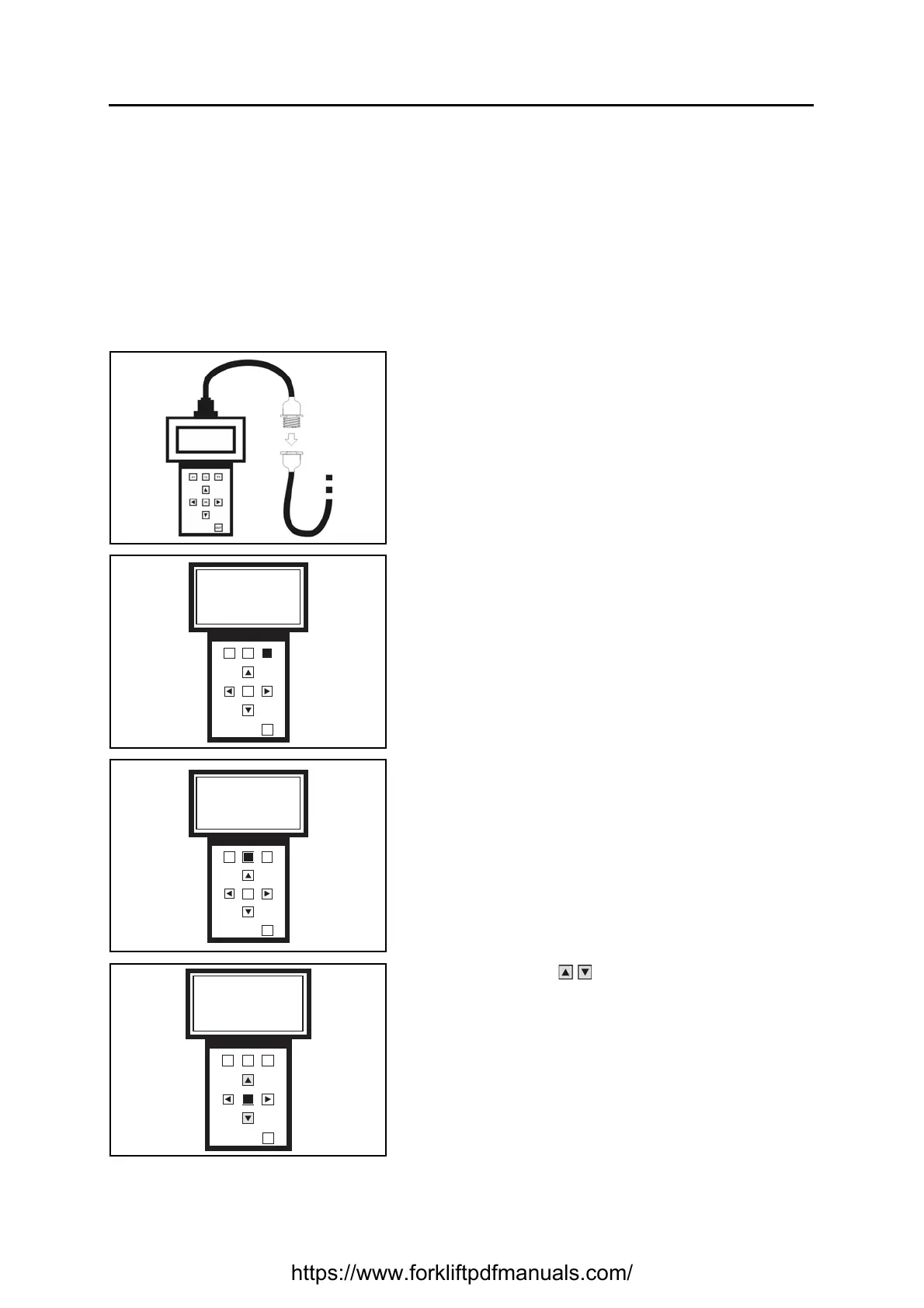
1. Connect the programmer and turn on the truck (see
specific paragraph)
Wait a few seconds for the data to load
2. Press F3 to select the function SAVE/RESTORE
3. Press F2 to select the RESTORE function
4. Use the buttons to select the file to be loaded
Press OK to confirm your choice
F1 F2
F3
OK
OUT
Please select funct
Programmer
Save/Restore
PROG S/R
F1 F2
F3
OK
OUT
S/R selected
Please select funct
SAVE RST DEL
F1 F2
F3
OK
OUT
File selection
XXX
Note
Profile X
https://www.forkliftpdfmanuals.com/


 To Next Page