3-62
0
1
2
3
4
5
6
7
8
9
10
11
12
13
14
15
16
17
18
19
20
21
E
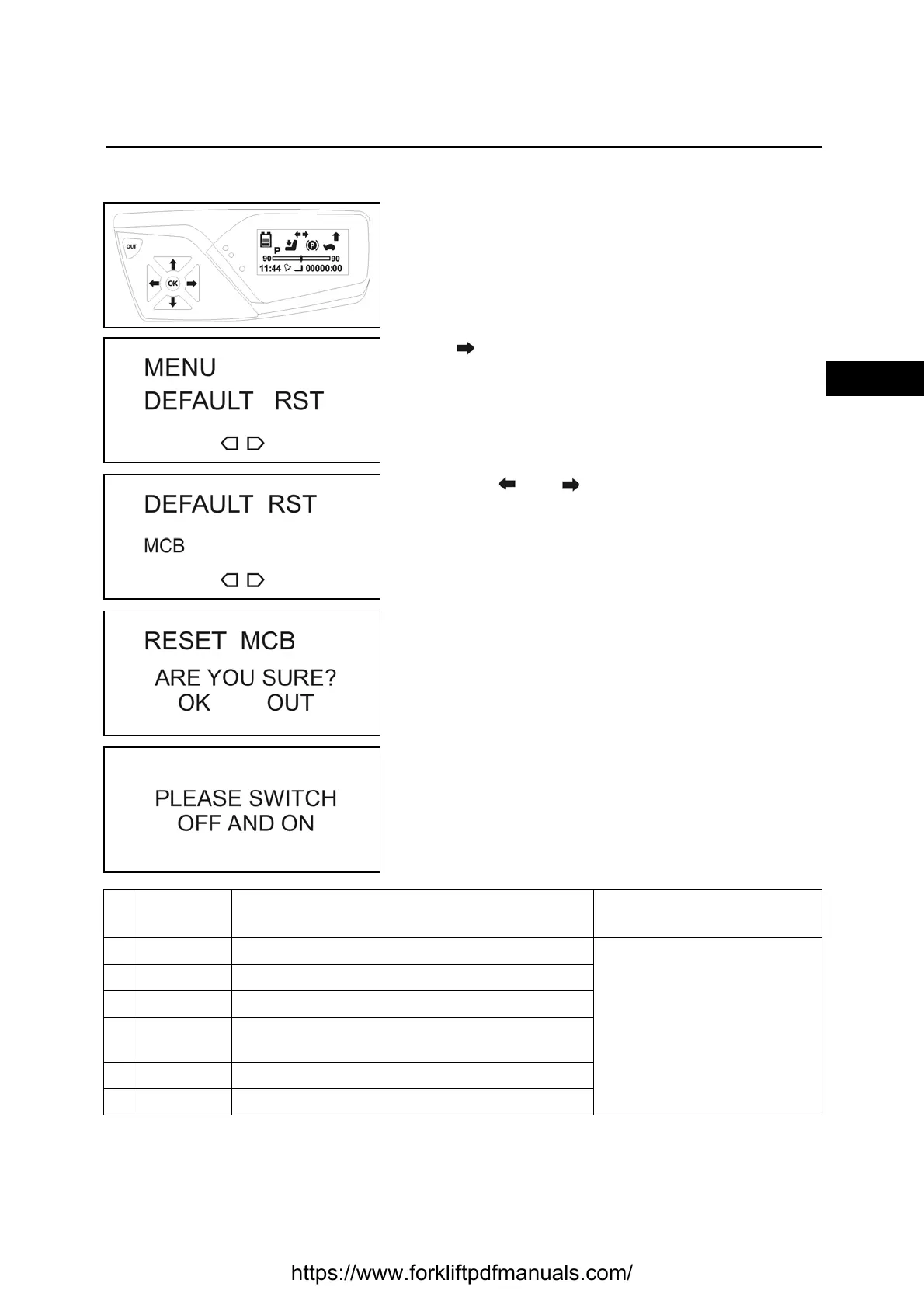
DEFAULT RST
Enter the service menu
[see SERVICE MENU PASSWORD INSERTION
PROCEDURE paragraph]
Press till reach the DEFAULT RST menu
Press OK to enter the menu
Use buttons and to navigate the menu
Press OK to select the required parameter
Press OK to save
Press OK to exit without saving
Turn the truck off and on again
Re
f.
Function Description Notes
1MCB Used to reset the MCB board
See paragraph
NECESSARY ADJUSTMENTS
AFTER A HARDWARE COMPO-
NENT REPLACED
2 ARMREST Used to reset the arm rest card
3 TRACTION Used to reset the traction logic
4
MHYRIO
UNIT
Used to reset the MHYRIO card
5PUMP This function allows to reset the PUMP logic
6 DISPLAY This function allows to reset the DISPLAY
https://www.forkliftpdfmanuals.com/



 To Next Page