38
CONTROLS & FEATURES
Handlebar Switch, LH (Optional State Two)
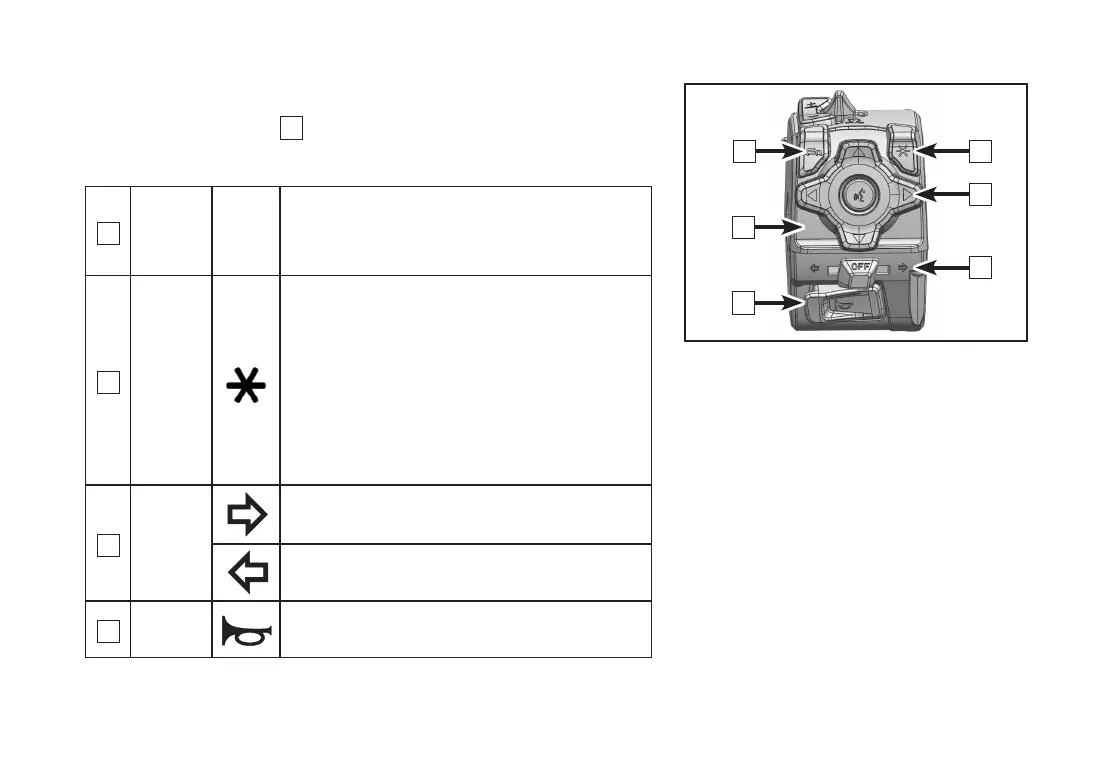
Left handlebar switch
1
is on the left side of the handlebar�
Functions of Left Handlebar Switch
2
Function
button
Fn
Press it to see the cyclical menu--Fn
menu;
Long press it to see shortcuts�
3
User-
dened
button
Press it (according to your preference)
to
:
Play/stop;
Activate intercome function of two
helmets;
Long press it to enter or exit split
screens�
4
Turning
light
switch
Push this switch to the right, the right
turning light will be on�
Push this switch to the left, the left
turning light will be on�
5
Horn
switch
Press and the horn will sound�
1
5
2
3
6
4


 To Next Page