74
CONTROLS & FEATURES
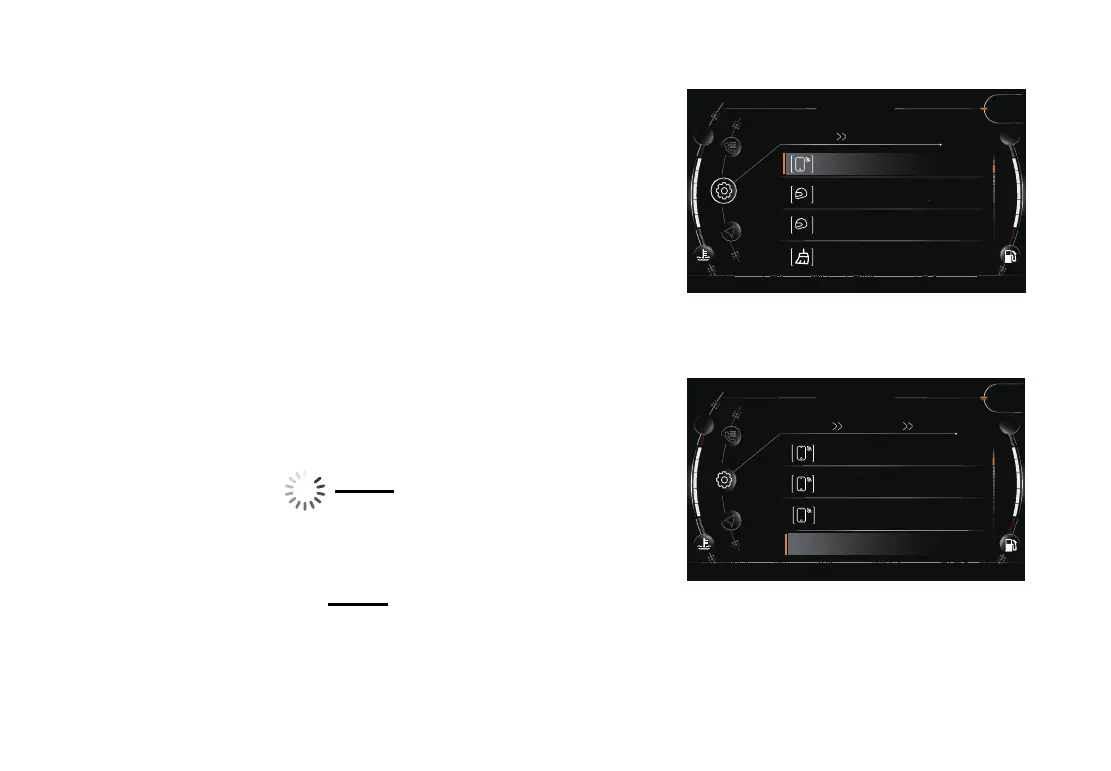
Paired Devices
Pair a smart phone and helmet to the instrument by bluetooth,
then navigation, calling, and music function can be used�
Following the below steps to pair a smart phone via bluetooth:
Short press button “SET” to enter into the menu�
Long press button “▲” or “▼” to enter into setting interface.
Short press button “▲” or “▼” to select device pairing, short
press button “SET” to enter into device pairing menu�
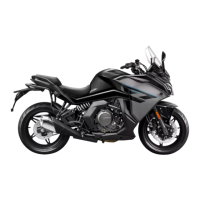
Short press button “▲” or “▼” to select smart phone bluetooth,
press button “SET” to open smart phone bluetooth�
Make sure the bluetooth function of smart phone is opened�
Short press button “▲” or “▼” to select your smart phone, then
press button “SET” to pair�
Short press button “▲” or “▼” to select the paired smart phone,
press button “SET” to disconnect the pairing�
195
Setting
5
SPORT
Paired Devices
Phone Pairing OFF
Headset 1 Pairing OFF
1
Headset 2 Pairing OFF
2
Delete Pairing
km/h
195
5
SPORT
iPhone
MIUI 10
HUAWEI MATE10
Connect a New Device
km/h
Setting
Paired Devices Phone Pairing
On
On Off


 To Next Page