85
CONTROLS & FEATURES
Vehicle Information
Riders can check the following content in the vehicle information
menu:
Basic Info
Miles Info
Warning
Version Info
Service
Basic Info (If equipped)
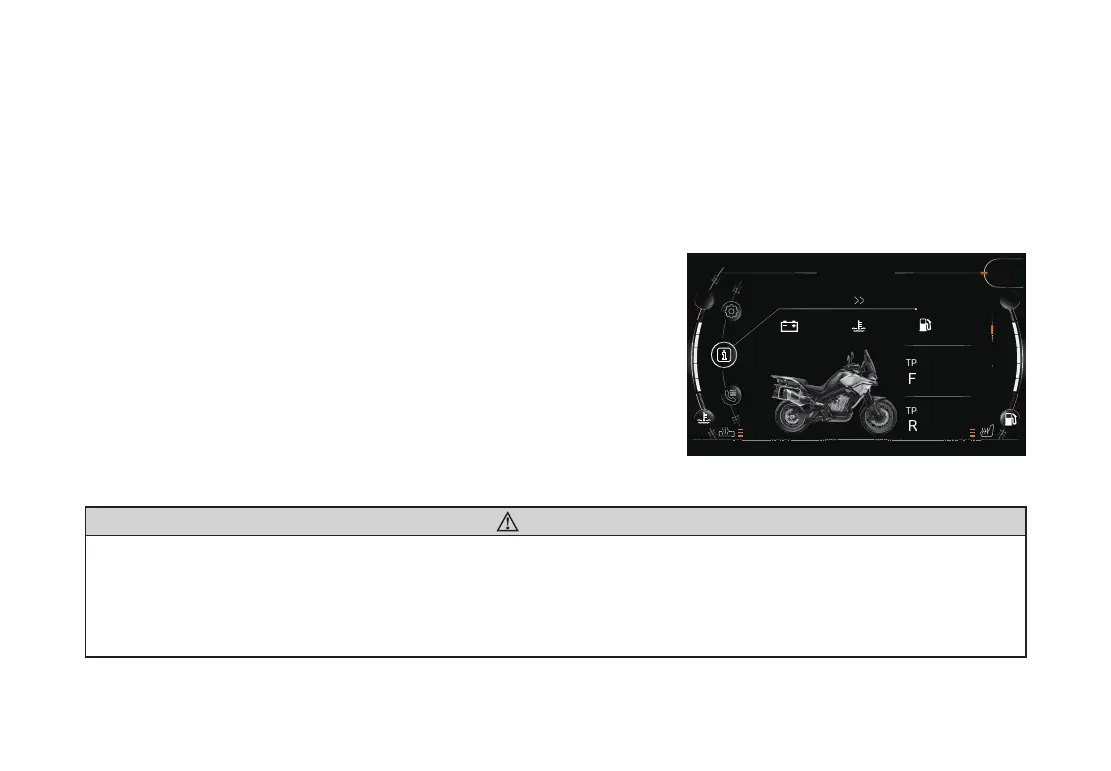
In the Basic Info interface, the rider can check voltage,
coolant temperature, remaining distance, tire pressure and tire
temperature, etc�
Short press button “SET” to enter into the menu�
Long press button “▲” or “▼” to select information.
Short press button “▲” or “▼” to enter into Basic Info interface.
WARNING
The tire pressure displayed represents the real-time tire pressure when the display is selected, which
may not be the same as the inated tire pressure set when it is cool. Because the temperature of the
tire becomes higher during riding, this causes the air in the tire to expand and the pressure to increase�
When adjusting tire pressure, a tire pressure guage should be used for testing� It is not recommended to
rely on the value displayed by the meter�
195
km/h
N
STORT
Information
TPMS
FW
RW
2.3bar
2.3bar
2.6bar
22.5°c
2.6bar
22.5°c
TPMS
12.4V
72.5°C
254km
Basic Info


 To Next Page