-22-
Data query: Supports users to view the
current voltage, temperature and other
operating data of the bound battery,
supports to view any 24-hour battery
operation data in the data record, supports
to view the battery operation status, and
the off-grid status.
Fault warranty: supports battery fault
self-check, records battery fault status
and fault information in real-time, and
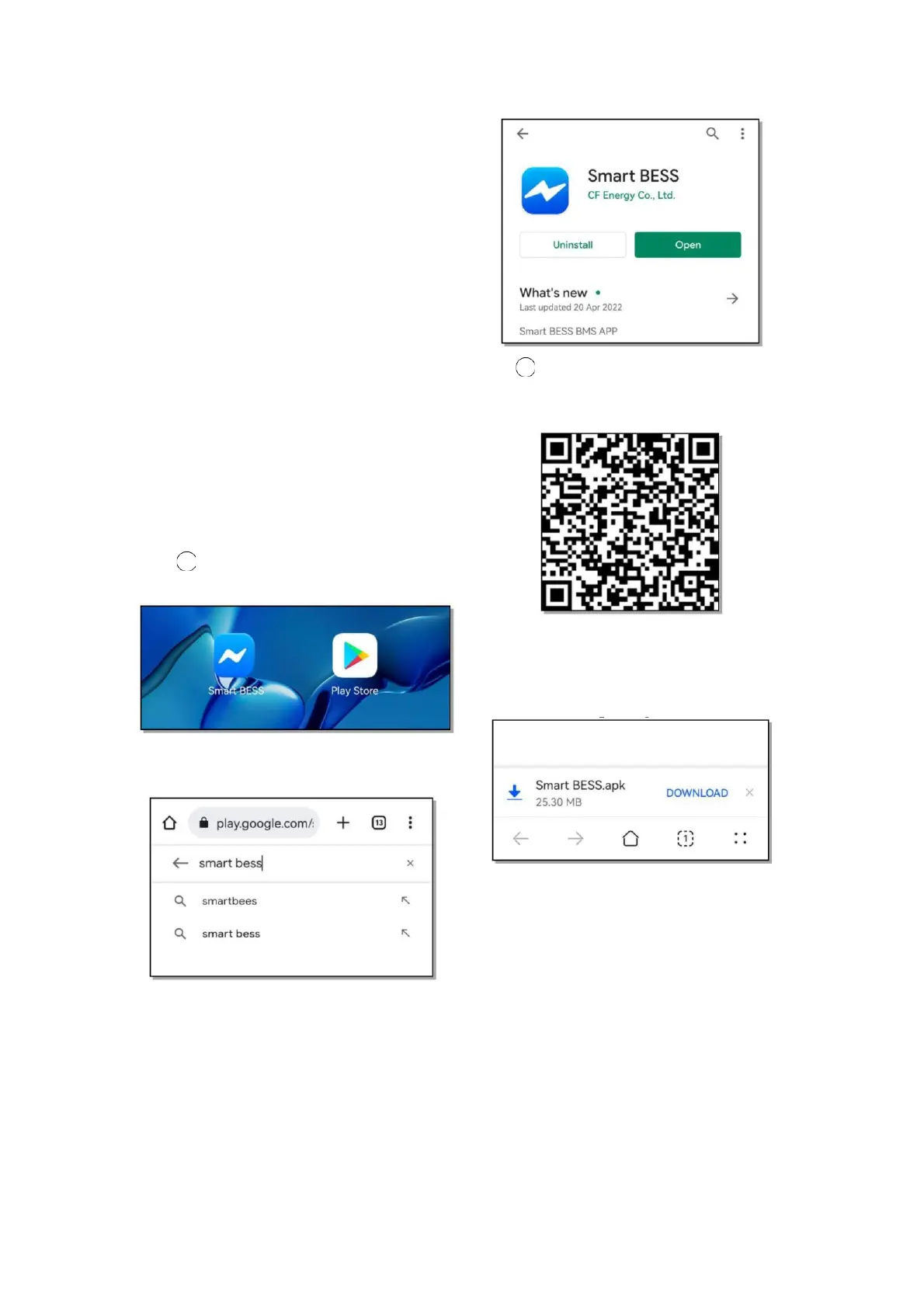
keeps data on battery faults 2 APK installation page
➢ Scan the QR code of the APK
6.2.1.3 Operating environment installation package to download
APP supports running on Android 7.0,
IOS 8.0 and above mobile phones
6.2.1.4 Software Installation
(1)Installation on Android
1 Google mall installation
➢ Open Google Play Store
➢ Search Smart BESS on Google Play
Store
➢ Select to enter the Smart BESS
application details page, click to
download and install
➢ The application download prompt
pops up, choose to agree to
download the Smart BESS
installation package
➢ Manually install the downloaded
Smart BESS installation package


 To Next Page