-28-
6.3 Settings for CAN /485 Bus Pins
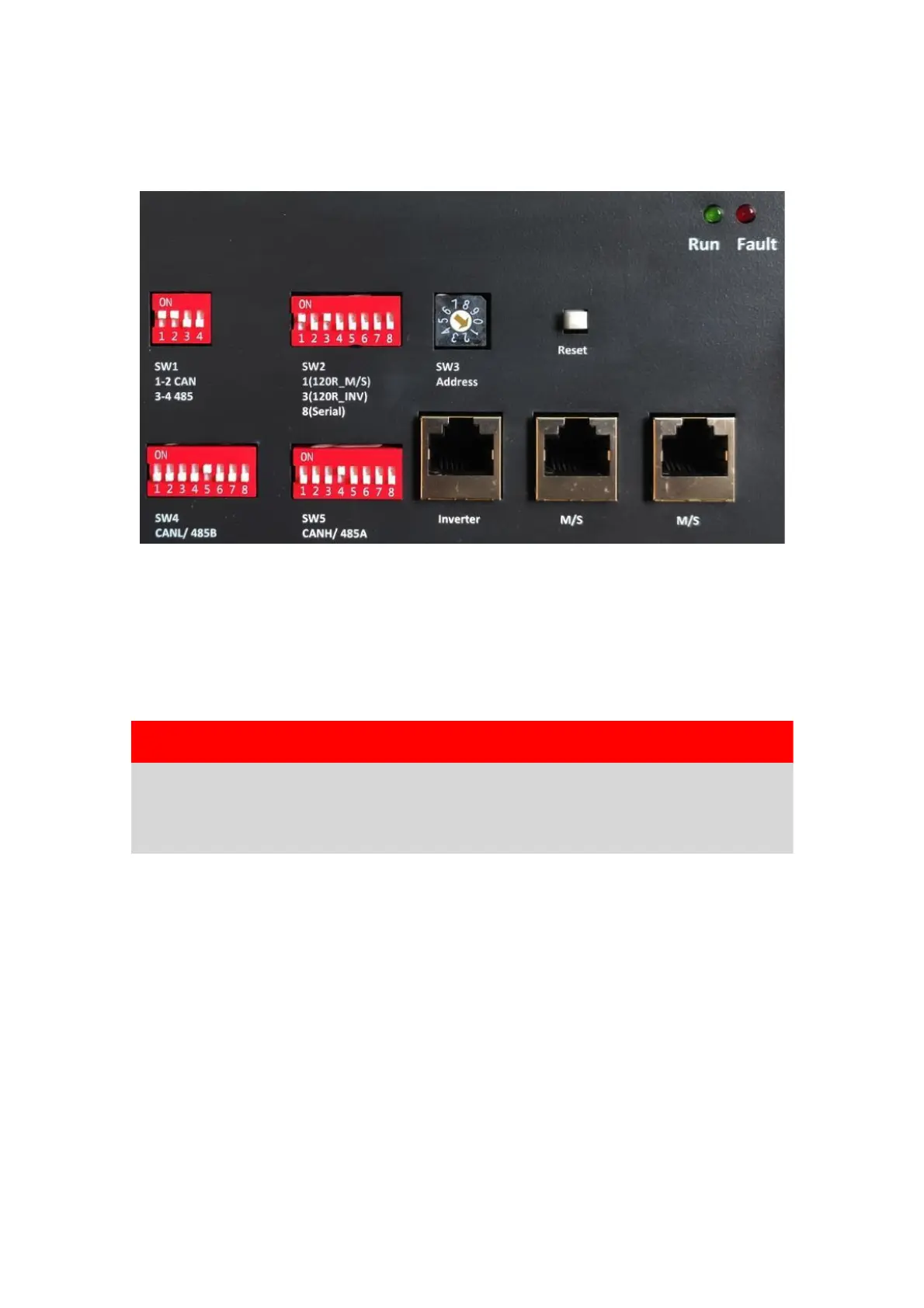
Confirm that the CANL/485B DIP switch is set to SW4 which pin is used for CAN low
signal by inverter (5-CANL/485B), and the CANH/485A DIP switch is set to SW5 which
pin is used for CAN high signal by inverter (4-CANH/485A).
As SW1 the CAN/485 GND/DIP switch, the installer should confirm which pin is used
for ground by inverter or not.
NOTICE
The battery default protocol is CAN bus, if an inverter communication
mode is RS485 or other protocol, please contact the CFE customer
careline before installing the battery.
7 Commissioning
7.1 Commissioning of Battery
If there is only one battery installed, use the following steps to operate:
1) Press and hold the panel button on the left side of the unit for about 4s, after the
indicator lights on, release the panel button.
2) Make sure that the Run light is on. If it stays off, do not use the battery and
contact CFE or your distributor.
3) Turn the inverter on, and wait for the start-up sequence to complete fully. When
there are two or more batteries connected with parallel mode, after the charging
cable and the date cable has been connected correctly, follow these steps to
operate:


 To Next Page