-21-
6 Configuration
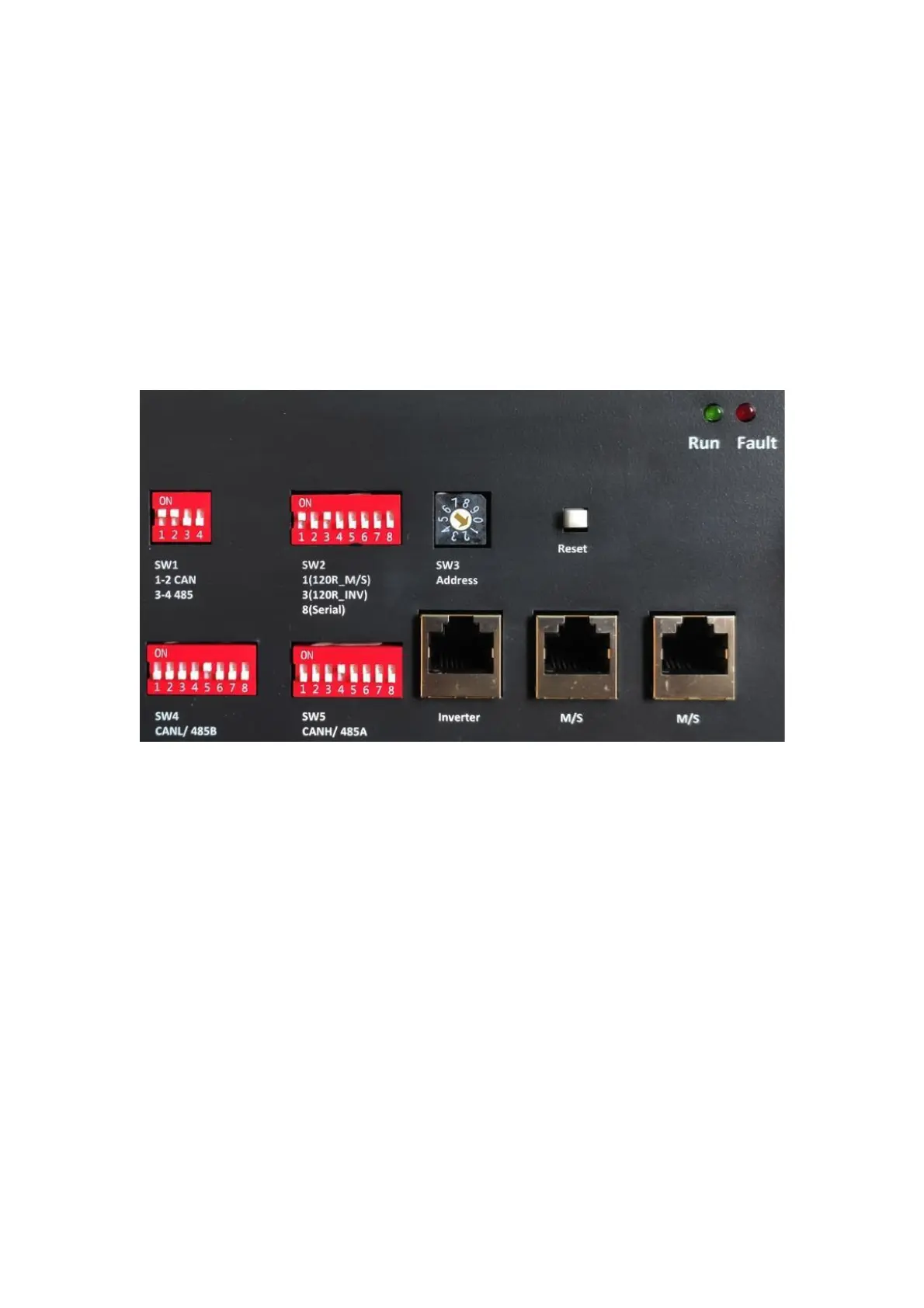
DIP switch should be set correctly for proper communication between inverter and
battery.
If parallel connecting multiple batteries, please set the DIP switches as follows:
6.1 Configure device Wi-Fi
The Product has a built-in Wi-Fi module for use with the CFE APP. The Wi-Fi
setting of the battery should be as follows:
6.2 App Monitor “Smart BESS” Instruction
6.2.1 Software Overview
6.2.1.1 Summarize
Smart BESS is a data information
system made for users to apply
battery management. It can query the
data update battery configuration key
network, fault warning and other
functions. It is uploaded to the battery
network through the battery
management system. Comprehensive
management of mobile phone query
system to create a more comfortable
battery management experience for
users
6.2.1.2 Function
User registration: the user registers the
APP account to realize the online data
query and management of the battery
under the personal name.
Battery distribution network: Users can
upload real-time battery data and
operating status to the Internet through
the one-key distribution of the battery.
Battery addition: add the battery to the
user account for the battery that has been
distributed to the network (you need to
log in in advance to use the user account)
to realize the battery view data in real-
time.


 To Next Page