M10 User Manual 14
3 How to congure and operate your M10
The M10 amplier is operated either from the unit’s front panel display and push buttons or from the CH
Control app. The initial set up should be done using the front panel buttons and the menus shown on the
display. Once congured for inclusion in the Control App, all parameters can be adjusted or re-set remotely.
3.1 Front panel controls
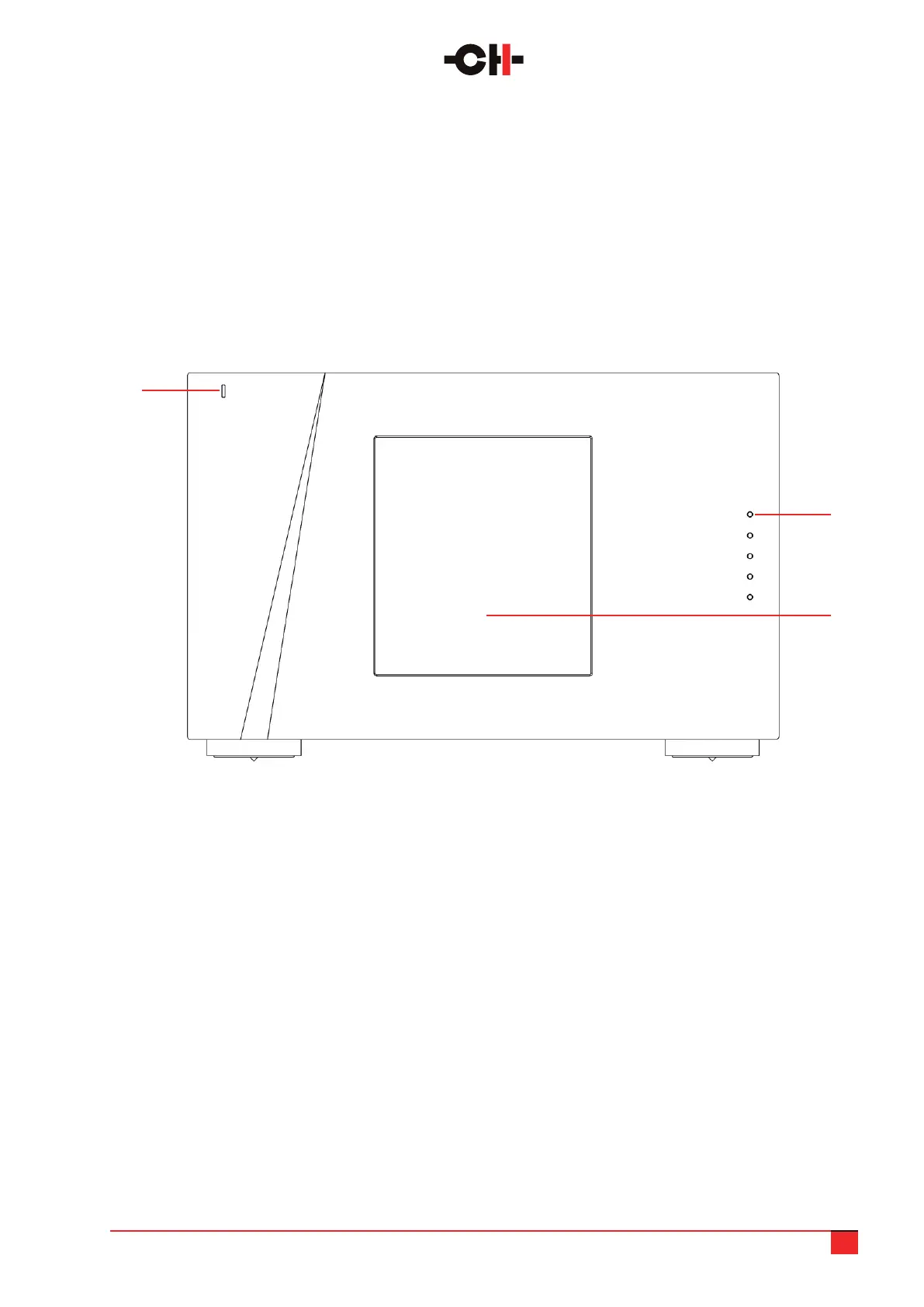
On the front panel of the M10 audio chassis you will nd the following controls and displays:
1. Standby LED
2. Five user control push buttons
3. Display area (high-denition display)
M10 audio chassis front panel elements
1
2
3
The standby LED lights up when the unit is in standby. It is normally turned off during operation.
The LED can also be programmed to remain on during operation.
The main display is a user customizable, multi-color high-denition panel with very wide viewing angle,
high contrast and high brightness, ensuring that it can be easily read from distance and at an angle.
The color and brightness of the display can be congured according to the user’s taste and other equipment.
It is set to dim to 30% brightness, once actual operations/adjustments have been completed, although this is
also user congurable.



 To Next Page