13
Programming to an External Receiver with a Program/LEARN Button
EXTERNAL RECEIVERS
PressandreleasetheProgram/LEARNbutton*onthe
externalreceiver.
Program/LEARN
Button*
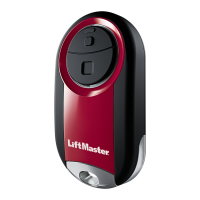
If using the Universal Mini Remote Control with residential door openers, the remote control must be used only with
door openers manufactured after 1993 that utilize photoelectric sensors. The photoelectric sensors are always located
on or near the bottom of the door track.
The external receiver is typically located on the product or mounted near the product.
Theimagesthroughoutthismanualareforreferenceonlyandyourproductmaylookdifferent.
*Dependingonyourproduct,theProgram/SMART/LEARNbuttonmayhavea
differentname(usethebuttonforprogrammingremotecontrols).
STOP
BottomButton
1
Startwithyourgaragedoor,commercialdoor,orgate
closed.
2
Pressandholdbottombuttonontheremotecontroluntil
theblueLEDstayssolid(approximately15seconds)then
releasethebutton.
3
4
Ontheremotecontrol,pressandreleasethebuttonthat
youwouldliketoprogramtwice.TheblueLEDwillblink
forupto60seconds.
5 6
Waitforthedoororgatetomove,thenpressandrelease
eitherofthebuttonsontheremote.
LED
Testtheremotecontrolbypressingthebuttonyou
programmedinstep4.Ifthegaragedooropener,
commercialdooroperator,orgateoperatordoesnot
activate,repeattheprogrammingsteps.
IMPORTANT: The remote will activate your door or gate during
programming. Ensure door or gate is clear of ALL obstructions.
LED






 To Next Page