32
TO ERASE ALL CODES FROM MOTOR UNIT MEMORY
To deactivate any unwanted remote control,
fi rst erase all codes:
Press and hold the “learn” button on motor
unit until the learn indicator light goes out
(approximately 6 seconds). All previous
codes are now erased. Reprogram each
remote controlor keyless entry you wish to use.
To Add or Reprogram an Additional Remote Control
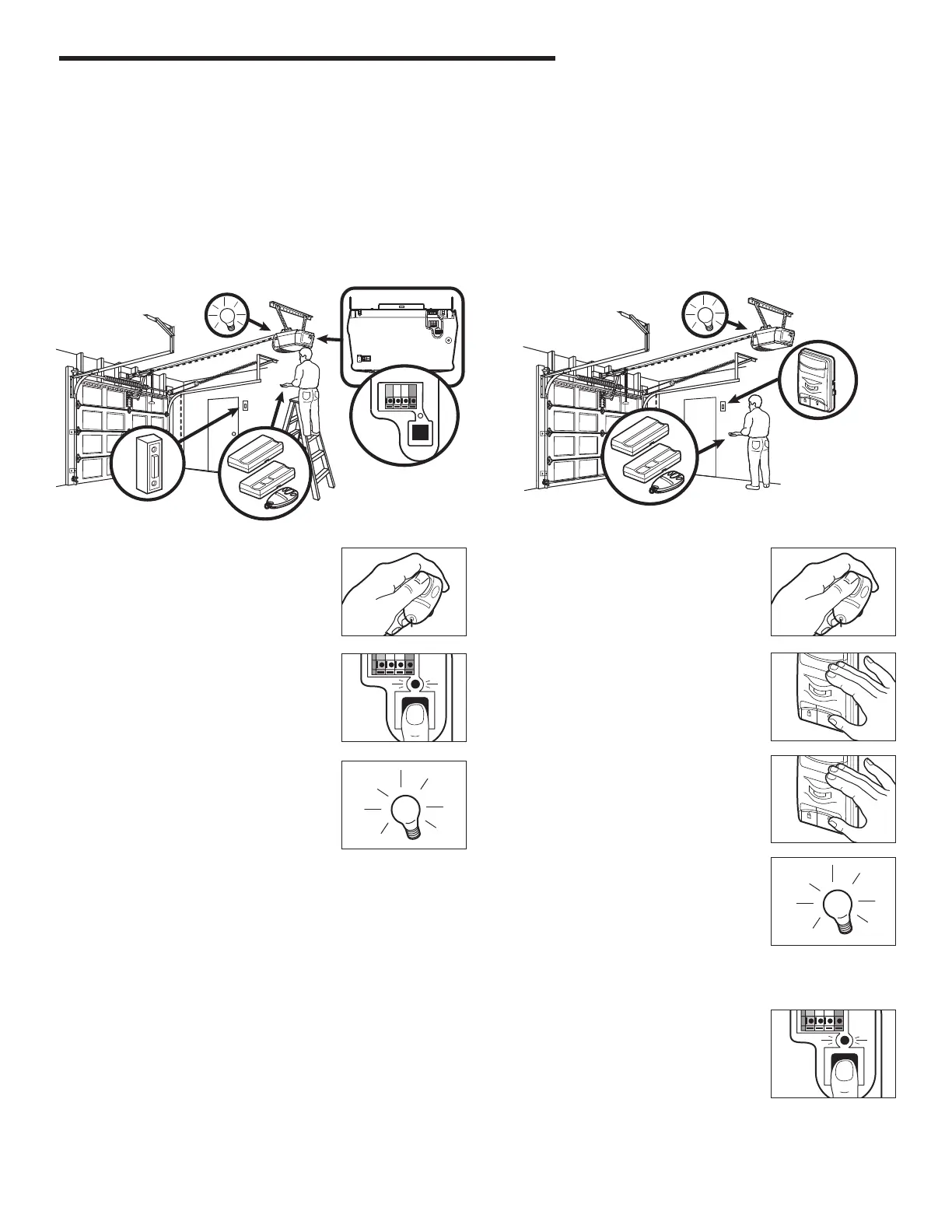
USING THE “LEARN” BUTTON USING THE MOTION DETECTING CONTROL PANEL (OPTIONAL
ACCESSORY)
1. Press and hold the button on the hand-
held remote control or wireless door
button that you wish to operate your
garage door.
2. The orange LED will fl ash continually.
Press and release the “learn” button on
the opener. The learn indicator LED will
go out.
3. Release the remote control or wireless
door button when the opener light blinks.
It has learned the code. If light bulb is not
installed, two clicks will be heard.
1. Press and hold the button on the hand-
held remote control that you wish to
operate your garage door.
2. While holding the remote control button,
press and hold the LIGHT button on the
motion detecting control panel.
3. Continue holding both buttons while
you press the push bar on the motion
detecting control panel (all three buttons
are held).
4. Release buttons when the opener light
blinks. It has learned the code. If the light
bulb is not installed, two clicks will be
heard.
(Optional accessory)
Activate the opener only when door is in full view, free of obstruction and properly adjusted. No one should enter or leave garage
while door is in motion. Do not allow children to operate push button or remote control. Do not allow children to play near the door.
The remote controls supplied with your opener are pre-programmed to your receiver in the factory. If you purchase additional remote
controls, you will need to program them into your opener using the steps below.
PROGRAMMING THE REMOTE CONTROL






 To Next Page