37
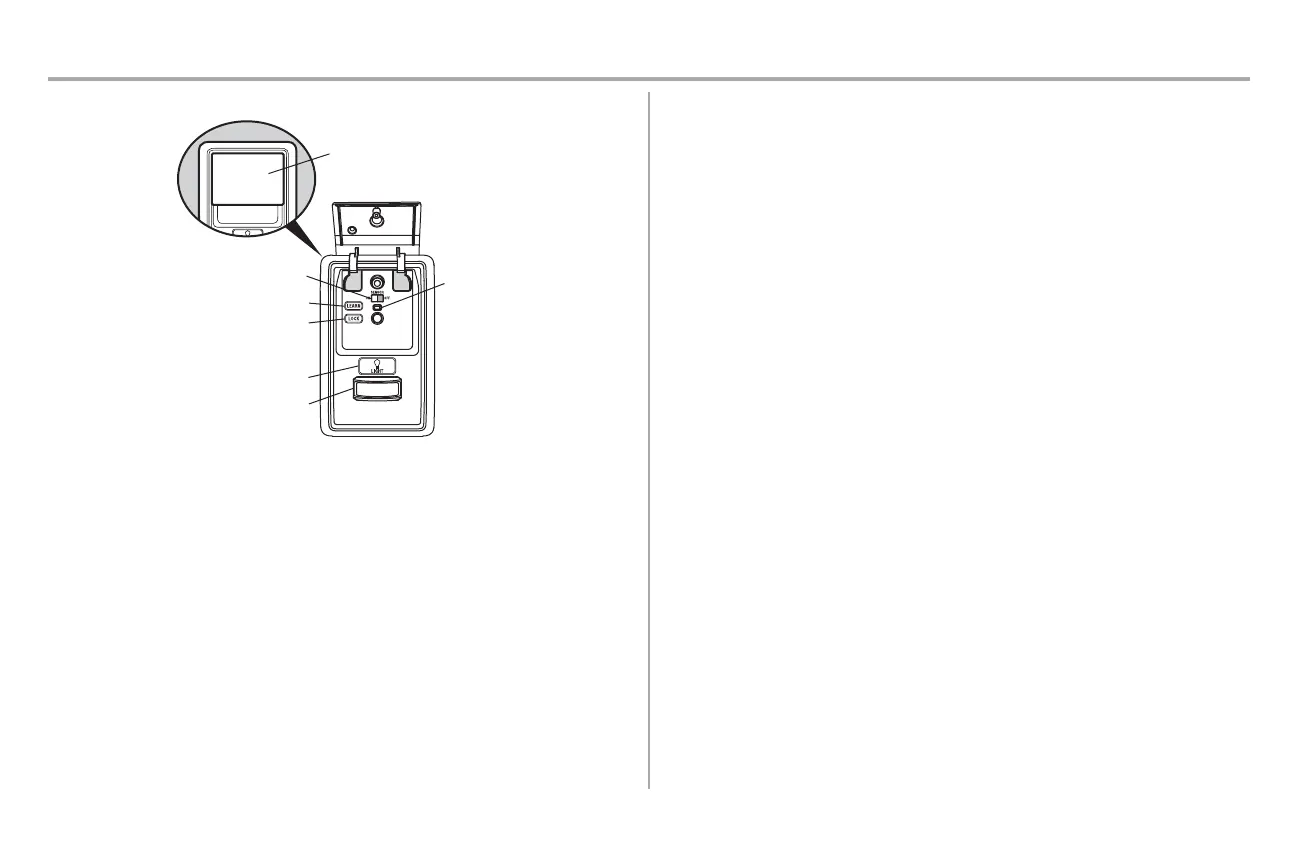
Motion Sensor
Switch
LEARN Button
LOCK Button
LIGHT Button
Motion Sensor
Push Bar
Operation
Motion Detecting Control Panel
Command
LED
SYNCHRONIZE THE DOOR CONTROL: To synchronize the door control to the garage door opener, press the push
bar until the garage door opener activates (it may take up to 3 presses). Test the door control by pressing the push
bar; each press of the push bar will activate the garage door opener.
PUSH BAR: Press the push bar to open or close the door.
LEARN BUTTON: Use to program compatible remote controls, wireless keyless entries and myQ® devices to the
garage door opener.
MOTION SENSOR: Turns the garage door opener lights on when motion is detected. Lights stay on for 4-1/2 minutes
(factory setting), then turn o. Set the motion sensor switch ON or OFF to control this feature.
LOCK: Prevents remote controls from working, while still allowing activation from the door control and keyless
entry. (Factory setting is OFF.)
Turn ON: Press and hold the LOCK button for 2 seconds. The command LED will ash as long as the lock feature
is on.
Turn OFF: Press and hold the LOCK button for 2 seconds. The command LED will stop ashing and normal
operation will resume.
LIGHT BUTTON: Turns the garage door opener lights on or o when pressed. Lights stay on for 4-1/2 minutes
(factory setting). The LIGHT button will not control the lights when the door is in motion.
To change the amount of time the lights stay on:
Press and hold the LOCK button (approximately 10 seconds) until the garage door opener lights ash. The time
interval is indicated by the number of times the garage door opener lights ash:
l 1 ash is 1-1/2 minutes
l 2 ashes is 2-1/2 minutes
l 3 ashes is 3-1/2 minutes
l 4 ashes is 4-1/2 minutes
To cycle through the time intervals repeat the step above. If the push bar LED is continuously blinking, the LOCK
feature needs to be turned o.
To turn the light feature ON (Factory default is On):
1. Close the garage door.
2. Start with the garage door opener lights "ON".
3. Press and hold the LIGHT button (approximately 10 seconds) until the garage door opener lights turn
o, then on again.
To turn the light feature OFF:
1. Close the garage door.
2. Start with the garage door opener lights "OFF".
3. Press and hold the LIGHT button (approximately 10 seconds) until the garage door opener lights turn
o, then on again.










 To Next Page