14
ACCOUNT SETUP NETWORK/MOUNTINGPOWER ACCESS CONTROLINTRODUCTION
INTRODUCTION ACCOUNT SETUP NETWORK/MOUNTINGPOWER ACCESS CONTROL
INTRODUCTION ACCOUNT SETUP NETWORK/MOUNTINGPOWER ACCESS CONTROL
INTRODUCTION ACCOUNT SETUP NETWORK/MOUNTINGPOWER ACCESS CONTROL
INTRODUCTION ACCOUNT SETUP NETWORK/MOUNTINGPOWER ACCESS CONTROL
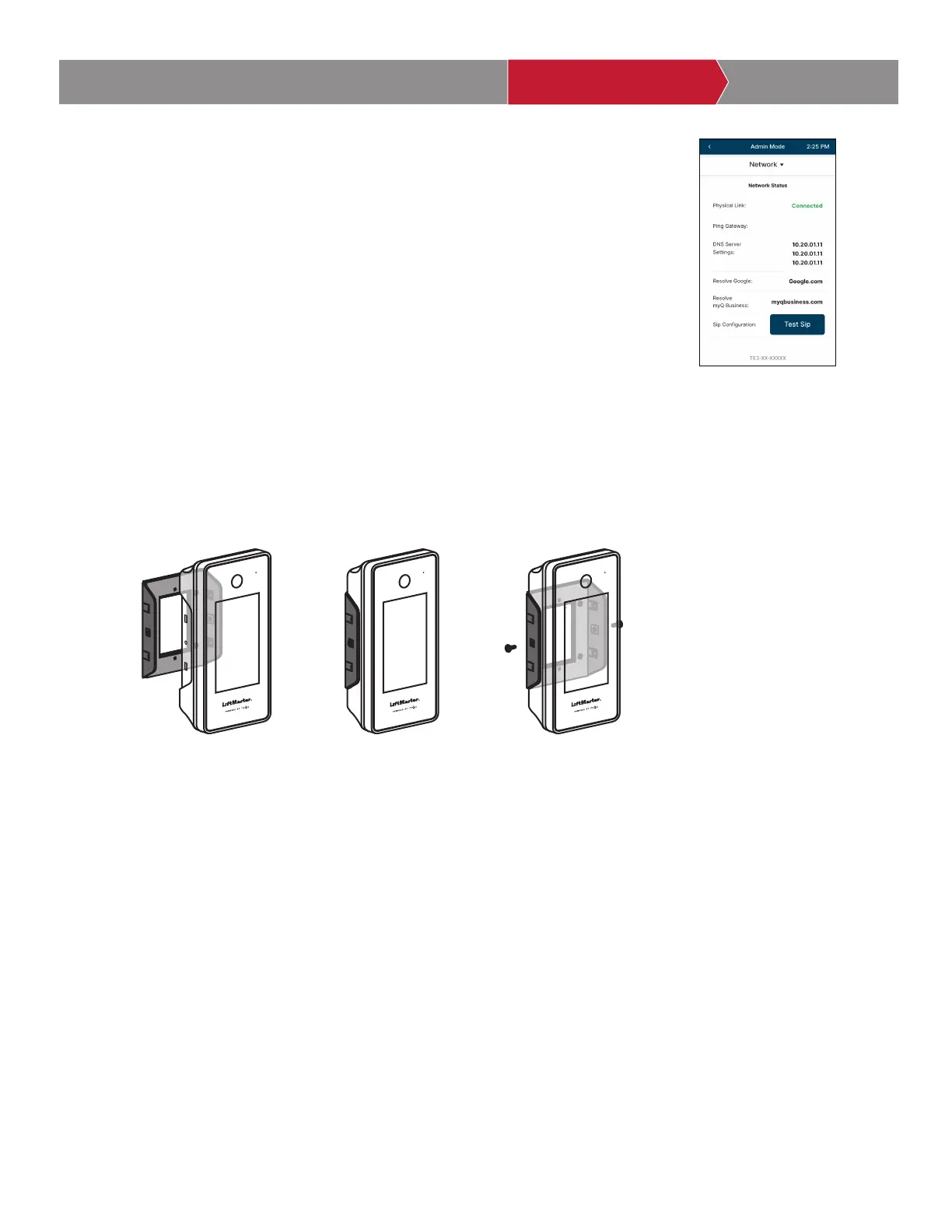
On the display, select each tab in Admin Mode to validate setup (network,
inputs, outputs, etc.). Once you have validated the setup, exit Admin Mode.
Setup CAPXS
4
Insert the CAPXS in the mounting bracket until the unit snaps into
place. Using screws provided, tighten the screws through the side of the
mounting bracket to securely affix the CAPXS to the Mounting Bracket.
Mounting CAPXS
5



 To Next Page