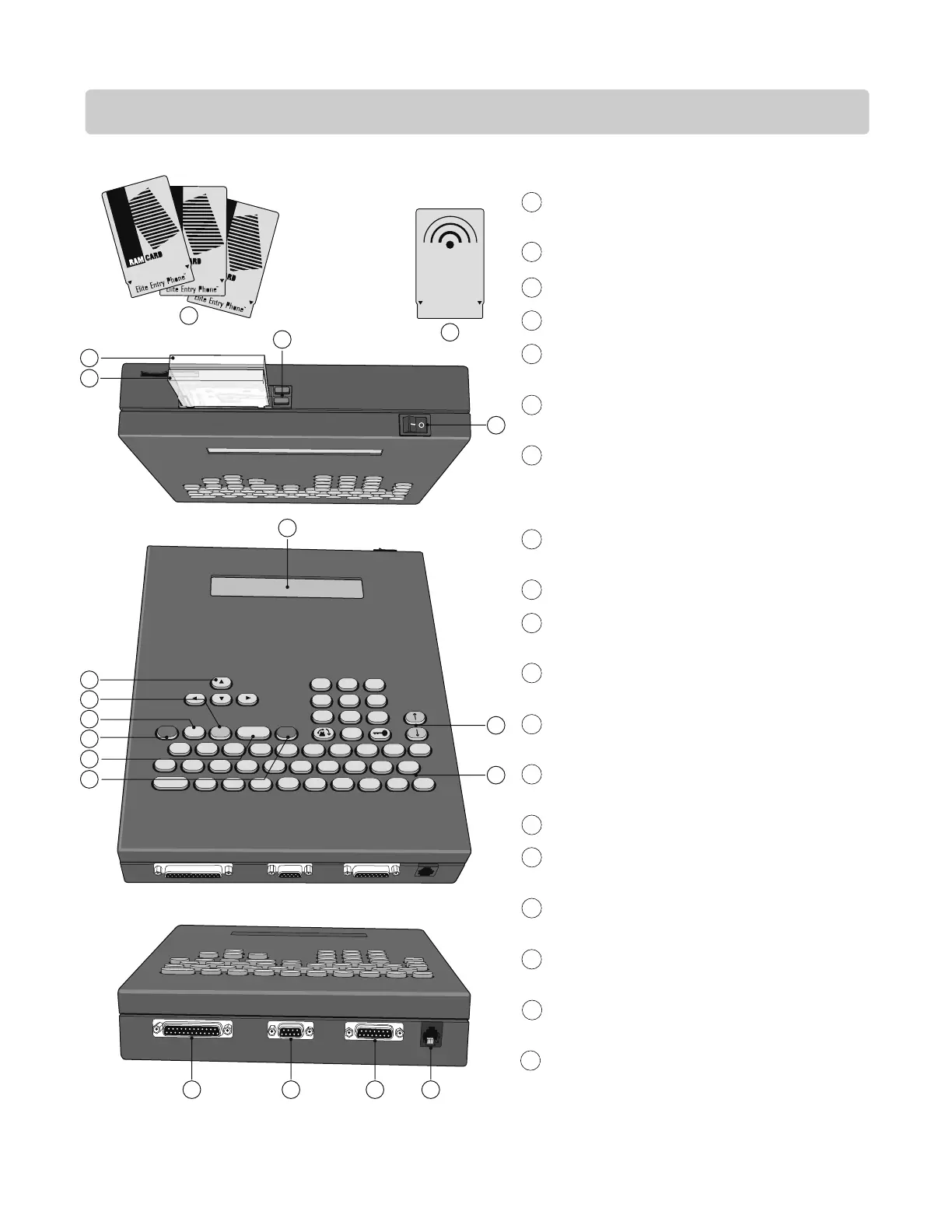
ENTRY PHONE FEATURES (PROCESSOR)
9
LC/VF Page
MEMORY CARD - Stores all programmed information.
(Different memory sizes available)
COMMUNICATOR CARD - Card for RS485 devices.
POWER ON/OFF SWITCH
CARD RELEASE BUTTONS - Eject Cards when pressed.
MAIN MEMORY CARD SLOT - Holds Main Memory
Card.
RS485 MEMORY CARD SLOT - Holds RF Communicator
Card or Backup Memory.
LCD TWO LINE, LARGE LIQUID CRYSTAL DISPLAY OR
VF SUPER BRIGHT VACUUM FLUORESCENT DISPLAY
SCREEN- Displays information and instructions, two
lines at a time.
DIRECTION KEYS - Move cursor to desired position
within screens.
PROGRAM KEY - Sets Processor to the program mode.
EXIT KEY - Press this key to go back to the previous
screen / menu.
ERASE KEY - Erases information screens no longer
needed.
ENTER KEY - Registers information into memory after it
is typed.
HELP KEY - Helps user while in programming or user
modes.
SCROLL KEYS - Scrolls through screens / menus.
KEYBOARD - Works like standard keyboard to type in
information and names.
PHONE JACK (RJ11) - Connects to surge suppressor
terminal board.
INPUT/OUTPUT CONNECTOR - Connects to Surge
Suppressor terminal board.
COMMUNICATION PORT - Connects to surge
suppressor terminal board.
PARALLEL PORT - Used for the Icon26 only.
1
2
3
4
5
6
7
8
9
10
11
12
13
14
15
16
17
18
19
All components and specifications are subject to change without notice.





 To Next Page