6
Wall Mounting
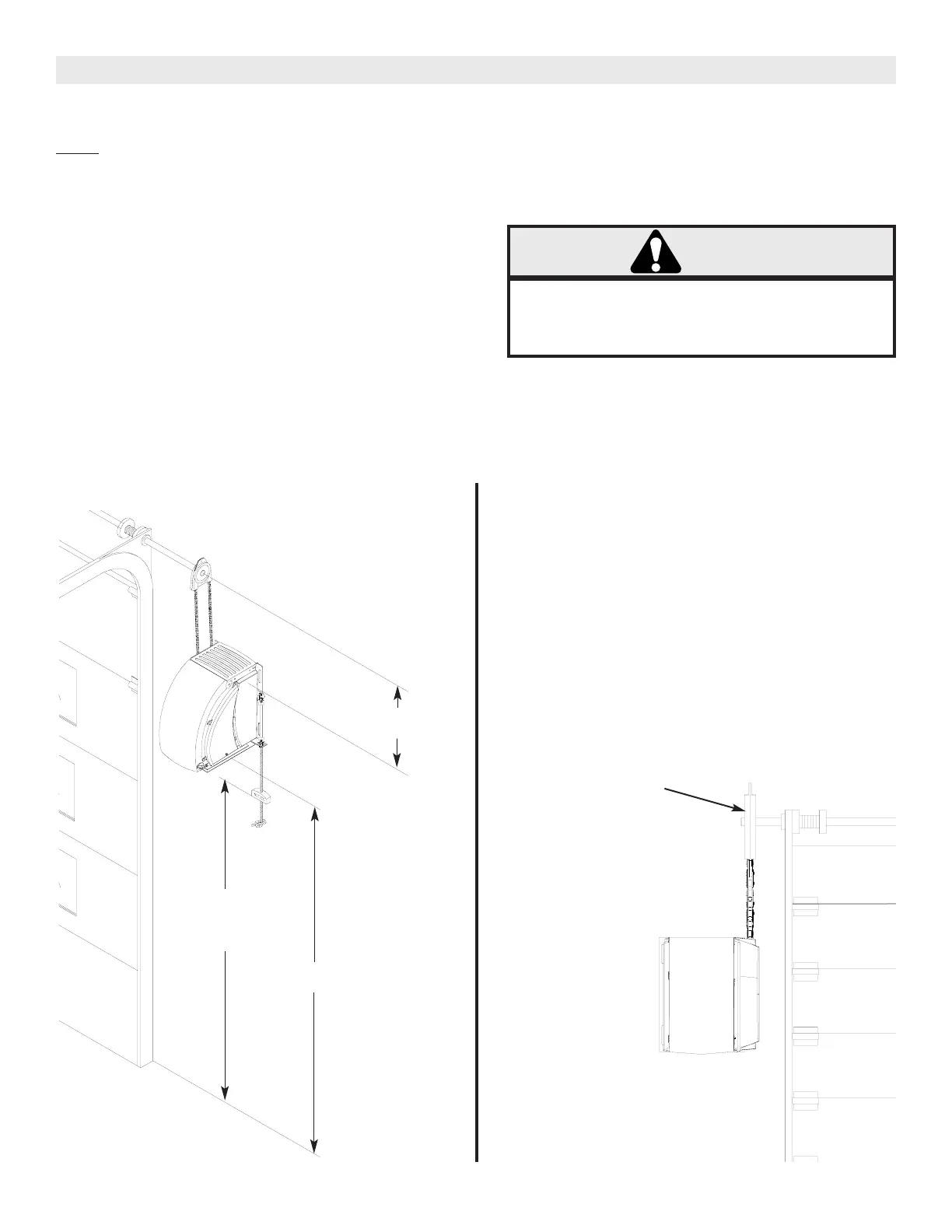
1a. The operator should generally be installed below the
door shaft, and as close to the door as possible. The
optimum distance between the door shaft and
operator drive shaft is between 305-380mm
(12 - 15”). Refer to Figure 2.
1b. Place one half of door sprocket cover, then place
door sprocket on the door shaft. Sprocket is pinned.
1c. Locate door sprocket as close to bearing plate as
possible. Leave clearance for sprocket cover to
rotate freely and chain to be vertical.
Be sure door sprocket is
properly aligned with
drive sprocket before
securing to the shaft.
FIGURE 2
FIGURE 3
OPERATOR MOUNTING
Before your operator is installed, be sure the door has been properly aligned and is working smoothly. The operator must
be wall mounted. Refer to the illustration and instructions below that suits your application.
NOTE
Mounting Hardware: Minimum (4) M8, Grade 5 Bolts.
Electrical Connections: All fittings and conduit connections must meet local electrical code requirements.
OPTIMUM DISTANCE
12-15”
7’ TYP.
6’ Minimum
Disconnect
Handle
6’ TYP.
5’ Minimum
Preparation
1a. The operator powerhead should be raised into its
mounting position by use of a hoist or elevated
platform.
1b. Acceptable lifting points are output shaft or chassis
frame.
1c. Do not lift by electrical enclosure, by lens, plastic
guards, vent, disconnect rope, limit chain, or limit
shaft.
2. The unit should be secured to the lifting apparatus
to prevent it from swaying or dislodging during
installation.
WARNING
To reduce risk of INJURY, the operator powerhead
MUST be raised into its mounting position by use
of a hoist or elevated platform.
3. The unit should be fastened to its mounting surface
with the correct size and grade hardware.
4. All mounting hardware should be securely fastened
before releasing supporting devices.





 To Next Page