35
Having a Problem? (Troubleshooting)
1. My door will not close and the light bulbs blink on
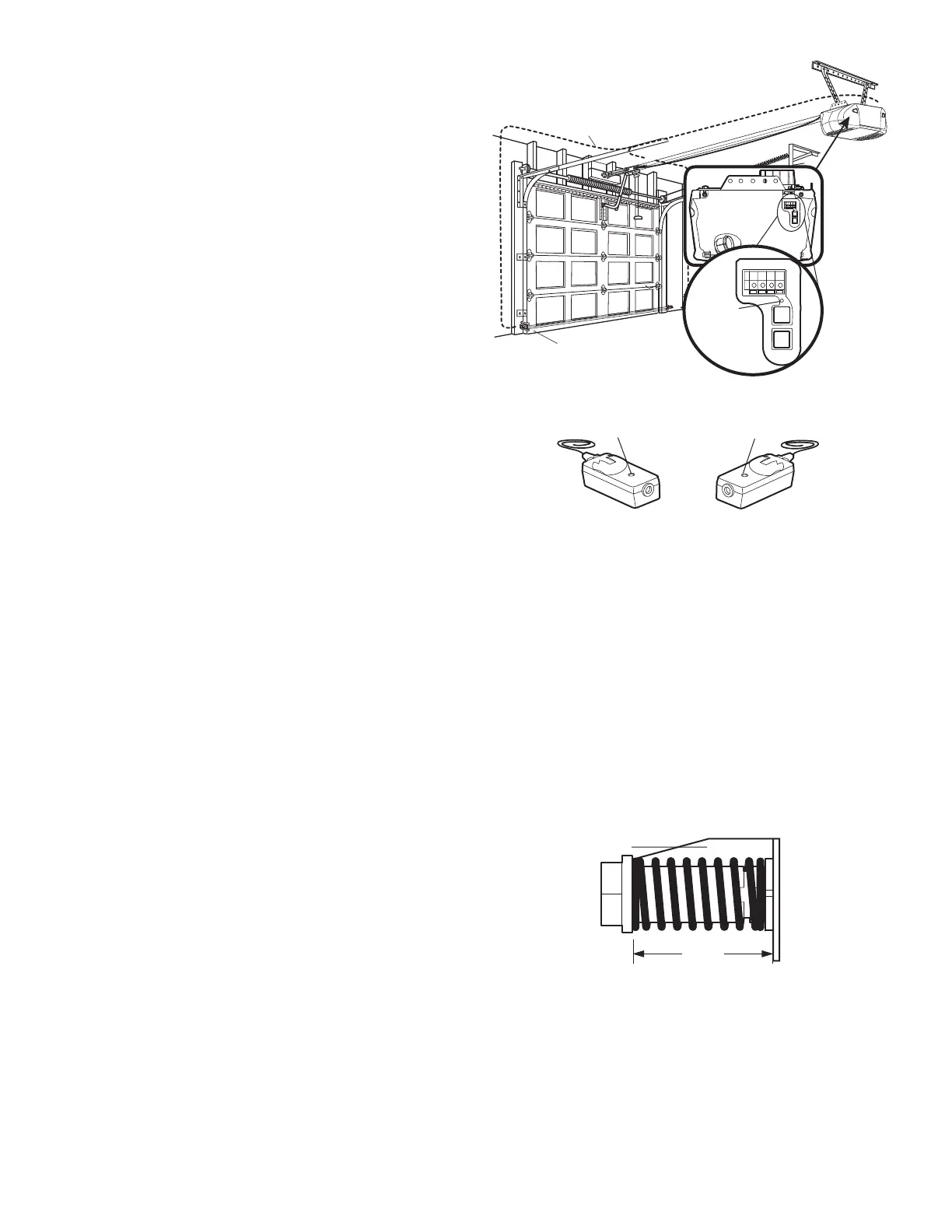
my motor unit: The safety reversing sensor must be
connected and aligned correctly before the garage door
opener will move in the down direction.
• Verify the safety reversing sensors are properly
installed, aligned and free of any obstructions. Refer
to Installation Step 11: Install The Protector System
®
.
• Check diagnostic LED for flashes on the motor unit
then refer to the Diagnostic Chart on the following
page.
2. My remotes will not activate the door:
• Verify your Motion Detecting Control Console is not
blinking. If it is blinking, deactivate the Lock Mode
following the instructions for Using the Wall Mounted
Control Console.
• Reprogram remotes following the programming
instructions. Refer to Programming.
• If remote will still not activate your door, check
diagnostic LED for flashes on motor unit then refer to
Diagnostic Chart on the following page.
3. My door reverses for no apparent reason: Repeat
safety reverse test after adjustments to force or travel
limits. The need for occasional adjustment for the force
and limit settings is normal. Weather conditions in
particular can affect door travel.
• Manually check door for balance or any binding
problems.
• Refer to Adjustment Step 2, Setting the Force.
4. My door reverses for no apparent reason after fully
closing and touching the floor: Repeat safety reverse
test after adjustments to force or travel limits. The need
for occasional adjustment for the force and limit settings
is normal. Weather conditions in particular can affect
door travel.
• Refer to Adjustment Step 1, Program the Travel
Limits.
5. My lights will not turn off when door is open:
• The garage door opener is equipped with a security
light feature. This feature activates the light on when
the safety sensor beam has been obstructed. Refer to
Operation section; Using the Wall Mounted Control
Console, Light Feature.
Receiving Eye
Safety Reversing Sensor
(Green Indicator Light)
Sending Eye Safety
Reversing Sensor
(Amber Indicator Light)
6. My motor unit hums briefly:
• First verify that the trolley is against the stop bolt.
• Release the door from the opener by pulling the
Emergency Release Rope.
• Manually bring the door to a closed position.
• Loosen the belt by adjusting the outer nut 4 to 5 turns.
This relieves the tension.
• Run the motor unit from the remote control or door
control. The trolley should travel towards the door and
stop. If the trolley re-engages with the door, pull the
Emergency Release Rope to disengage.
• Re-Tighten the outer nut until the trolley spring is
approximately 1-1/4" (3.18 cm) in length.
• If the trolley does not move away from the bolt, repeat
the steps above.
7. If battery status LED is not lit properly:
• Check battery connections.
Bell Wire
Safety Reversing Sensor
Diagnostics
Located On
Motor Unit
“Learn”
Button
LED or
Diagnostic
LED



 To Next Page