39
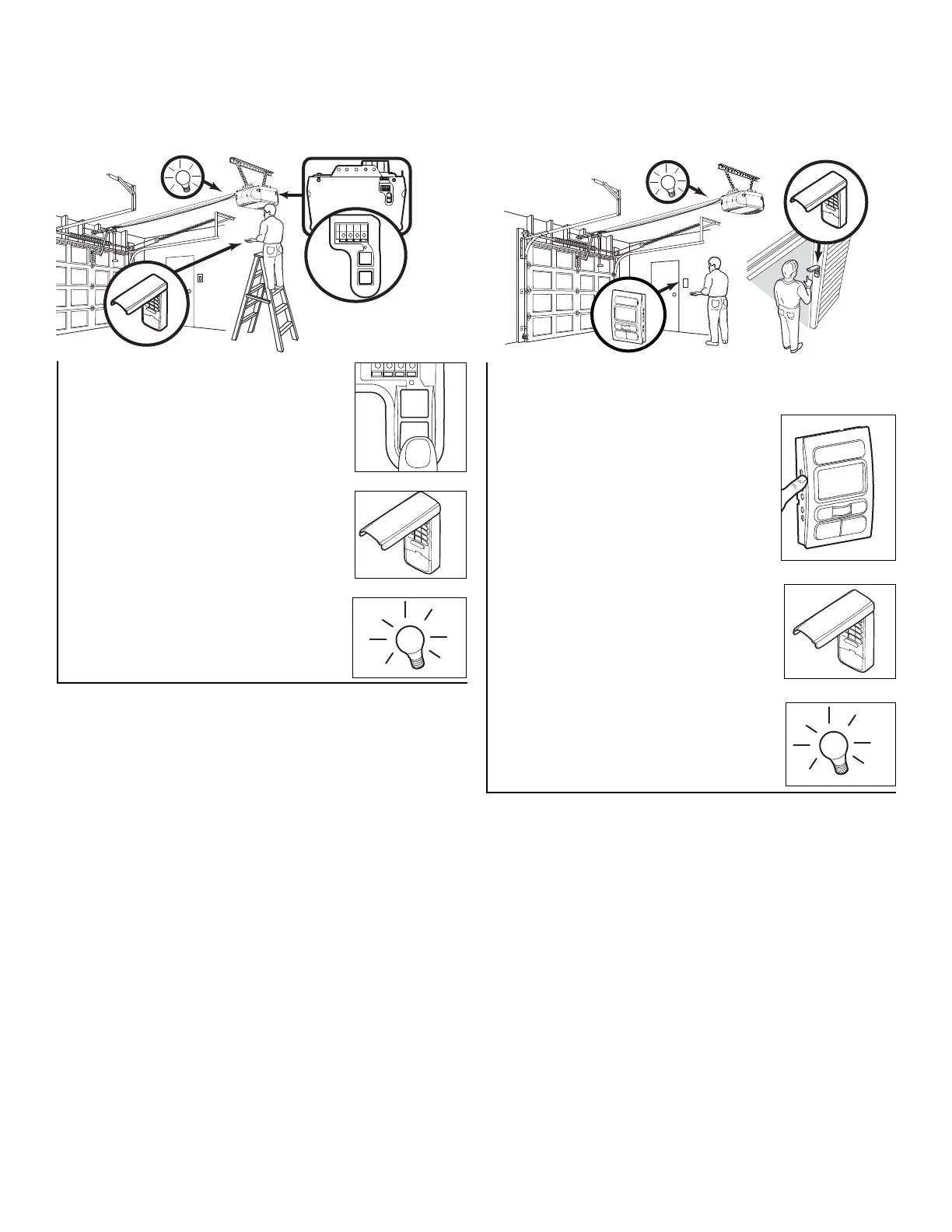
1. Press the Prog <Learn> button on the
Motion Detecting Control Console.
2. Press the Prog <Learn> button again
to confirm Learn Mode.
3. Enter a four digit personal identification
number (PIN) of your choice on the
keypad. Then press ENTER.
4. When the motor unit lights blink, it has
learned the code. If light bulbs are not
installed, two clicks will be heard.
1. Press and release the “learn” button on
motor unit. The learn indicator light will
glow steadily for 30 seconds.
2. Within 30 seconds, enter a four digit
personal identification number (PIN) of
your choice on the keypad. Then press
and hold the ENTER button.
3. Release the button when the motor unit
lights blink. It has learned the code. If
light bulbs are not installed, two clicks
will be heard.
To Add, Reprogram or Change a Keyless Entry PIN
NOTE: Your new Keyless Entry must be programmed to operate your garage door opener.
USING THE “LEARN” BUTTON USING THE SMART CONTROL PANEL™
NOTE: This method requires two people if the Keyless
Entry is already mounted outside the garage.
To change an existing, known PIN
If the existing PIN is known, it may be changed by one
person without using a ladder.
1. Press the four buttons for the present PIN, then press and
hold the # button.
The opener light will blink twice. Release the # button.
2. Press the new 4-digit PIN you have chosen, then
press ENTER.
The motor unit lights will blink once when the PIN has been
learned.
Test by pressing the new PIN, then press ENTER. The door
should move.
To set a temporary PIN
You may authorize access by visitors or service people with a
temporary 4-digit PIN. After a programmed number of hours
or number of accesses, this temporary PIN expires and will
no longer open the door. It can be used to close the door
even after it has expired. To set a temporary PIN:
1. Press the four buttons for your personal entry PIN (not the
last temporary PIN), then press and hold the ✽ button.
The opener light will blink three times. Release the button.
2. Press the temporary 4-digit PIN you have chosen, then
press ENTER.
The opener light will blink four times.
3. To set the number of hours this temporary PIN will work,
press the number of hours (up to 255), then press ✽.
OR
3. To set the number of times this temporary PIN will work,
press the number of times (up to 255), then press #.
The opener light will blink once when the temporary PIN has
been learned.
Test by pressing the four buttons for the temporary PIN, then
press ENTER. The door should move. If the temporary PIN
was set to a certain number of openings, remember that the
test has used up one opening. To clear the temporary
password, repeat steps 1-3, setting the number of hours or
times to 0 in step 3.
One Button Close: Opener can be closed by pressing only the ENTER button if the one button close feature has been
activated. This feature has been activated at the factory. To activate or deactivate this feature press and hold buttons
1 and 9 for 10 seconds. The keypad will blink twice when the one button close is active. The keypad will blink four times
when one button close is deactivated.



 To Next Page