18
INSTALLATION STEP 8
Install the Lights
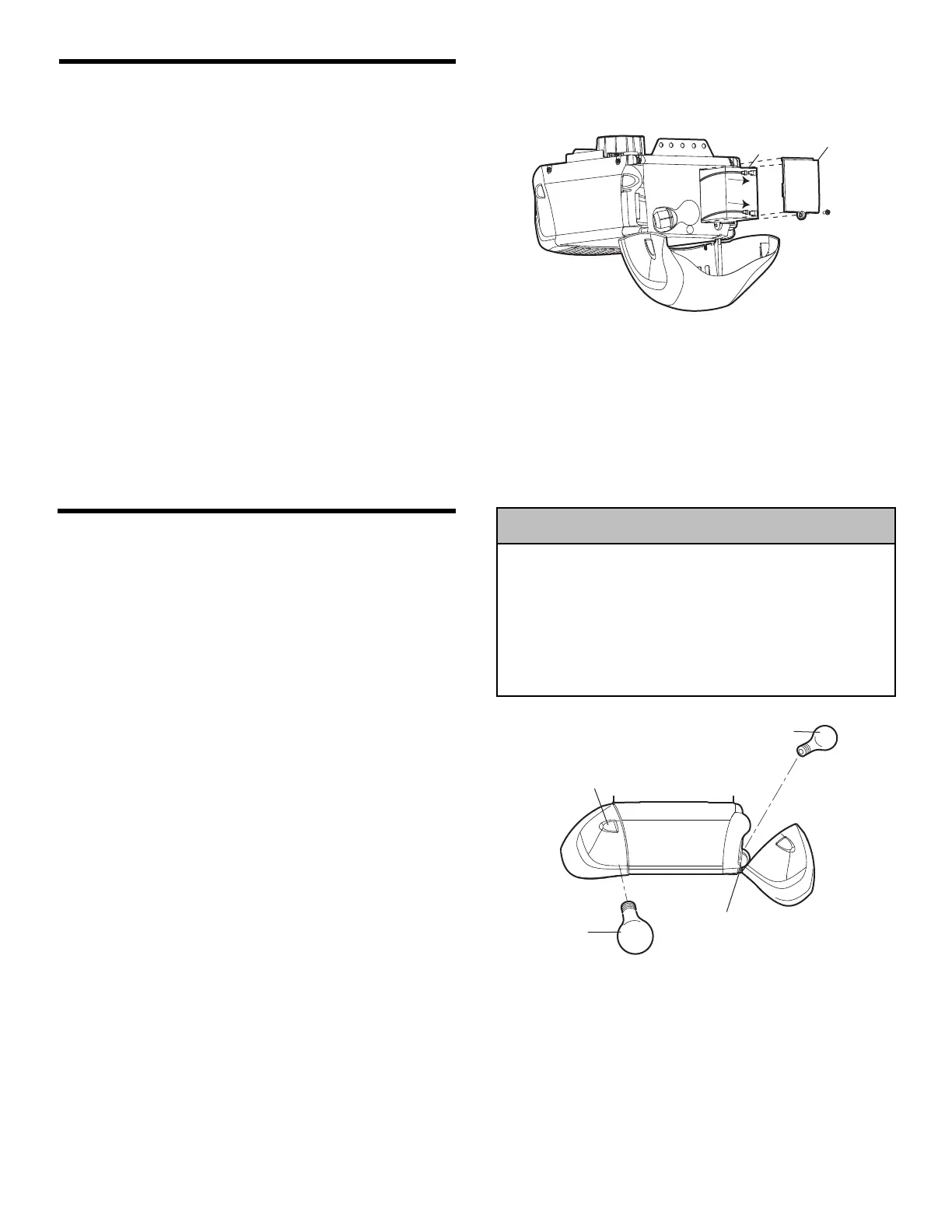
• Press the release tabs on both sides of lens. Gently
rotate lens back and downward until the lens hinge is
in the fully open position. Do not remove the lens.
• Install up to a 100 watt maximum light bulb in each
socket. Light bulb size should be A19, standard neck
only. The lights will turn ON and remain lit for
approximately 4-1/2 minutes when power is connected.
Then the lights will turn OFF.
• Reverse the procedure to close the lens.
• Use A19, standard neck garage door opener bulbs for
replacement.
NOTE: Use only standard light bulbs. The use of short
neck or speciality light bulbs may overheat the endpanel
or light socket.
To prevent possible OVERHEATING of the endpanel or light
socket:
• DO NOT use short neck or specialty light bulbs.
• DO NOT use halogen bulbs. Use ONLY incandescent.
To prevent damage to the opener:
• DO NOT use bulbs larger than 100W.
• ONLY use A19 size bulbs.
INSTALLATION STEP 7
Install the Battery Backup
• Make sure motor unit is unplugged.
• Using a Phillips head screwdriver, remove the battery
cover on the motor unit.
• Partially insert battery into motor unit with terminals
facing out.
• Connect the red (+) and black (-) wires from motor
unit to corresponding terminals on battery.
• Replace battery cover.



 To Next Page