Regeneration Cycle Step Programming
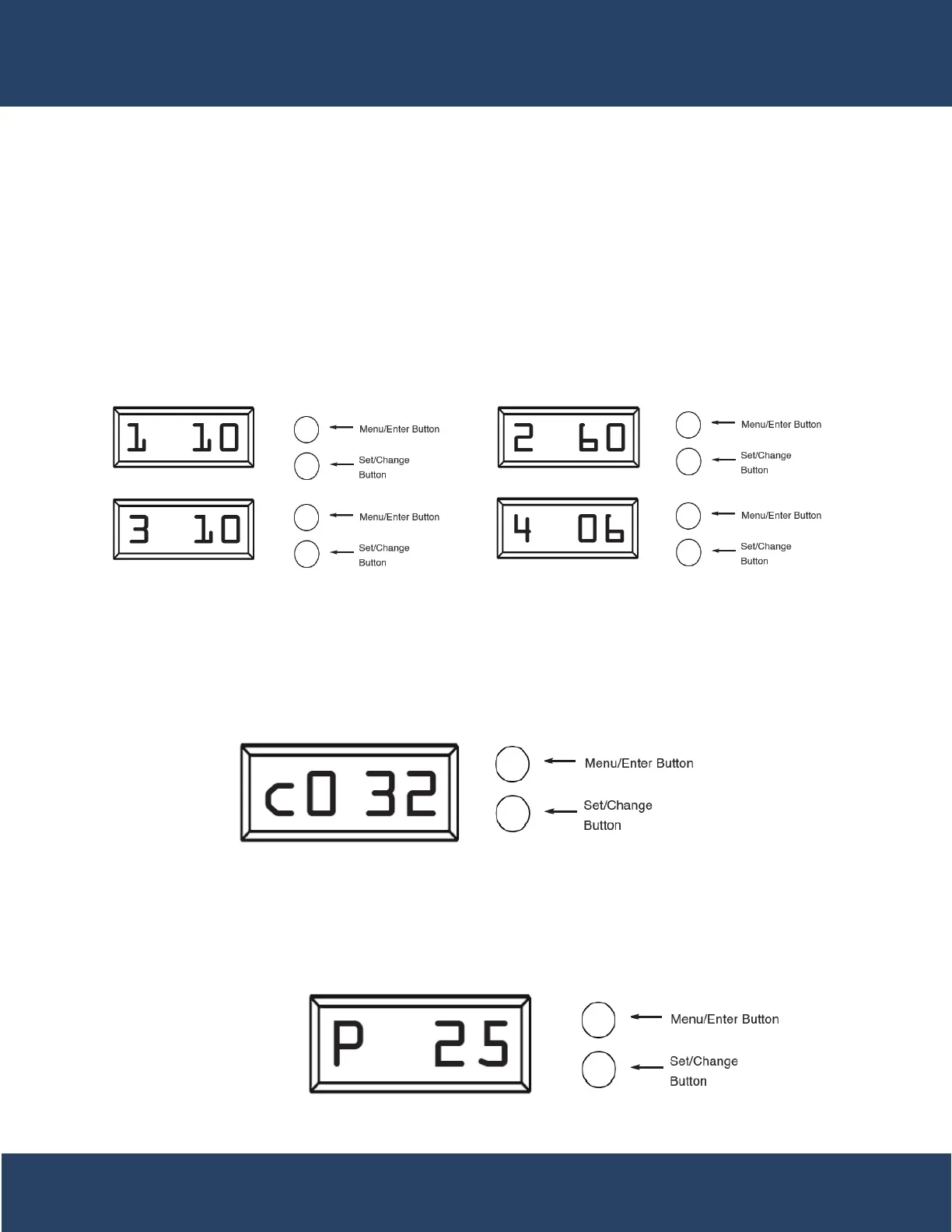
Press the Menu/Enter Button. The next 4 displays viewed are part of a series of ption settings used to
program the Regeneration Cycle. Each display is used to set the duration time in minutes for that specif-
ic step in a regeneration cycle. A step # will turn on for the regeneration cycle step being programmed.
Regeneration steps are skipped by setting the display to 0.
Examples: Regeneration Cycle Step #1 - 10 minutes - [ 1 - 10 ] (Factory Setting)
Regeneration Cycle Step #2 - skipped - [ 2 - - 0 ]
* All units are preprogrammed for full salting at factory
System Capacity in Grains (c)
Press the Menu/Enter button. This display is used to set the system capacity in grains and is used in conjunction
with the hardness setting to calculate total gallons of treated water available between regenerations. The maxi-
mum value for this item is 399.
Example: 32,000 grain capacity [ c 0 3 2 ]
System Reserve Capacity in % (P)
Press the Menu/Enter button. This display is used to set the system reserve capacity in percent and is used in
conjunction with the hardness and capacity setting to calculate total gallons of treated water available between
regenerations. This setting gives a buffer of treated water in case the system runs out of soft water hours before
he next regeneration time
Example: 25% [ P 2 5 ]
21


 To Next Page