This document serves as a quick start guide for the Char-Broil EVOLVE gas grill, model number 2465999. It provides instructions and features in multiple languages, including English, French, German, Italian, Swedish, Spanish, Danish, Norwegian, Slovak, Czech, Hungarian, and Slovenian.
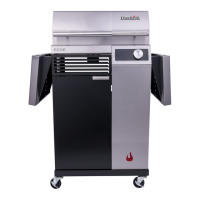
The Char-Broil EVOLVE grill is a modern gas grill designed for outdoor cooking, featuring advanced electronic controls and smart functionalities. It is equipped with two independent temperature zones, allowing users to cook different foods at varying temperatures simultaneously.
Function Description:
The grill's primary function is to cook food using gas as a fuel source. It offers precise temperature control for each cooking zone, enhancing versatility for various grilling tasks. Key functionalities include:
- Power ON/OFF: The grill is turned on by pressing the power button for three seconds. The display will show "ON" for both zones, indicating that the grill is ready for operation. To turn off, press the power button again for three seconds.
- Temperature Setting: Users can set the desired temperature for each zone independently. The display shows the current temperature and the set temperature. The control knob is used to adjust the temperature, and the light ring around the knob pulsates during adjustment and becomes solid once the target temperature is reached. The display alternates between the current and desired temperatures, with "Set" and "Act" (Actual) indicators.
- Temperature Units: The grill supports both Celsius (°C) and Fahrenheit (°F) temperature units. Users can switch between these units by pressing the "Timer" and "AutoClean" buttons simultaneously while the controller is ON.
- Separate Zones: The grill features two distinct cooking zones. To set individual temperatures for each zone, users press the grill symbol above the temperature display for the selected zone. This allows for precise temperature management for different types of food.
- Synchronize Zones: For cooking tasks requiring uniform temperature across both zones, the "Synchronize Zones" feature allows users to synchronize the zones. To do this, rotate the control knob to the desired temperature and press the knob to confirm. This will set both zones to the same temperature.
- Turning Zones ON and OFF: A long press on a grill symbol switches the respective zone off completely. To switch it back on, press the symbol until it lights up again.
- Timer Function: The grill includes a stopwatch timer that can be activated by pressing the timer symbol. The display will show "00:00". The rotary knob is used to set the time in 30-second increments and confirm by pressing the knob. This is useful for monitoring cooking durations.
- Core Temperature Monitoring: The grill is equipped with LED displays for food temperature sensors, located on the left side of the grill. These LEDs show the temperatures as soon as they are connected to the grill, allowing users to monitor the internal temperature of their food.
Usage Features:
- Electronic Controls: The grill utilizes an intuitive electronic display and control knob for all settings, making it user-friendly.
- Independent Zone Control: The ability to set different temperatures for each zone provides flexibility for cooking various items simultaneously, such as searing steaks on one side and gently cooking vegetables on the other.
- Temperature Readout: Clear digital displays show both the set and actual temperatures, ensuring precise cooking.
- Visual Feedback: The pulsating light ring around the control knob provides visual feedback during temperature adjustment, and the "Set" and "Act" indicators on the display help users understand the current state of the temperature.
- Multi-language Support: The quick start guide is available in multiple languages, catering to a diverse user base.
Maintenance Features:
- AutoClean Function: The grill includes an "AutoClean" feature for easy maintenance. With the lid closed, pressing the AutoClean symbol for two seconds will activate the cleaning cycle. The light ring will illuminate, and the EVOLVE grill will automatically switch off once the program is completed. To interrupt the process, press the AutoClean symbol for two seconds, and the EVOLVE grill will return to the last setting. This feature simplifies the cleaning process, helping to maintain the grill's performance and longevity.
- Error Codes: The manual mentions that all error codes are explained in the interactive assembly instructions. For customer service inquiries, users are directed to charbroil.co.uk/contact-us. This indicates a system for diagnosing and addressing potential issues, contributing to easier maintenance and troubleshooting.
Important Technical Specifications (inferred from the manual):
- Model Number: 2465999
- Power Source: Gas (as indicated by "gas grill" references).
- Temperature Range: Not explicitly stated, but the display shows temperatures up to 315°C (600°F equivalent), suggesting a wide range suitable for various cooking methods.
- Display: Digital LED display for temperature, timer, and status indicators.
- Control Interface: Rotary knob with integrated push function and touch-sensitive grill symbols for zone control.
- Sensors: Food temperature sensors with LED indicators.
- Cleaning: Automatic cleaning cycle (AutoClean).
The Char-Broil EVOLVE grill is designed to offer a sophisticated and convenient grilling experience with its advanced controls, dual-zone cooking capabilities, and user-friendly maintenance features.

 Need help?
 General


 To Next Page