QUICK START
CHARBROIL.EU2
GB
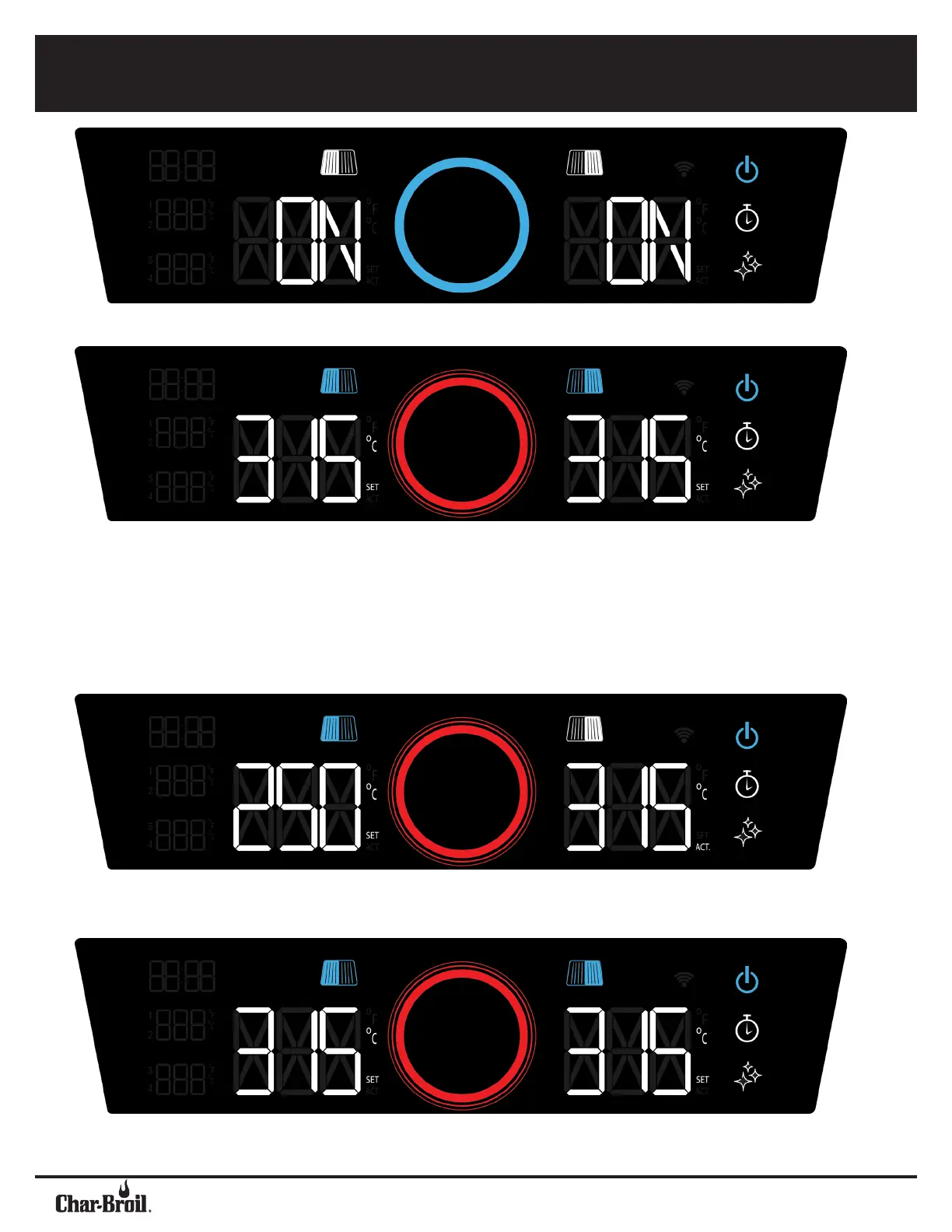
POWER ON / OFF
Press the power button to turn the grill on. Press and hold the power button for three seconds to turn the grill off.
SYNCHRONIZE
ZONES
To synchronize the zones again, rotate the control knob to desired temperature and press the knob to conrm.
SET
TEMPERATURE
Both temperature zones are initially synchronized. Move the control knob clockwise to set a higher
temperature. Press the knob and wait until the light ring stops pulsating, indicating target temperature is
reached.. The display alternates between the current and the desired temperature, "Set" and "Act'' ash.
Turning counterclockwise decreases the temperature.
SEPARATE
ZONES
To set the zones individually, press the grill symbol above the temperature display on the selected side.
This allows the temperature to be set for the selected zone.
TEMPERATURE
UNITS
To convert temperature units, press the timer and AutoClean buttons together while the controller is ON.



 To Next Page