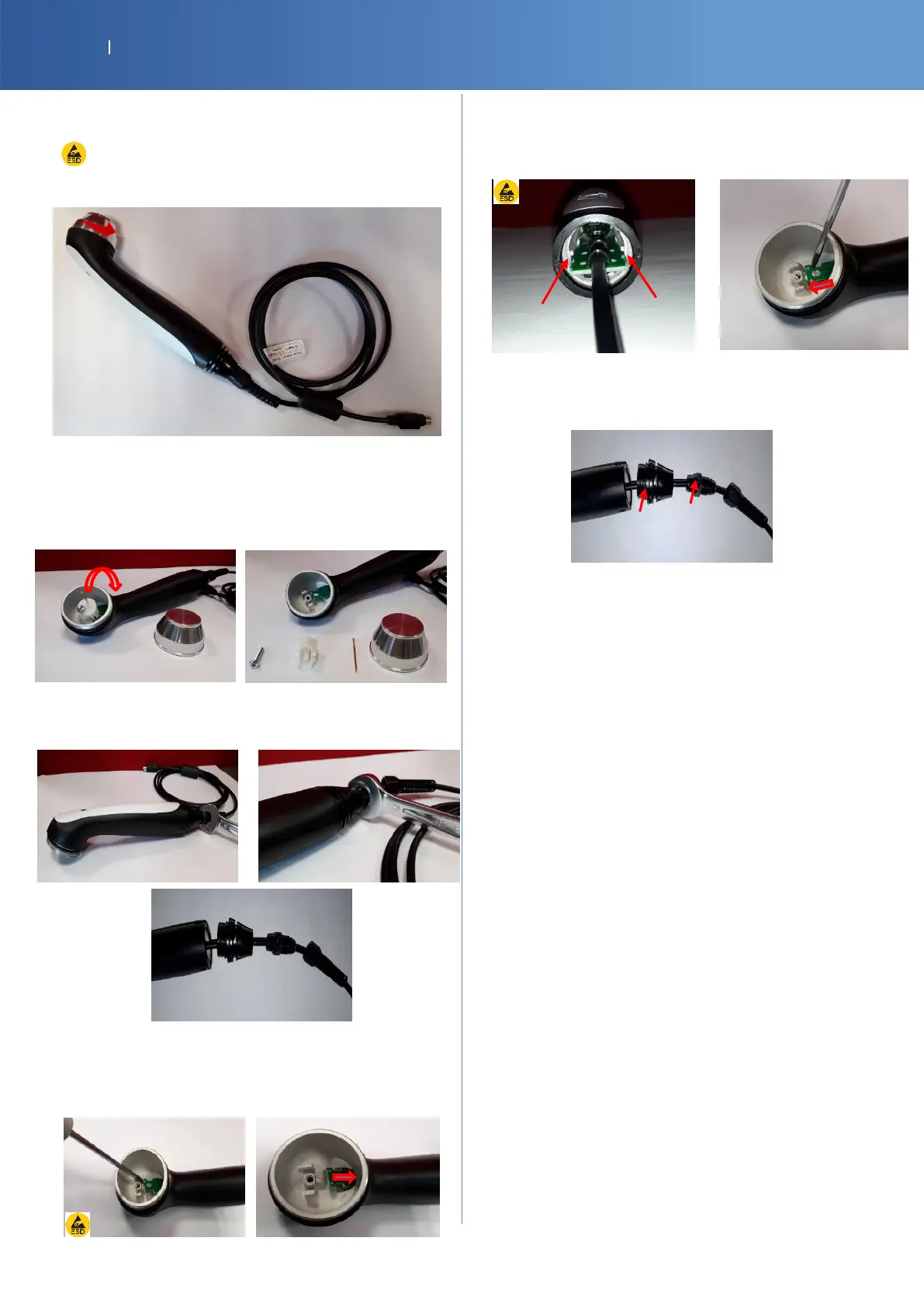
7.7. US APPLICATOR
ESD equipment is required to touch the PCBA
Unscrew the transducer
Take the contact spring out and
Unscrew the support (screw driver PH1)
14-1085-SP G16 US APPLICATOR INTERNAL PROBE SPRING x5
27040-SP1 G16 US APPLICATOR INTERNAL PROBE HOLDER x5
27138-SP SCREW M3X16MM PAN HD PHIL PLT x5
Unscrew the strain relief (2 parts) and the adaptator
screwed on the grip with a wrench size 15
With a flat screwdriver push a little bit the board inside the
grip and then pull gently on cable to remove the complete
assembly (cable + PCB)
27039-SP1 GRIP OVERMOLD ASSY 10CM BLACK
REASSEMBLY
Insert the PCB inside the grip in the rails and push the
board to the end
Screw the plastic part to the grip and check if the 2 O-
rings stay in right position
Reminder
The US Applicator was calibrated during the
manufacturing process and doesn't need calibration
during the product life.
But after the replacement of some parts of the
applicator implies a calibration. Refer to P28 for
more information.
The calibration must be performed only by a repair
center trained and equipped with a US power meter
.
A measurement of power is obligatory after repair
(Final Test)














 To Next Page