| Intelect
®
Mobile 2 - Service Manual 61
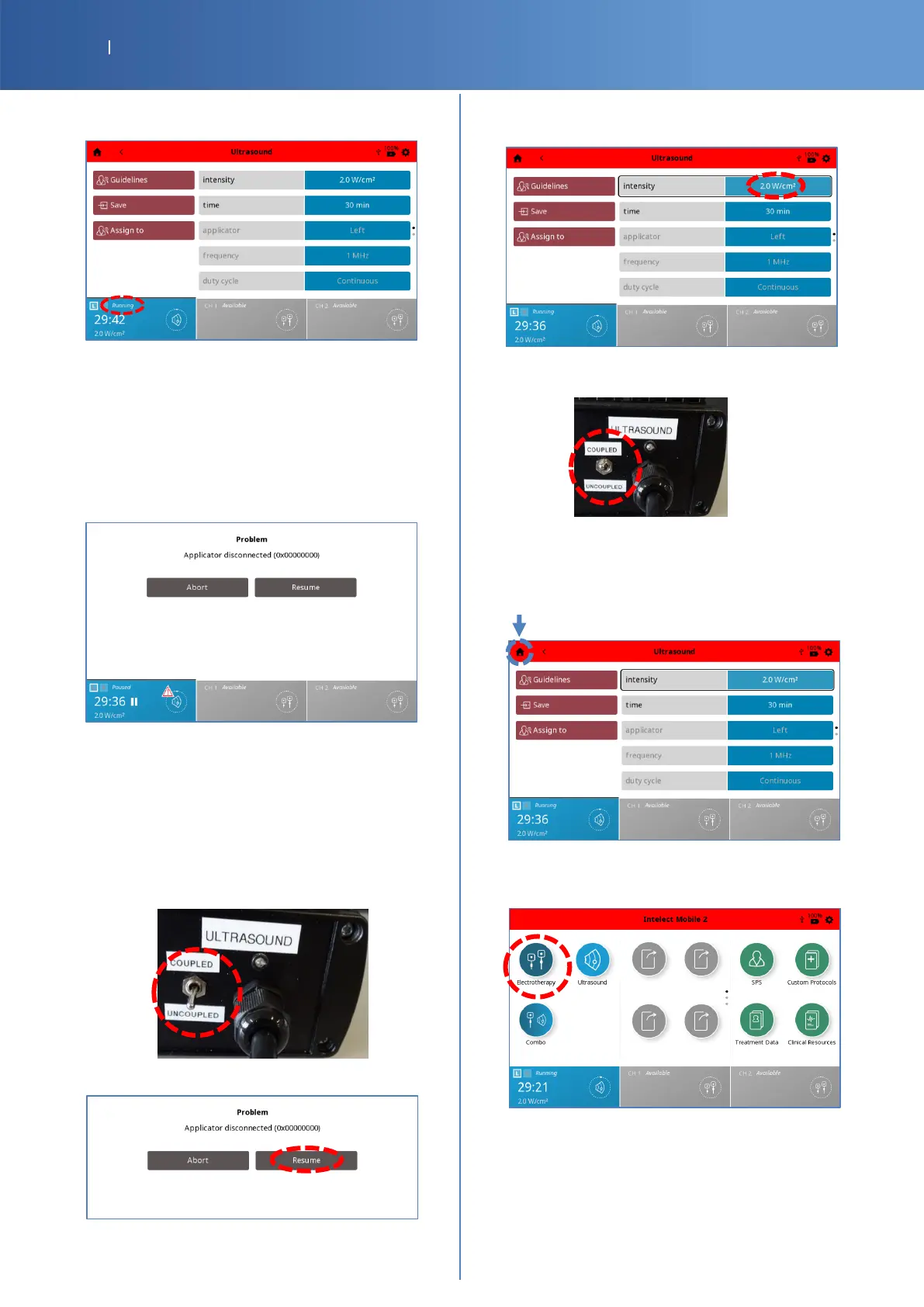
• You should have the Ultrasound status channel
“Running”.
• Let the program “Running” for 15 seconds and
verify that there is not pause or any popped error.
• Check Pass/Fail the tracker sheet §4 if the
program runs without problem.
Simulation of applicator disconnection
• Remove the Ultrasound connector from the device,
the advice “Applicator disconnected
(0x00000000)” is displayed.
• Check Pass/Fail the tracker sheet §5 if “Applicator
disconnected (0x00000000)” is displayed.
Resumption of the Ultrasound program
• Put back the Left Ultrasound connector into the
device.
• Set the G16 Test Load switch ULTRASOUND to
“UNCOUPLED”.
• Press “Resume” button.
• Select the field intensity and increase again with
the knob until 2.0 W/Cm2.
• Set the G16 Test Load switch ULTRASOUND to
“COUPLED”.
• Check Pass/Fail the tracker sheet §6 if the test is
resumed.
• Press “Home“ logo to return to home menu.
Electrotherapy and User Interface
• Press the “Electrotherapy” icon.














 To Next Page