| Intelect
®
Mobile 2 - Service Manual 63
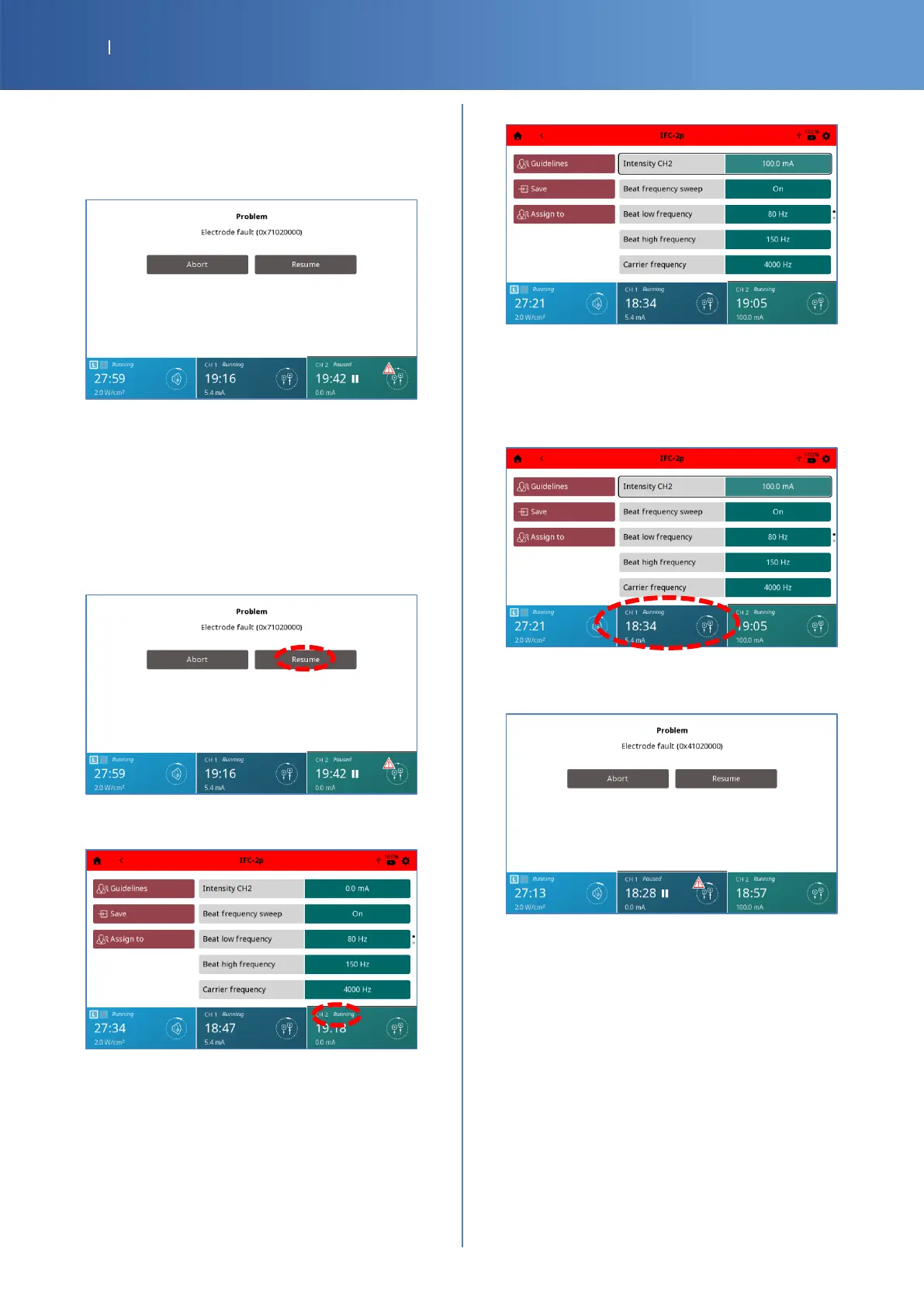
Simulation of Electrode fault on CH2
• Remove the Electrotherapy connector 2 from the
device, an advice is displayed indicating
“Electrode fault (0x71020000)”.
• Check Pass/Fail the tracker sheet §8 if “Electrode
fault (0x71020000)” is displayed.
Resumption of the Electrotherapy program on
CH2
• Put back the Electrotherapy connector 2 into the
device.
• Press “Resume”.
• You should have the CH2 status channel
“Running”.
• Increase again the intensity with the knob until
the maximum, 100 mA.
• Check Pass/Fail the tracker sheet §9 if the
program is resumed on CH2.
Simulation of Electrode fault on CH1
• Select CH1
• Remove the Electrotherapy connector 1 from the
device, an advice is displayed indicating
“Electrode fault (0x41020000)”.
• Check Pass/Fail the tracker sheet §10 if
“Electrode fault (0x41020000)” is displayed.














 To Next Page