| Intelect
®
Mobile 2 - Service Manual 64
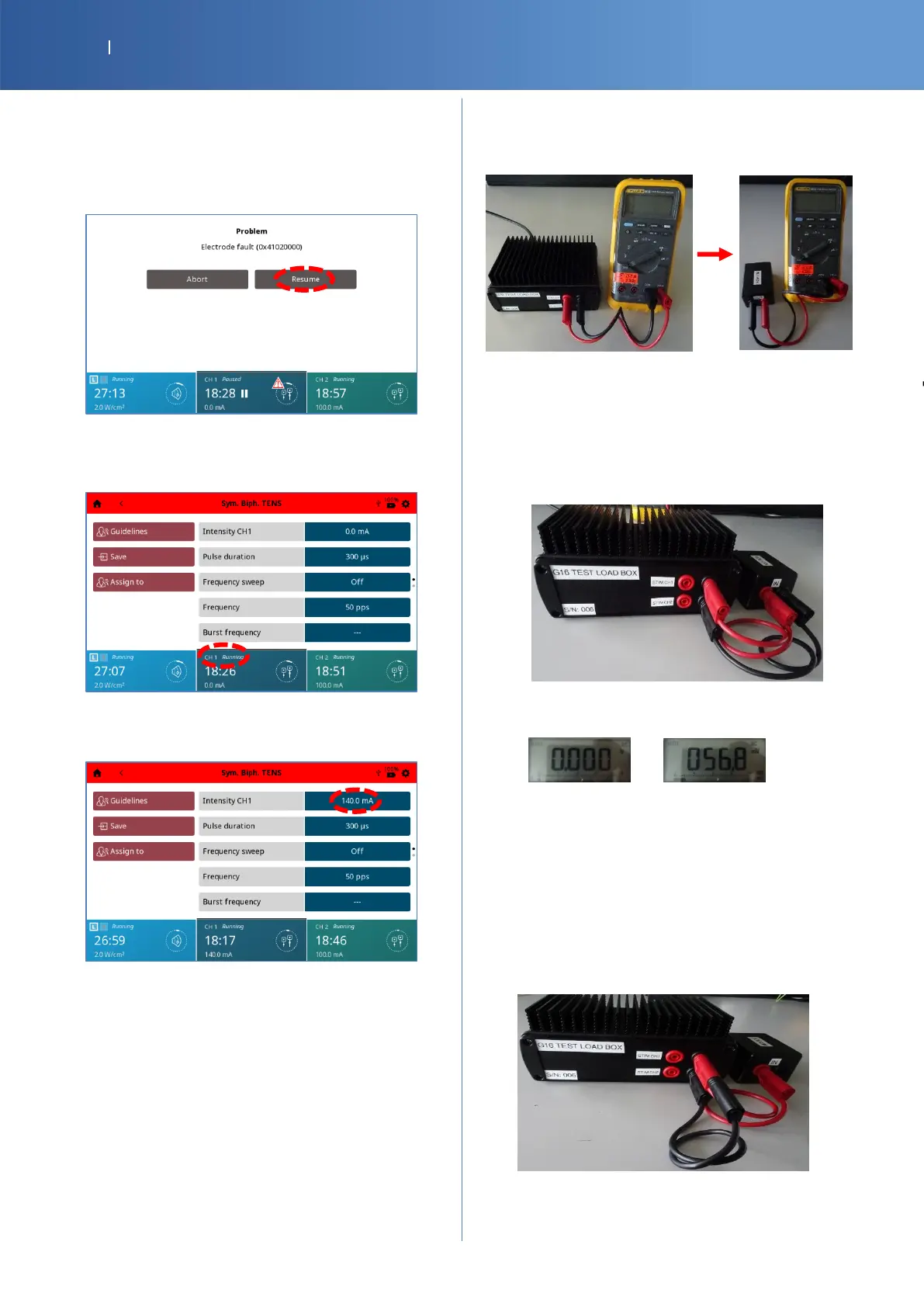
Resumption of the Electrotherapy program on
CH1
• Put back the Electrotherapy connector 2 into the
device.
• Press Resume.
• You should have the CH1 status channel
“Running”.
• Increase again the intensity with the knob until
the maximum, 140 mA.
• Check Pass/Fail the tracker sheet §11 if the
program is resumed on CH1.
Auxiliary Leakage current
• Remove the red and black cables on the G16 Test
Load and put it on the OUT of MD BOX.
• Connect a red Banana cable between the black
connector of STIM CH1 (G16 Test Load) and the
red connector of IN (MD box).
• Connect a black Banana cable between the black
connector of STIM CH2 (G16 Test Load) and the
black connector of IN (MD box)
• Set the multimeter to V DC and V AC, then read
the values after stabilization.
Value of V DC Value of V AC
• Check Pass/Fail the tracker sheet §12 , if the
values are less than the reference
Total patient leakage
• Remove the black connector of IN (MD Box).
Then, connect it over the red banana cable,
connected to the black connector of STIM CH1
(G16 Test Load).
• Connect the banana connector of the “Banana
wall plug” to the black connector IN (MD box).














 To Next Page