12
ILS Command User Manual Rev. 1
Operation
Configuration (ILS)
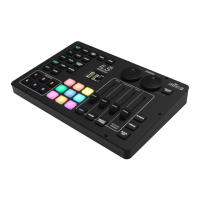
The ILS Command controls each connected effect via ILS instructions configured by the control panel.
Master Controls
The master controls affect all connected products and effects.
Automatic or Sound-Activated Mode
To set the operating mode to automatic, press <AUTO>. Upon activation or cycling through options, the
default mode for each effect type becomes AUTO.
• Control the automatic program speed by adjusting the <SPEED> fader directly above the <AUTO>
button, from 0–99.
To set the operating mode to sound-activated, press <SOUND>. Upon activation or cycling through
options, the default mode for each effect type becomes SOUND.
• Control the sound sensitivity by adjusting the <SENSITIVITY> fader directly above the <SOUND>
button, from 0–99.
Master Strobe
The <MASTER STROBE> button can trigger momentary strobing of all effects while pressed, or toggle
strobing on and off. To select which one, see Strobe Mode
.
• Control the master strobe speed by adjusting the <SPEED> fader directly above the <MASTER
STROBE> button, from 0–255.
Master Dimmer
Control the brightness of all connected effects by adjusting the <MASTER DIMMER> fader, from 0–255.
Blinder
The blinder effect sets all effects to white at full output.
•The <BLINDER> button can momentarily trigger the blinder effect while pressed, or toggle the
blinder effect on and off. To select which one, see Blinder Mode
.
Freeze
The <FREEZE> button freezes all output on the current look until it is pressed again.
Blackout
The <BLACK OUT> button blacks out all connected products until it is pressed again.
Color Override
The unlabeled color override buttons can be identified by the color of each button’s back light.
• Pressing a color override button sets all connected effects to the selected color.
• Press the currently selected color override button to disable color override.
• When programming Follow Spot Mode
, use the <Amber>, <Green>, <Cyan>, and <White> buttons
to select which parameter to configure.
The ILS Command will only respond to low frequencies of music (bass and drums).






 To Next Page