EasyManua.ls Logo

Check Point 2200 - 2200 Appliance Hardware; 2200 Appliance Front Panel

Check Point 2200
33 pages
Print Icon
To Next Page IconTo Next Page
To Previous Page IconTo Previous Page
Loading...
Check Point 2200 Appliance Getting Started Guide | 25
Chapter 3
2200 Appliance Hardware
In This Chapter
2200 Appliance Front Panel 25
Rear Panel Components 26
Optional Rack Mounting 26
This chapter describes the hardware components on the 2200 Appliance.
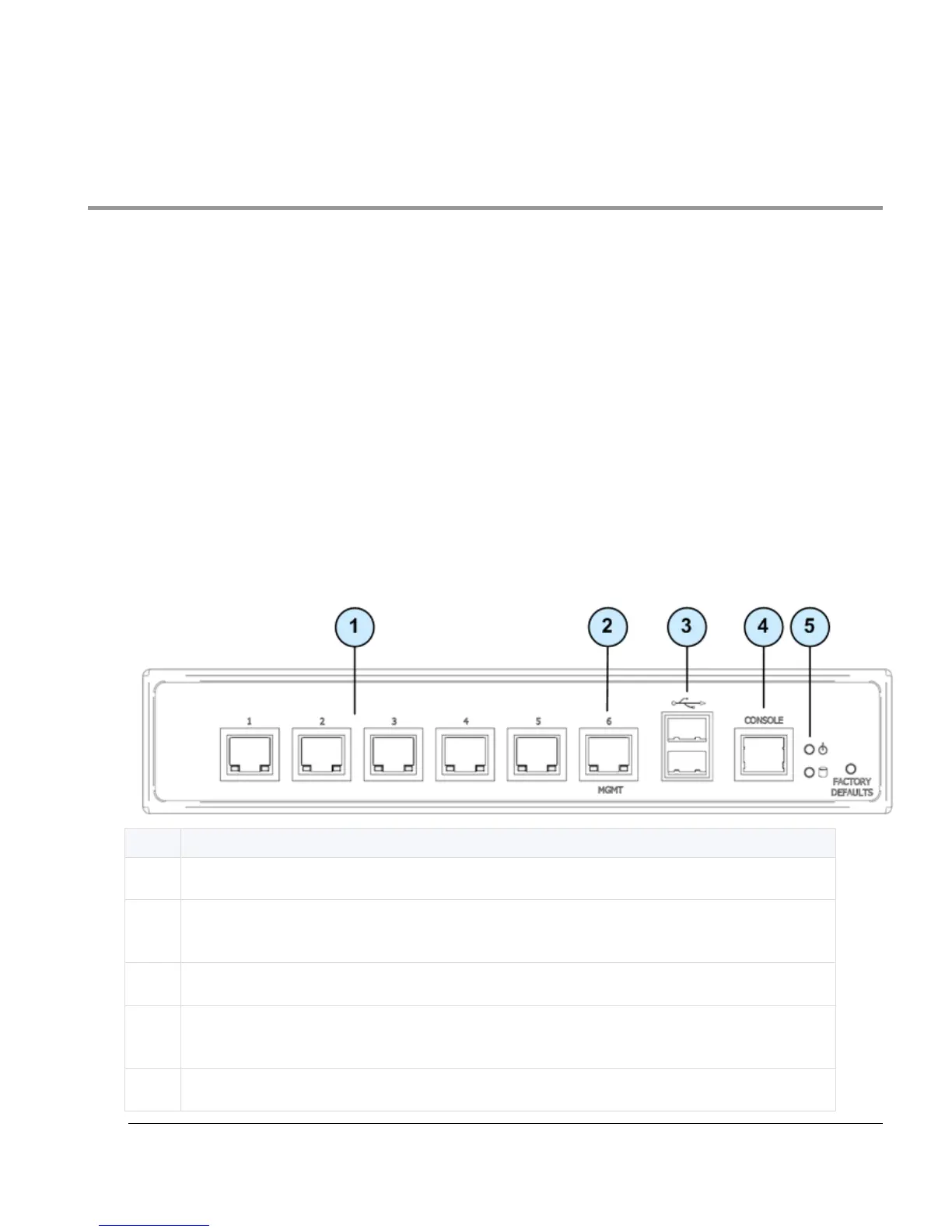
2200 Appliance Front Panel
This section describes the features and components located on the appliance front panel.
Item
Description
1
Built in Ethernet ports (ETH1 - ETH5)
2
Management configuration port - Ethernet connection to a remote management
workstation
3
USB ports
4
Console port - A serial connection to the appliance using a terminal emulation
program such as HyperTerminal or PuTTY
5
Power LED

Other manuals for Check Point 2200

Related product manuals