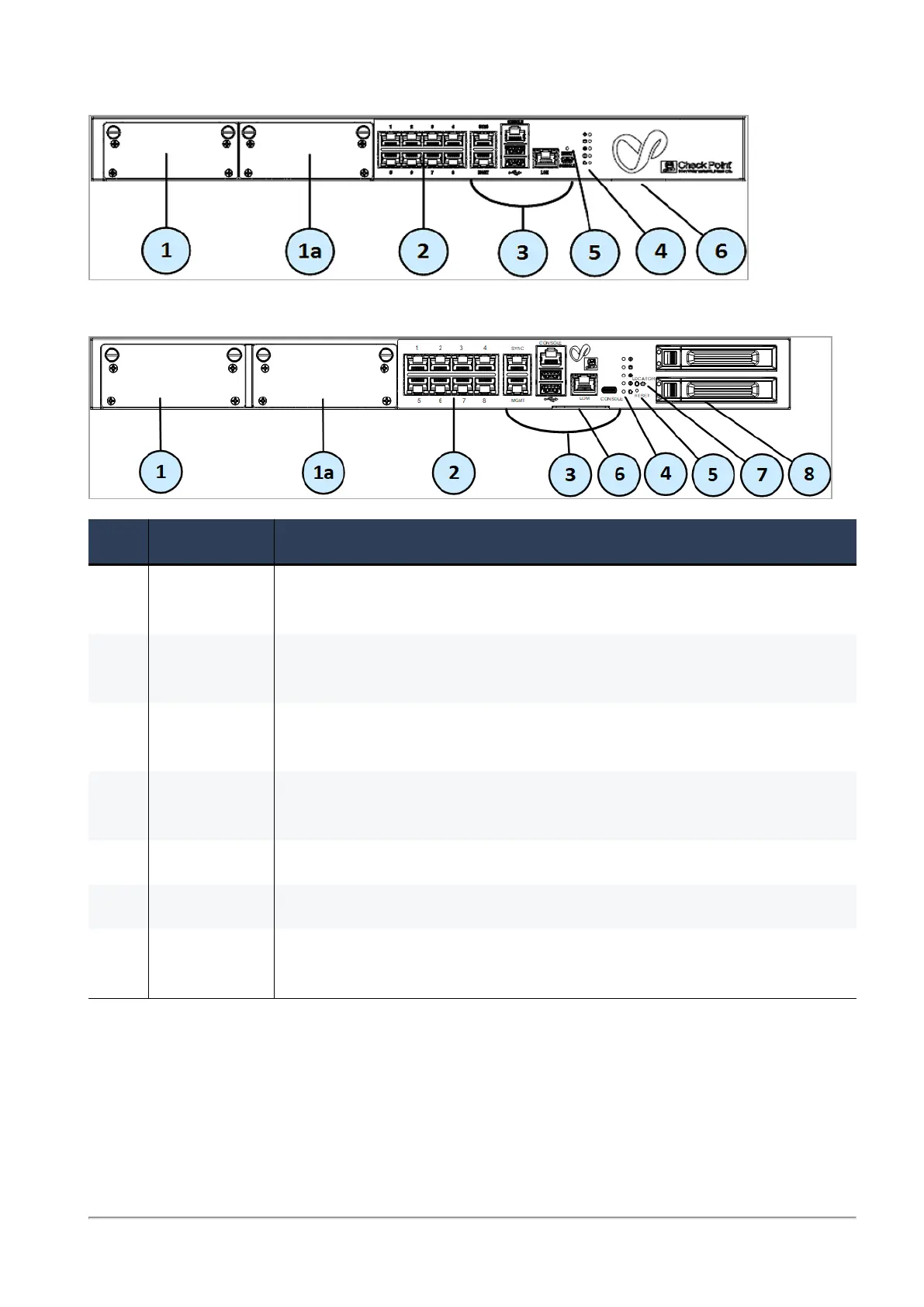
6000/7000 Appliances Hardware
6000 and 7000 Appliances Getting Started Guide|35
6800
6900 Base/Plus and 7000 Base/Plus
Item Component Description
1 Expansion
line card
Expansion slot.
This expansion slot is assigned eth1-0x in the OS.
1a Expansion
line card
6800, 6900, and 7000 appliances only - Expansion slot.
This expansion slot is assigned eth2-0x in the OS.
2 On board
LAN ports
Eight 10/100/1000Base-T RJ-45 ports.
These expansion slots are assigned eth1-eth8 in the OS.
3 Appliance
ports
See "Front Panel Ports" on the next page - Use these ports to connect to
the appliance.
4 System LEDs
See "Front Panel System LEDs" on page37.
5 Reset Insert a pin for 5 to 8 seconds to perform a hardware reset.
6 Identification
service tag
A slide out card that identifies the appliance and shows its serial
number, MAC address, and model number.








 To Next Page