RELATED DOCUMENT – MUST COMPLY WITH SCHEDULE DOCUMENT(S):
CERT-iS3 MNL, CDM-10000105, 106, 107, 108, 109, 110,
113, 119, 167, 188, 191, 192
FOR A LIST OF RELEVANT PATENTS
AND TRADEMARKS PLEASE SEE
CHENTRONICS.COM/LEGAL-NOTICES
THIS DRAWING OWNED BY CHENTRONICS. IT IS
CONDITIONALLY LOANED AND IS TO BE RETURNED UPON
REQUEST. THE BORROWER BY RECEIVING IT HAS AGREED
NOT TO REPRODUCE NOR COPY IT IN WHOLE OR IN PART NOR
TO FURNISH INFORMATION FROM IT TO OTHERS NOR TO
MAKE ANY USE OF IT THAT IS OR MAY BE INJURIOUS TO
CHENTRONICS. FOR MORE INFORMATION, PLEASE CONTACT
CHENTRONICS AT +1.607.334.5531.
TOLERANCE NOTES
FABRICATED TOLERANCES
≥ 2 ft (610 mm) ± 0.250 in (6.4 mm)
< 2ft (610 mm) ± 0.125 in (3.2 mm)
MACHINED TOLERANCES
± 0.050 DECIMAL DIM (1 PLACE)
± 0.010 DECIMAL DIM (2 PLACES)
± 0.005 DECIMAL DIM (3 PLACES)
4.8 Remote File Select
The Remote File Select feature provides a means for automatically selecting one of the configuration files
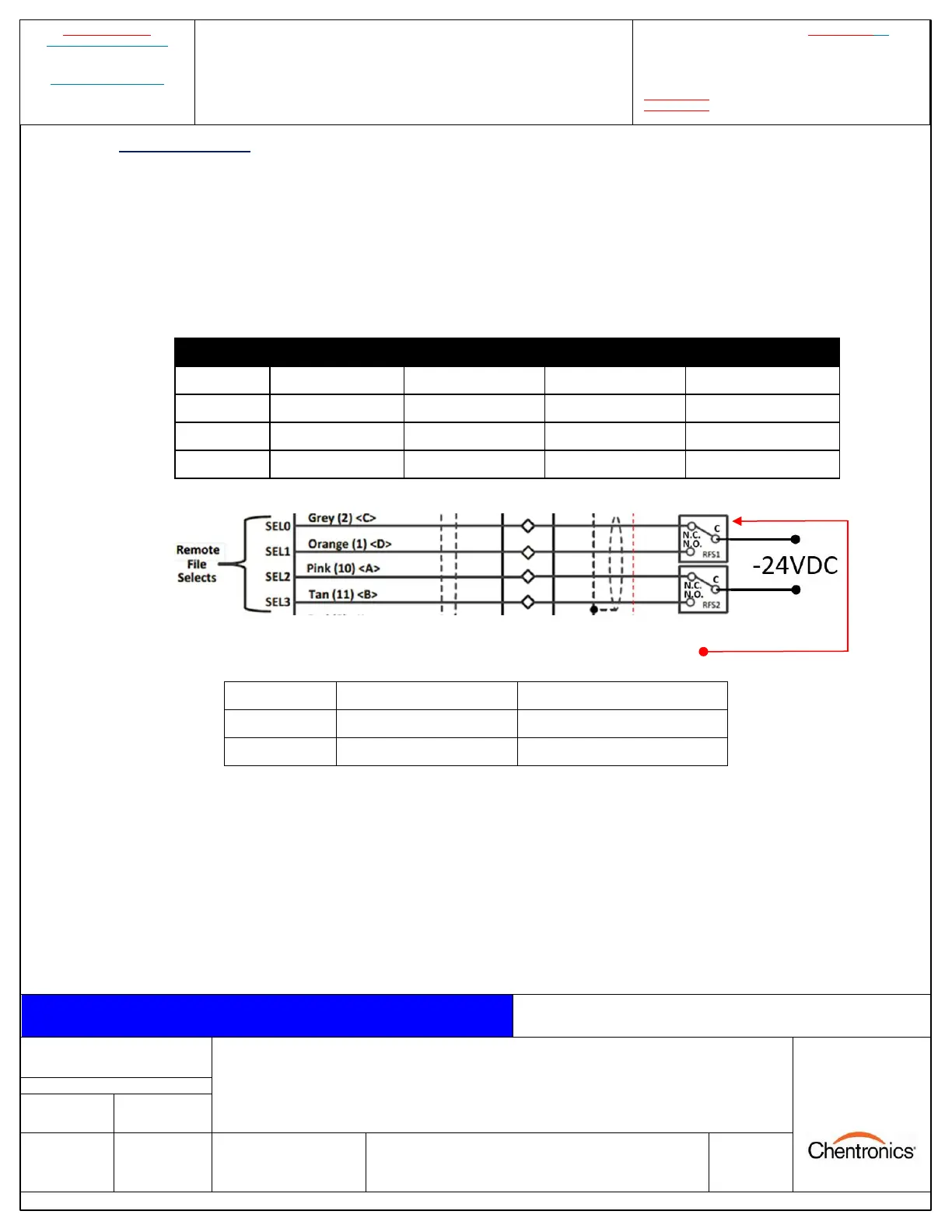
resident within the scanner. IScan®3 Flame Scanner has a two- or four-wire option to remotely select files.
File select configurations are wire fault protected, meaning if any wire combination is broken, i.e., loose
wire connection or a wire gets cut, the scanner will fault. Switching must occur in less than 800ms. Per
NFPA, file selects must not be used to “blind” the scanner from seeing flame to obtain a start permissive.
FOUR WIRE CONFIGURATION: USES TWO RELAYS
TWO WIRE CONFIGURATION: USES ONE RELAY
Note: Connect iScan®3 Flame Scanner SEL (File Select) wires via dry relays contacts (supplied by others)
per above. Connect the common (C) side of the File Select relays to the -24 VDC return. Remote File
Select must be enabled; otherwise, SEL inputs are ignored. Refer to the Remote File Select (RFS) section
of MNL-iScan Software for instructions on setting up and using the Remote File Select feature


 To Next Page