MNL-ISCAN3, REVB INSTALLATION & OPERATION MANUAL Page 21 of 25
DCO #12743 For Technical Support Call: +1.866.821.5504 Schedule Document
Remote File Select
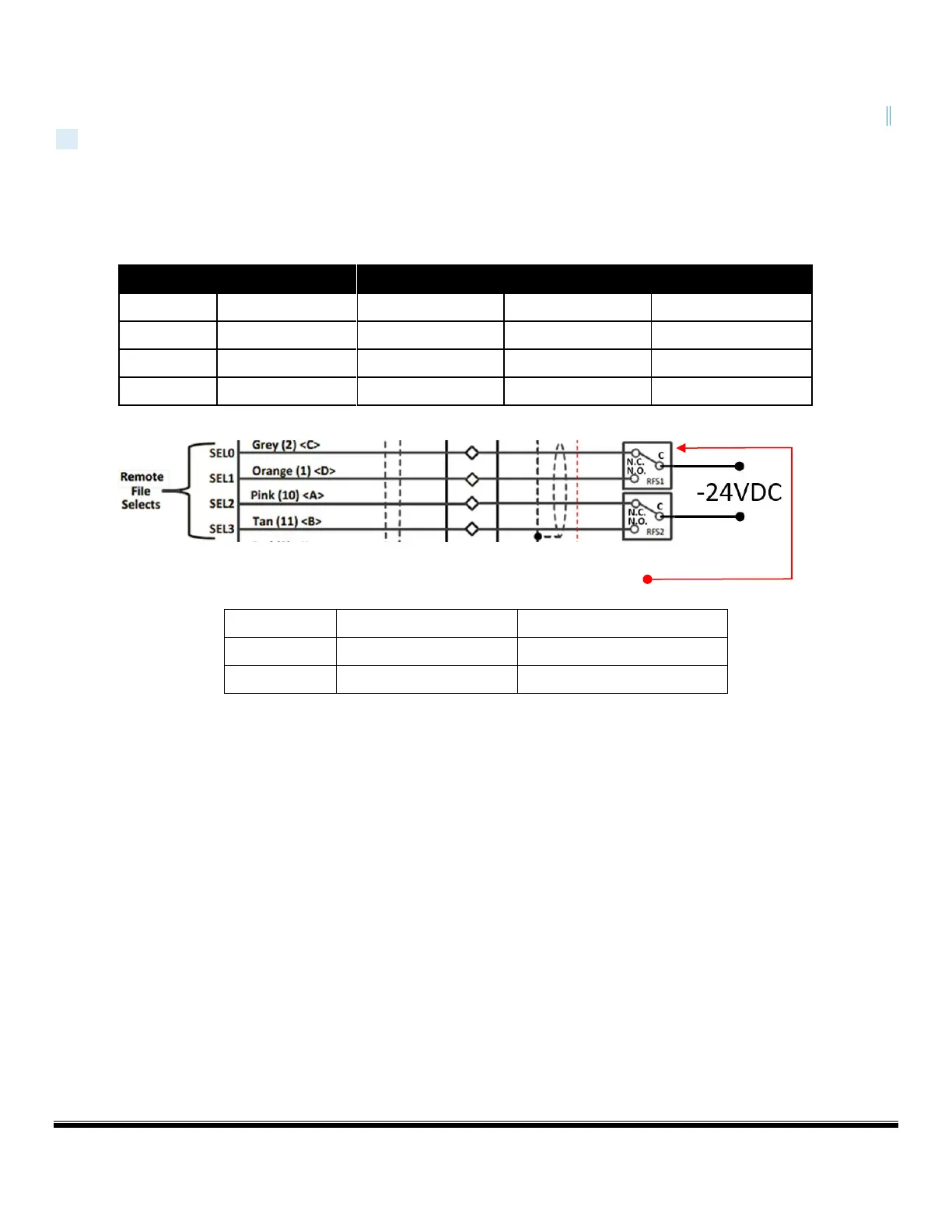
The Remote File Select feature provides a means for automatically selecting one the configuration files resident within the
scanner. iScan3 has a two wire or four wire option to remotely select files. File select configurations are wire fault protected;
meaning if any wire combination is broken, i.e. loose wire connection or a wire gets cut, the scanner will fault. Switching
must occur in less thatn 800ms. Per NFPA, file selects should not be used to “blind” scanner from seeing flame, to obtain a
start permissive.
FOUR WIRE CONFIGURATION: USES TWO RELAYS
TWO WIRE CONFIGURATION: USES ONE RELAY
Note: Connect iScan3 SEL (File Select) wires via dry relays contacts (supplied by others) per above. Connect the common (C)
side of the File Select relays to -24 VDC return. Remote File Select must be enabled otherwise SEL inputs are ignored. Refer to
Remote File Select (RFS) section of MNL-iSCAN for instructions on setting up and using the Remote File Select feature


 To Next Page