33
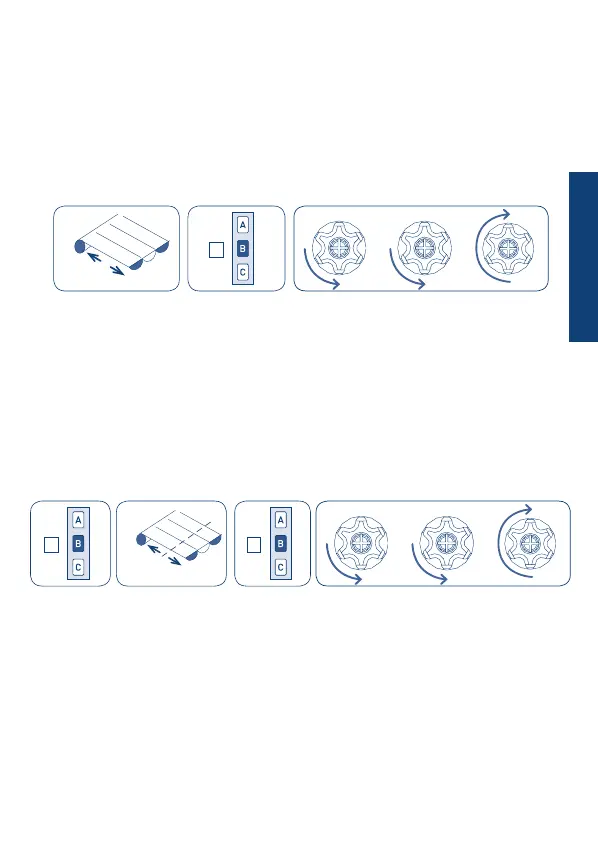
SETTING A MIDDLE POSITION
DELETING THE MIDDLE POSITION
This function allows to drive the awning to a favourite middle position. When this middle
position is memorized, just press the STOP button for 2 seconds and automatically the
motor will move the awning to this position.
To memorize the middle position, move the awning to the desired position and then hold
the STOP button down (for about 4 seconds) until the motor gives conrmation.
Tn: Already programmed remote control
If you want to delete the middle position, it can be done as described below.To change this
position, it’s also necessary to delete rst the memorized middle position.
Before deleting the middle position, the awning must go to the middle position by pressing
the STOP button for 2 second, then press the STOP button again (for about 4 seconds) until
the motor performs the conrmation movement.
Tn: Already programmed remote control
down
up
Tn (4 sec)
Tn (4 sec)Tn (2 sec)
down
up
B
BB
ENGLISH


 To Next Page