36
2) WITH THE WHITE WIRE
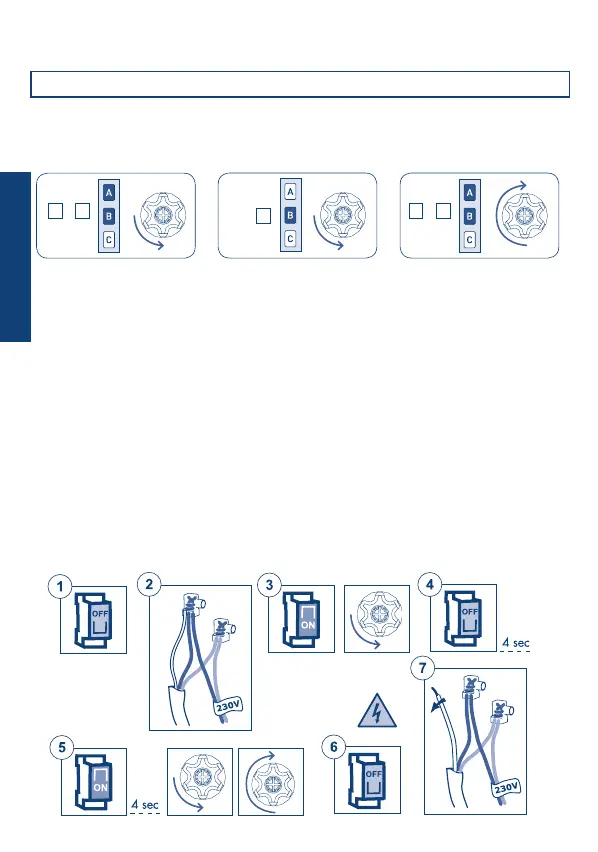
Do this operation only in case of emergency, if all remote controls are no longer operating.
To delete the memory we have to access the white wire of the motor.
The sequence of this operation is the following:
1) Disconnect the power supply from the motor, via the main switch for example.
2) Connect the white motor wire to the brown wire (phase) or to the blue wire (neutral).
3) Connect the power supply to the motor, which rotates briey in one direction.
4) Disconnect the power supply from the motor for at least 4 seconds.
5) Connect the power supply to the motor which performs one brief rotation in one
direction after around 4 seconds and then a longer one in the opposite direction.
6) Disconnect the power supply from the motor.
7) Separate the white wire from the brow/blue wire. Insulate the white wire, in an
appropriate way, before reconnecting the power supply.
At this point it is possible to proceed with the setting of the rst remote control.
FULL MEMORY CLEARING
The full memory clearing can be performed in two ways:
1) WITH THE REMOTE CONTROL
Tn: Already programmed remote control
TnTn Tn (4 sec)
This full memory clearing does not delete the setting of the limit switch.
W
H
I
T
E
W
H
I
T
E
+
A B
+
A B
B
ENGLISH


 To Next Page