39
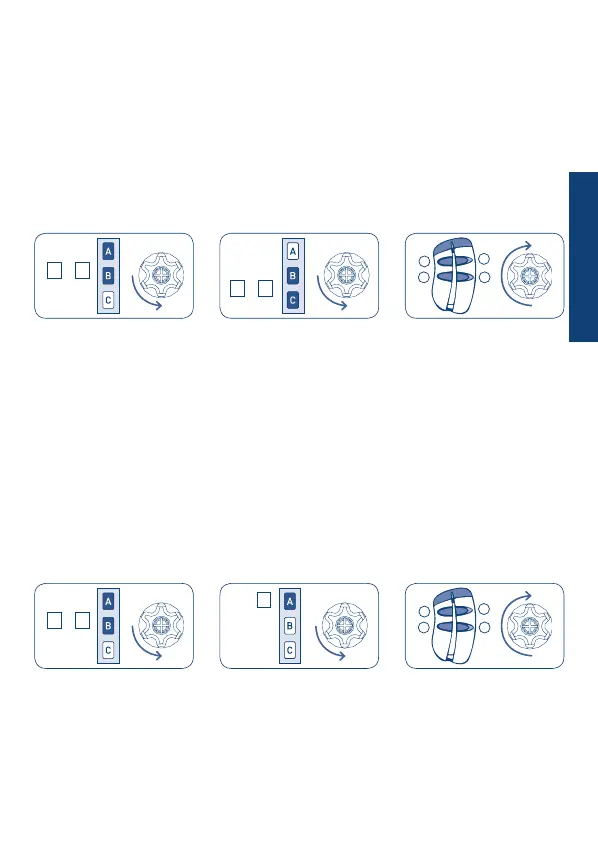
SETTING THE A530058 POCKET REMOTE CONTROL
NB: The new pocket remote control can be set only after programming of a previous
remote control as the traditional Cherubini remote controls (Skipper or Giro - 3 buttons
Up-Down-Stop remote control).
HOW TO PROCEED TO SET THE BUTTON ON THE POCKET REMOTE CONTROL
Tn: Already programmed remote control
Tx: Pocket remote control to be set
Tn
Tn
Tn
Tx (2 sec)
1
3 4
2
Tx (2 sec)
1
3 4
2
After to have pressed for minimal 2 seconds one of the 4 buttons on the pocket remote
control, this one will be memorized on the step-by-step mode (UP-STOP-DOWN-STOP).
The following buttons will be not memorized and have to be done with previous described
sequence, and could be used to move additional motors.
DELETING ONE BUTTON ON THE POCKET REMOTE CONTROL
The buttons saved may be deleted individually according to the following sequence:
Tn: Already programmed remote control
Tx: Pocket remote control with button to be deleted
Tn
To conrm the operation the motor will do a short shunt and the button, which has to be
pressed for minimal 2 second, will be deleted.
+
A B
+
B C
+
A B
A
ENGLISH


 To Next Page