Chiltrix Inc. www.chiltrix.com
5 STATUS
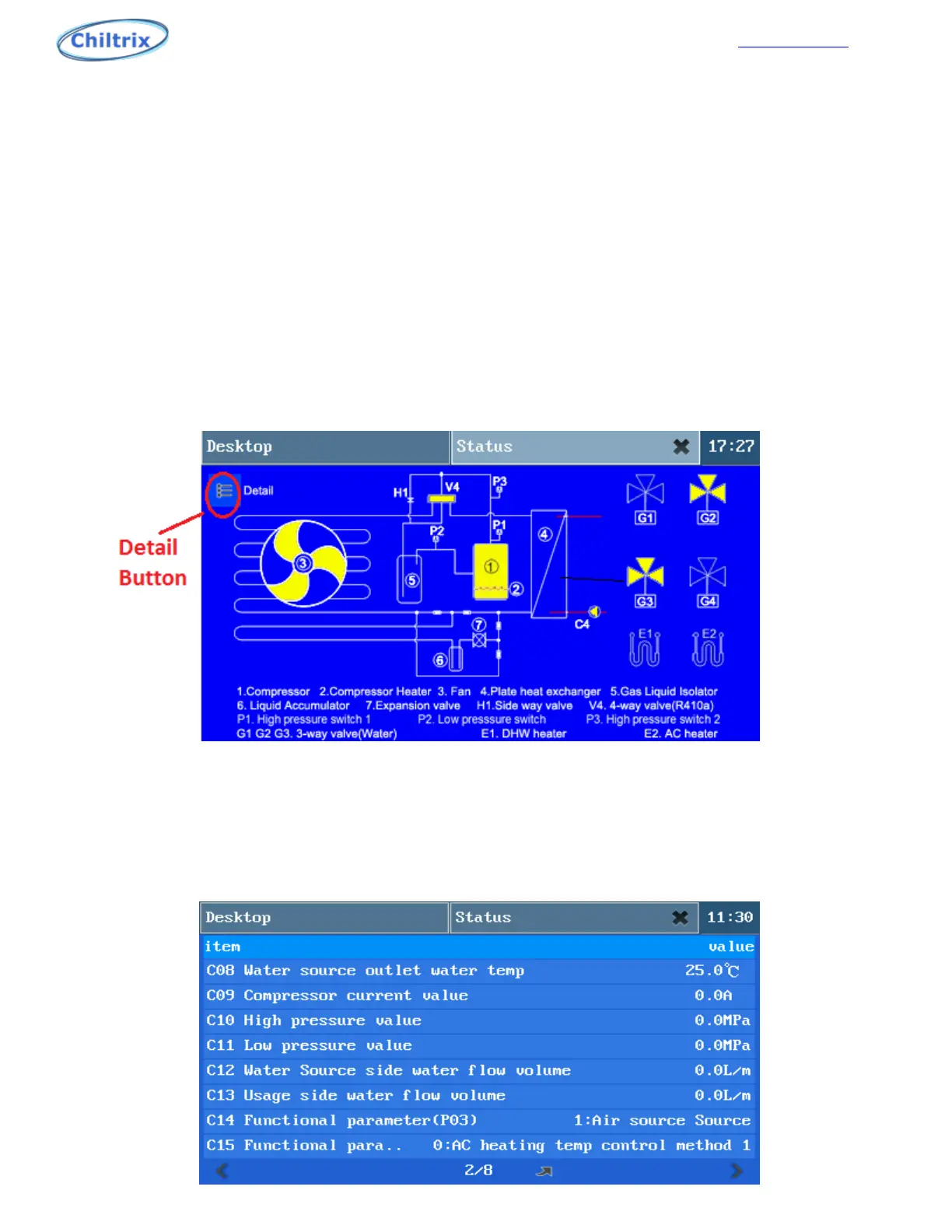
The status application is used to check the detailed status of the unit operation, such as
compressor speed, fan speed, G1, G2, G3, G4 valves and so on. See Fig. 5-1
5.1 State preview display interface
a) Compressor: Displays the current working status of the compressor.
b) Compressor Heating: Displays compressor heating status.
c) Outdoor fan: show the working status of the outdoor fan.
d) Reversing valve, electronic expansion valve, electrical heating, G1 valve and other work status,
query can be directly observed through this interface.
Figure 5-1
5.2 Detailed Status Interface “C Parameters”
Click "detail" in the status query interface to enter the detailed status interface of the
machine, as shown in Figure 5-1. Click the arrow “->” button to return to the previous state
interface..
Figure 5-2
50


 To Next Page