IRIS Touch Engineering Manual Version 1.4 Page 23 of 40
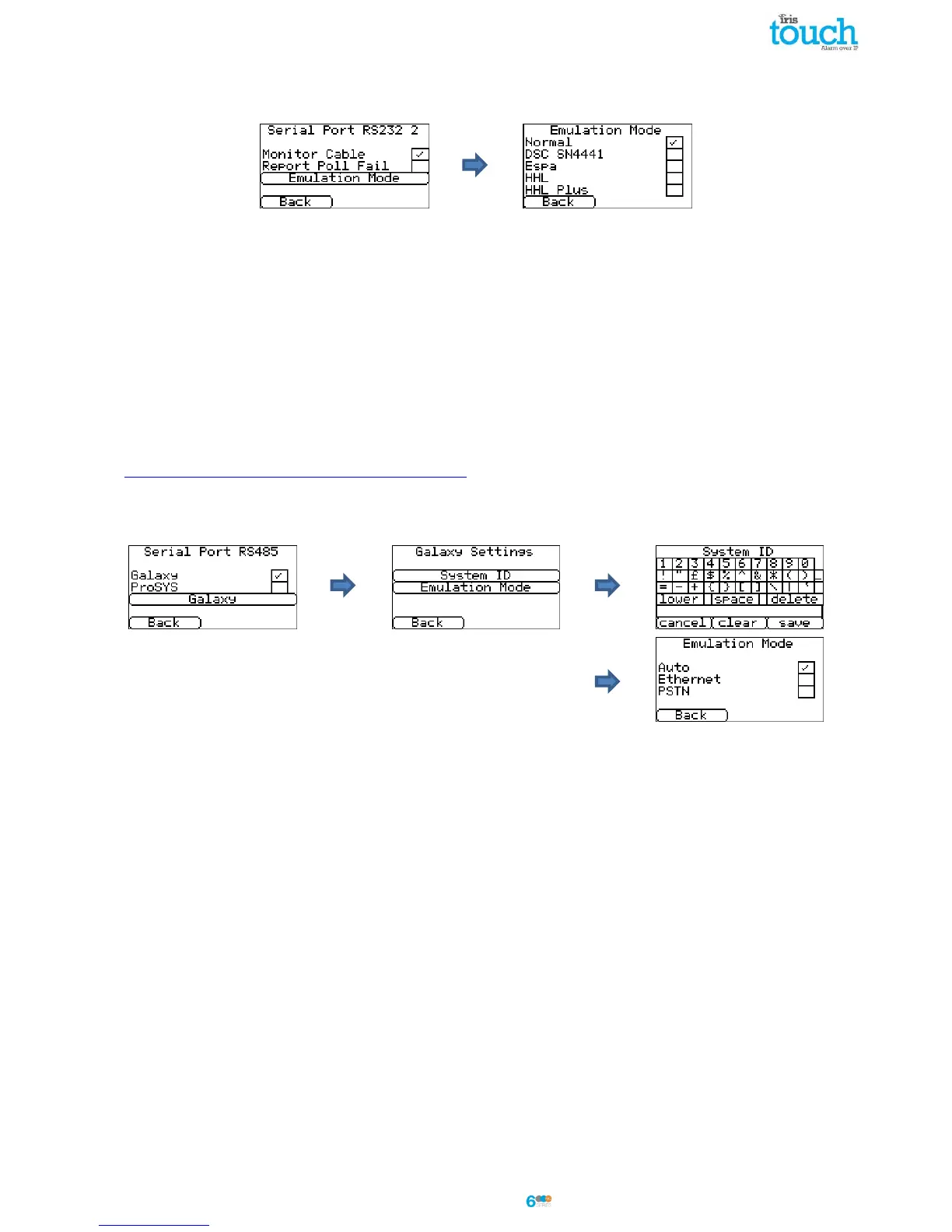
Serial Port RS232 2
This is the configuration setting for the second RS232 serial port connections (TX2 & RX2) and allows the following
configurations.
Monitor Cable
Set the IRIS dialler to monitor the serial port for activity and report any status change back to the monitoring
centre (ARC). The monitoring centre will also need to enable the serial port monitoring from the IRIS Secure
Apps software to receive alarm notifications on this status.
Report Poll Fail
Set the IRIS dialler to stop responding to the serial commands if polling has failed. This will then indicate the
failure back to the alarm panel. This allows the site to have local indication of a communication failure (for EN
standards).
Emulation Mode
This allows you to setup the serial port RS232 port for Normal, DSC SN4441, Espa, HHL and HHL plus connection
for alarm communications. Please refer to the IRIS Touch panel installation manual for further details. For more
information on the connection and setup please refer to the panel installation manual available from
http://www.chironsc.com/downloads_security.html.
Serial Port RS485
Galaxy
Set the RS485 bus for Honeywell Galaxy mode where the IRIS Touch will simulate one of 3 external modules in
the following order (Ethernet, External Telecoms, and External RS232).
ProSYS
Set the RS485 bus for the Risco ProSYS bus to allow Upload/Download connections but not alarms, the panel
alarm will need to be either on the dial port, or pin inputs.
Galaxy
The Galaxy Bus emulation mode has some additional option available for configuration and these are detailed
below:
System ID
Can override or enter a system ID independent from the panel.
Emulation Mode
This option allows you to select the Honeywell Galaxy RS485 bus module that is emulated to the Galaxy
control panel. By default this is set to AUTO (Automatic assigned) which will try the external Ethernet
module first and if this is not seen then the external PSTN, and finally the external serial modules. This
allows for backwards compatibility to older Galaxy panel software versions that do not support the
Honeywell Ethernet module (Galaxy Classic below version 4.00).
You can also pre fix the module emulated to be either Ethernet or PSTN if required; this may be needed if
for instance you already have a Honeywell Ethernet module fitted.



 To Next Page