- 11 -
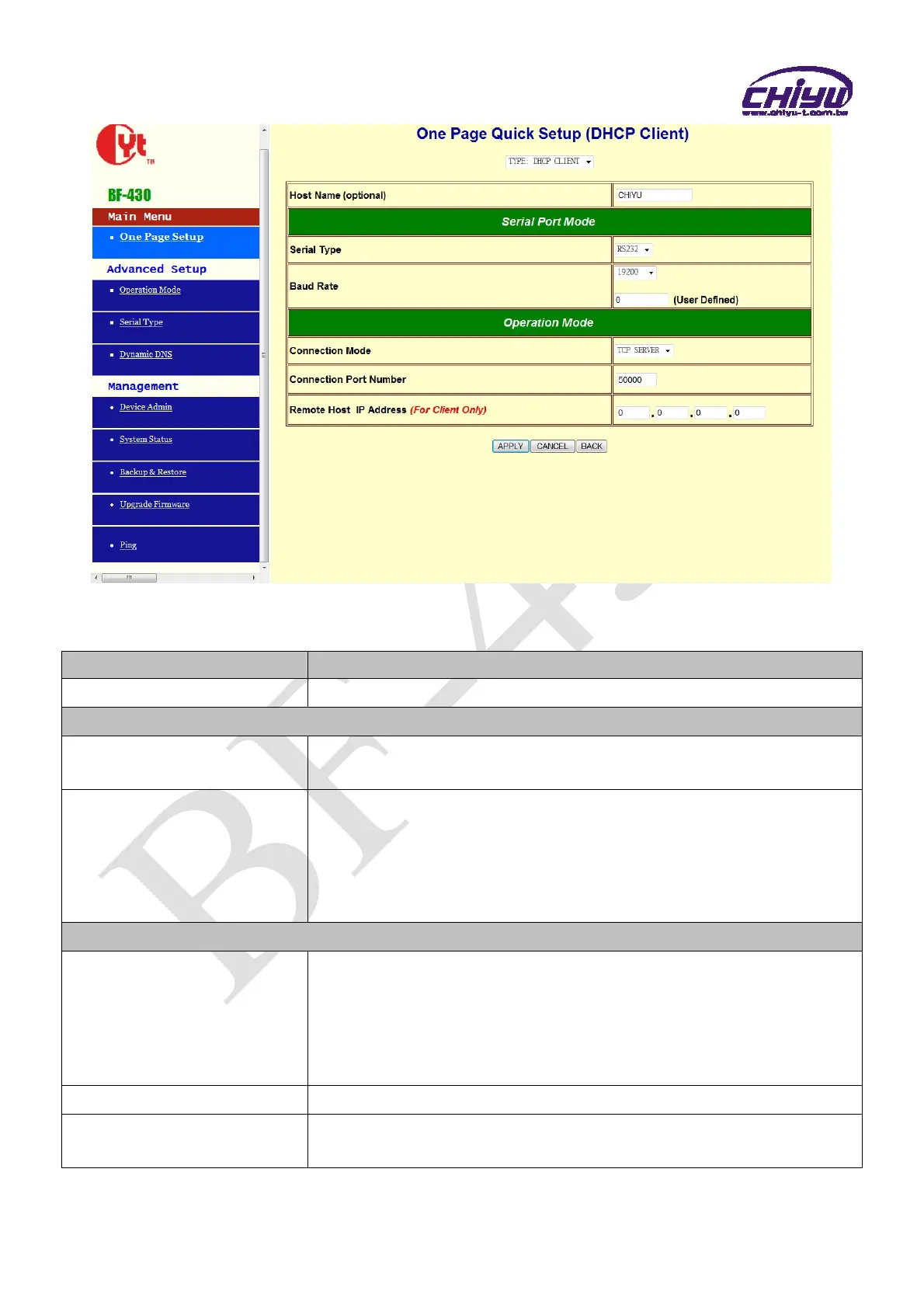
Function instruction of DHCP CLIENT
Function Description
Host Name (optional)
Fill in the host name , default setting is CHIYU (optional)
Serial Port Mode
Serial Type
Set the serial type, RS232 and RS485 for setting , default setting is
RS232
Baud Rate
1.Set serial port baud rate, the parameters can be selected:1200、
2400、4800、9600、19200、38400、57600、115200、230400 and
Others
2.After selecting Others , fill custom baud rate into the user defined
3.Default setting is 19200
Operation Mode
Connection Mode
There are 4 modes to set into connection mode, such as:
TCP Server
TCP Client
UDP Server
UDP Client
Connection Port Number
Set BF-430 connection port number, default setting is 50000
Remote Host IP Address
(For Client Only)
1.Set the remote host IP address, the default setting is 0.0.0.0
2.For Client Only


 To Next Page