- 6 -
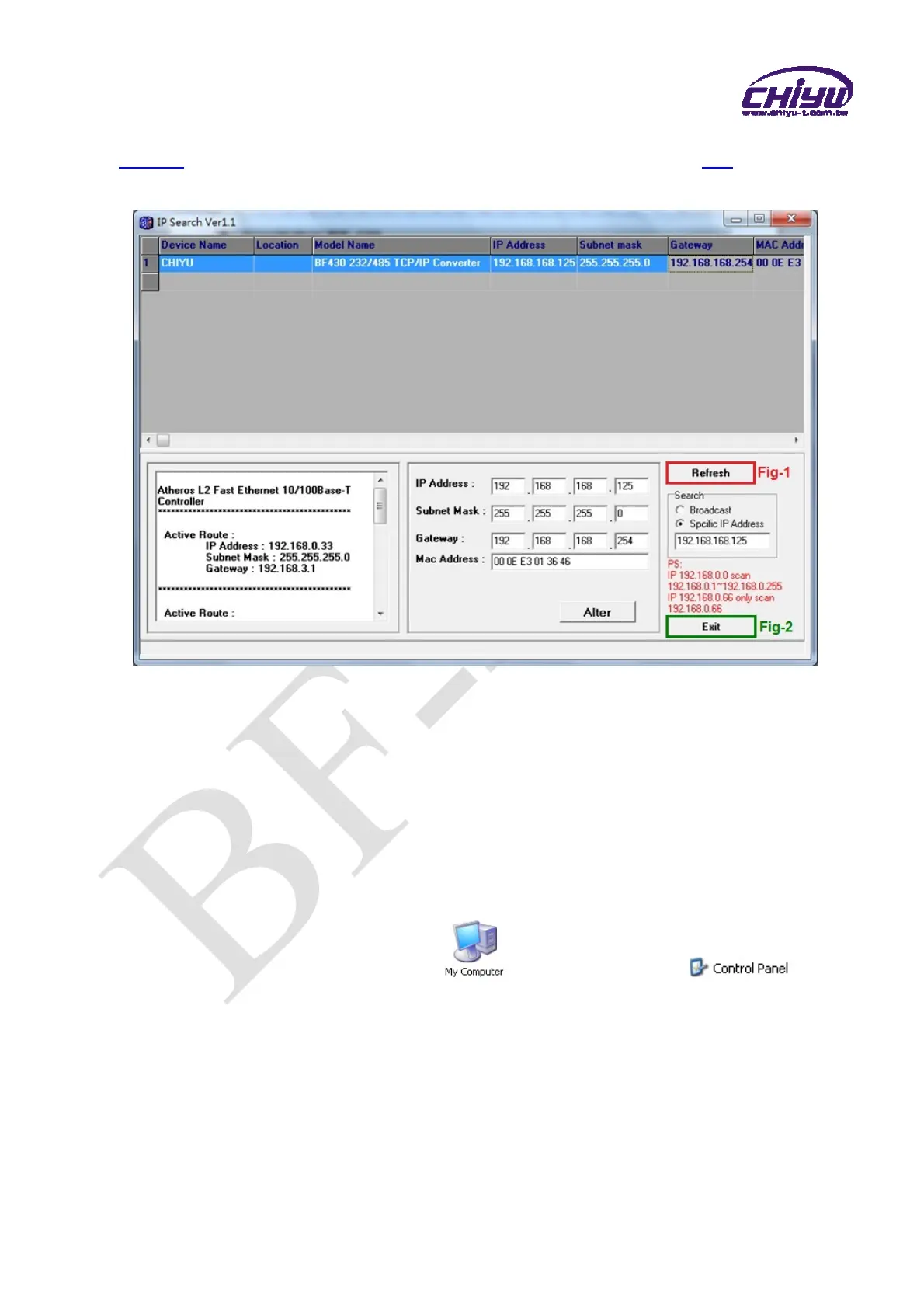
5、After modification, if want to confirm whether the modification is correct or not, click
Refresh button to refresh and check information ( Fig-1 ), click Exit button to
leave.(Fig-2)
6、After modification, the IP address of BF-430 has matched with its WAN, if want to get
access into the Web of BF-430, has two methods:
(1)Open IP Search, select and double click particular BF-430, then to enter its
webpage.
(2)While the internet explorer opened, input BF-430 IP address to enter its
webpage
Remark:
WINDOWS XP:
《Step 1》
Click WINDOWS XP my computer , Open Control Pan on
the left side, please turn to traditional overview and select network link
《Step 2》
Click LAN, then select content, the link configuration will be shown, click Internet
Protocol (TCP/IP), then input the same setting as BF-430, as below figure:


 To Next Page