Chord Electronics
Hugo M Scaler | Manual
_
The top panel of the Hugo
M Scaler does not provide
any visual feedback, with the
exception of the buttons labelled
within the previously annotated
front panel.
You may view the internal plate
via the porthole looking glass
which protects the sensitive
internal circuitry from radio
frequency (RF) interference.
3.1 Getting to know Hugo M Scaler
& drivers
3.2 The front panel
3.3 The top panel
3.4 The rear panel
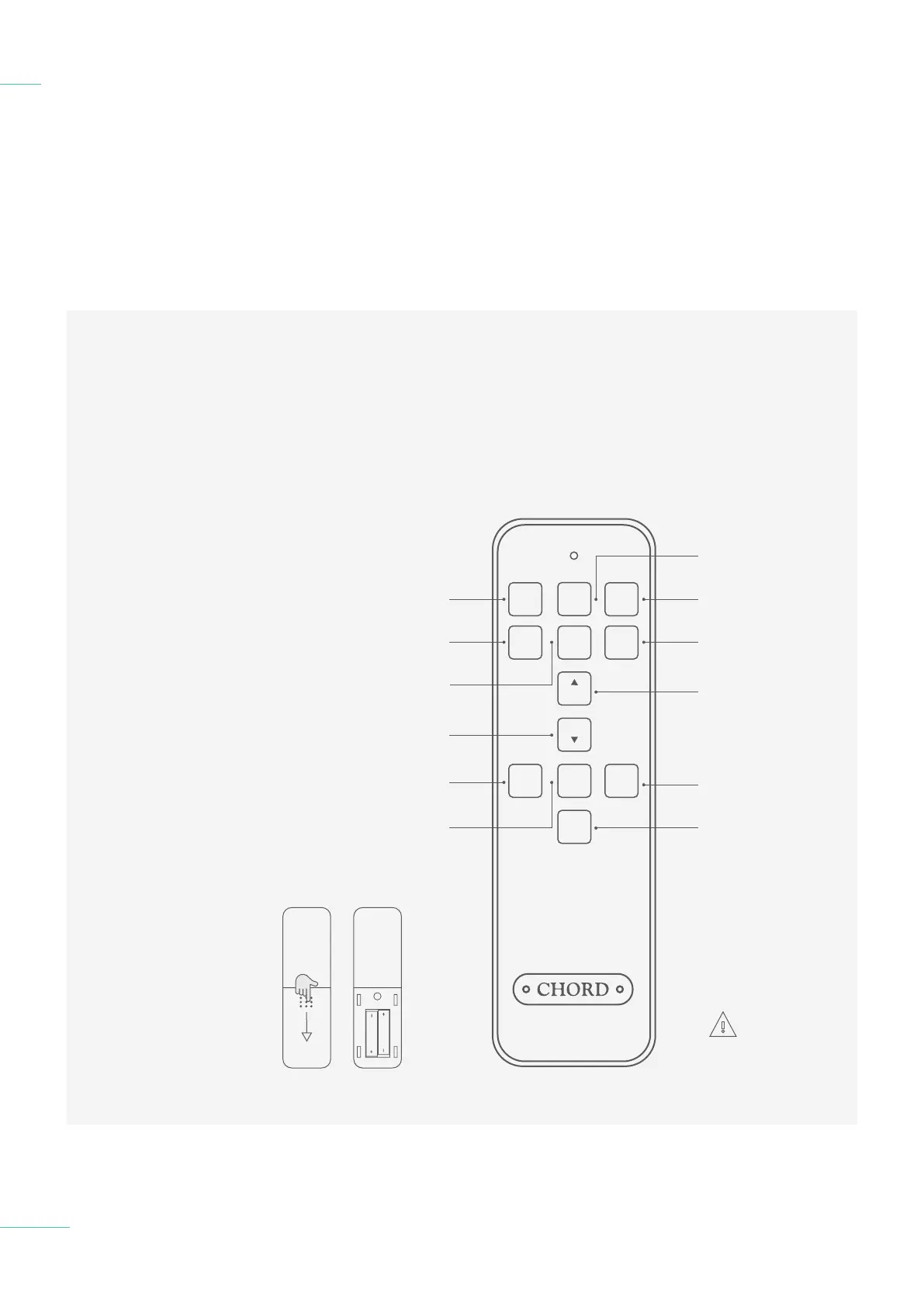
3.5 The remote control
The remote control 3.5
17 // 30
Select USB input
Automatic input
Select BNC 2
input
DX up
Select output
sample rate
Select optical 2
input
DX down
Select video mode
USB
BNC 1
OPT 2
AUTO
SOURCE
DX
MUTE
DX
DX OP
VIDEO
BNC 2
OS SR
OPT 1
Select BNC 1
digital input
Cycle DX Output Mute
Select optical 1
input
NOTE: Please only
insert AAA batteries
into the IR remote
control and observe the
correct orientation as
indicated within the remote
control. Failure to do so
could result in non-operation
or battery leakage.



 To Next Page
 Loading...