Chord Electronics
Hugo M Scaler | Manual
_
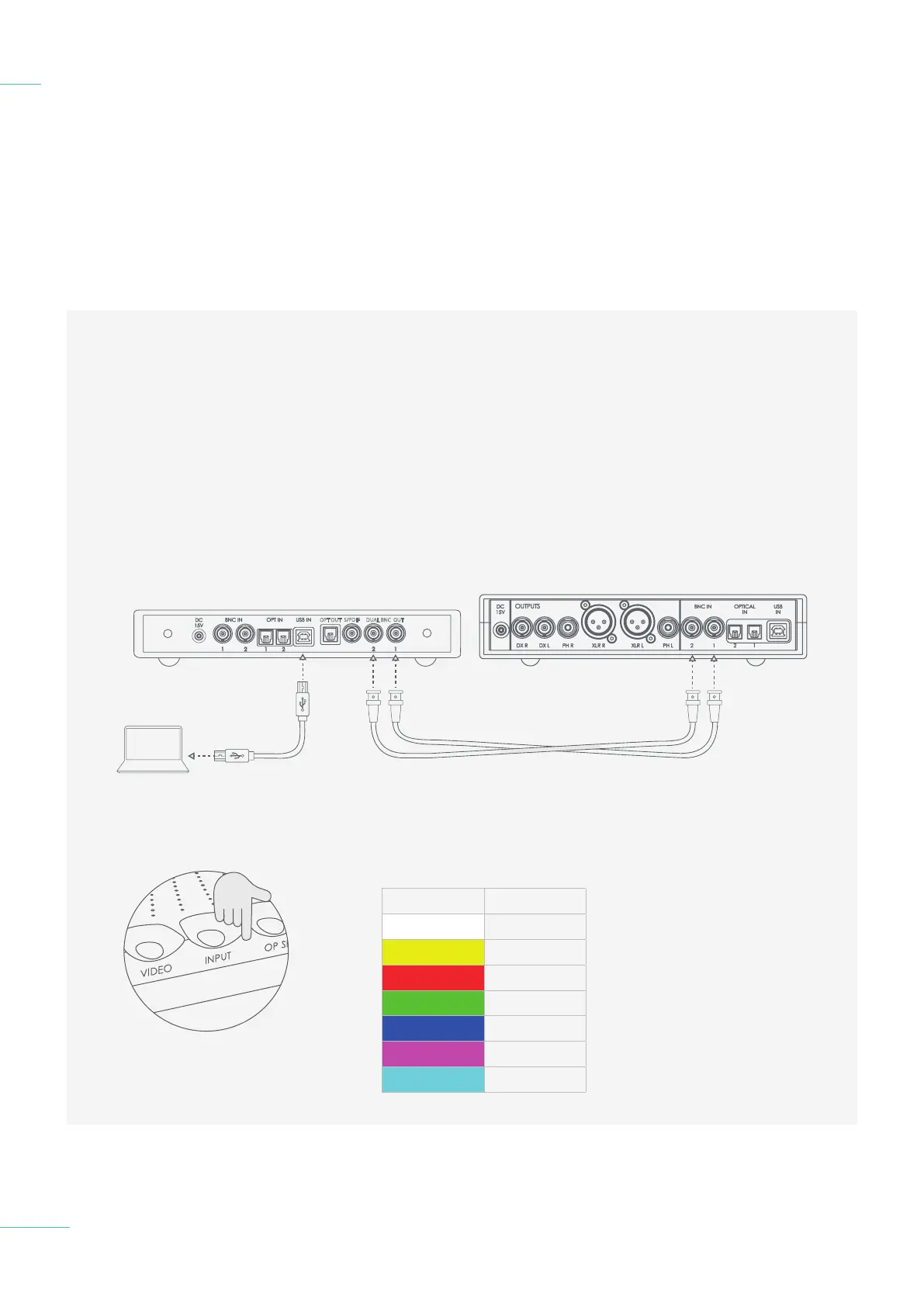
In order for the Hugo M Scaler
to upscale, you must connect
the digital output of your audio
playback device, for example,
computer via USB or CD
transport via BNC, to the Hugo M
Scaler directly instead of to your
existing DAC. M Scaler’s output
can then be connected to a DAC.
4.1 Placement
4.2 Connecting an input to
Hugo M Scaler & input
selection
4.3 Connecting Hugo M Scaler
to Hugo TT 2
4.4 Connecting Hugo M Scaler
to another DAC
4.5 Output sample rate settings
Connecting an input to Hugo M
Scaler & input selection
4.2
20 // 30
OPT OUT
S/PDIF
DUAL BNC OUT
1
2
3
Input selection colours
COLOUR INPUT
USB
BNC 1
BNC 2
Optical 1
Optical 2
Automatic
Dual BNC
You can select your input via
the input selection switch on the
front panel of Hugo M Scaler.
Please make sure to select the
approproate output on your
playback device.



 To Next Page
 Loading...