Section 3: Operation
013-100199-04 3-17.
Table 3.2. Abbreviations for Signal Type
Abbrev. Signal Type
4WH Composite (4 wire) on HC input
4WV Composite (4 wire) on V input
SG Sync-on-green
5W Separate H,V
5WR Separate H,V swapped
SVid S-Video
CVid Composite Video
Dig Digital
FUNCTIONS WITHIN THE CHANNEL SETUP MENU —
To copy, delete or edit a channel,
highlight the desired channel in the Channel Setup menu and do one of two things:
• Press
Func
if you want to copy the selected channel or delete this or other
channels. See Copying or Deleting a Channel below.
• Press
if you want to edit channel setups (i.e., non-image related parameters)
for the selected channel. See Editing a Channel Setup, below.
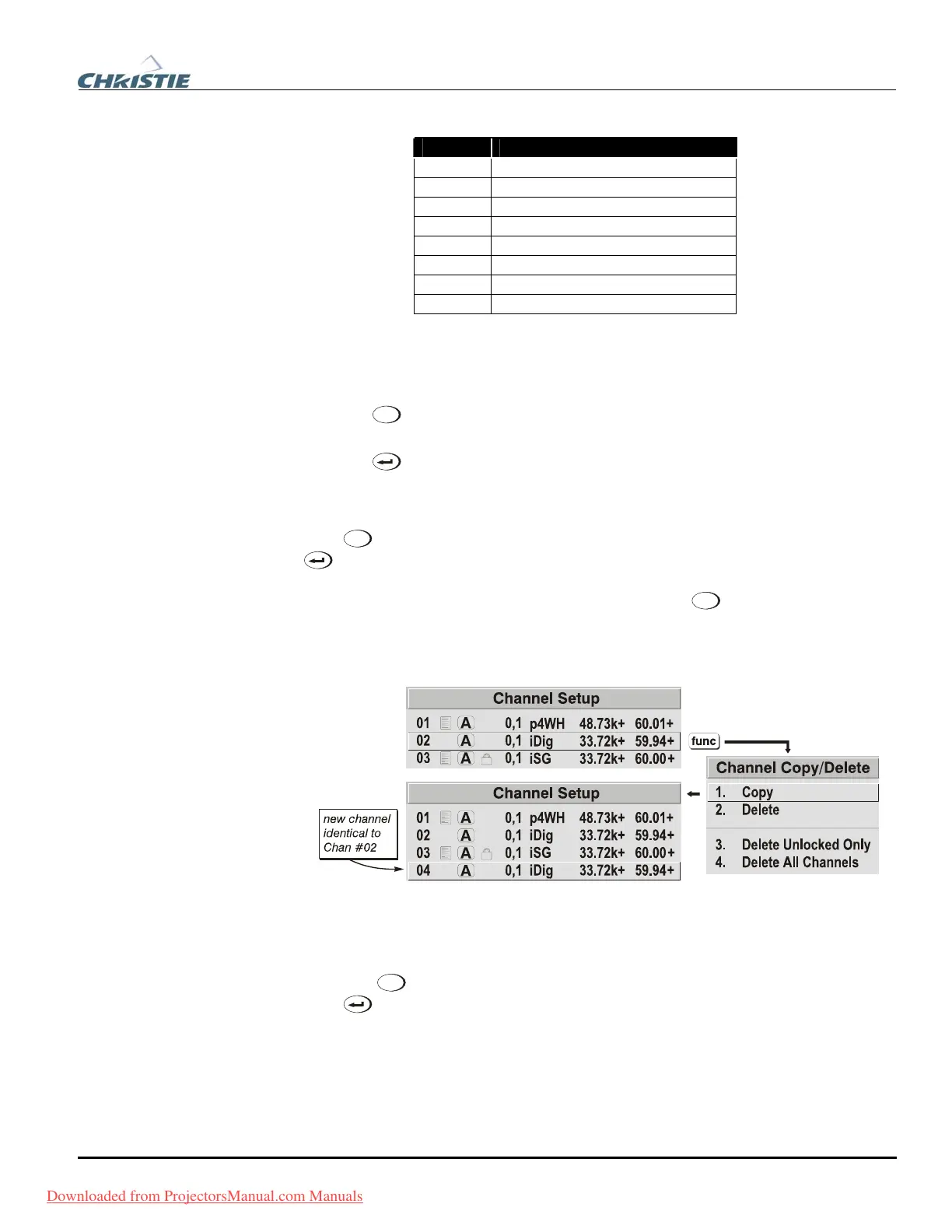
TO COPY A CHANNEL, highlight the desired channel in the Channel Setup menu, then
press
Func
to go to the Channel Copy/Delete submenu. Select “Copy” and press
—a new channel will be created. It is identical to original, which still remains,
but it is identified with the next available number from 01-50. If you change your
mind and do not want to copy the current channel, press
Exit
to cancel and return to
the previous menu. Copying channels is a quick method for creating numerous
channels, each of which can then be edited and adjusted for a variety of presentations
in the future. See Figure 3.4.
Figure 3.4. Copying A Channel
TO DELETE A CHANNEL, highlight the desired channel in the Channel Setup menu,
then press
Func
to activate the Channel Copy/Delete submenu. Select “Delete” and
press
—a window will appear to confirm the deletion of this channel. See Figure
3.5.
Copying o
f
Deletin
Channels
Downloaded from ProjectorsManual.com Manuals



 To Next Page